
PN532 NFC Module
The PN532 NFC module provides a powerful and flexible platform for integrating NFC and RFID capabilities into your projects. Its multi-protocol support and versatile interfaces make it suitable for various use cases, including access control, contactless payment, and data exchange.

PN532 pinout
The PN532 is a versatile NFC controller supporting multiple communication protocols: I²C, SPI, and HSU (High-Speed UART). Select the mode using onboard switches (Switch 1: ON + Switch 2: OFF = I²C | Switch 1: OFF + Switch 2: ON = SPI | Both OFF = UART).
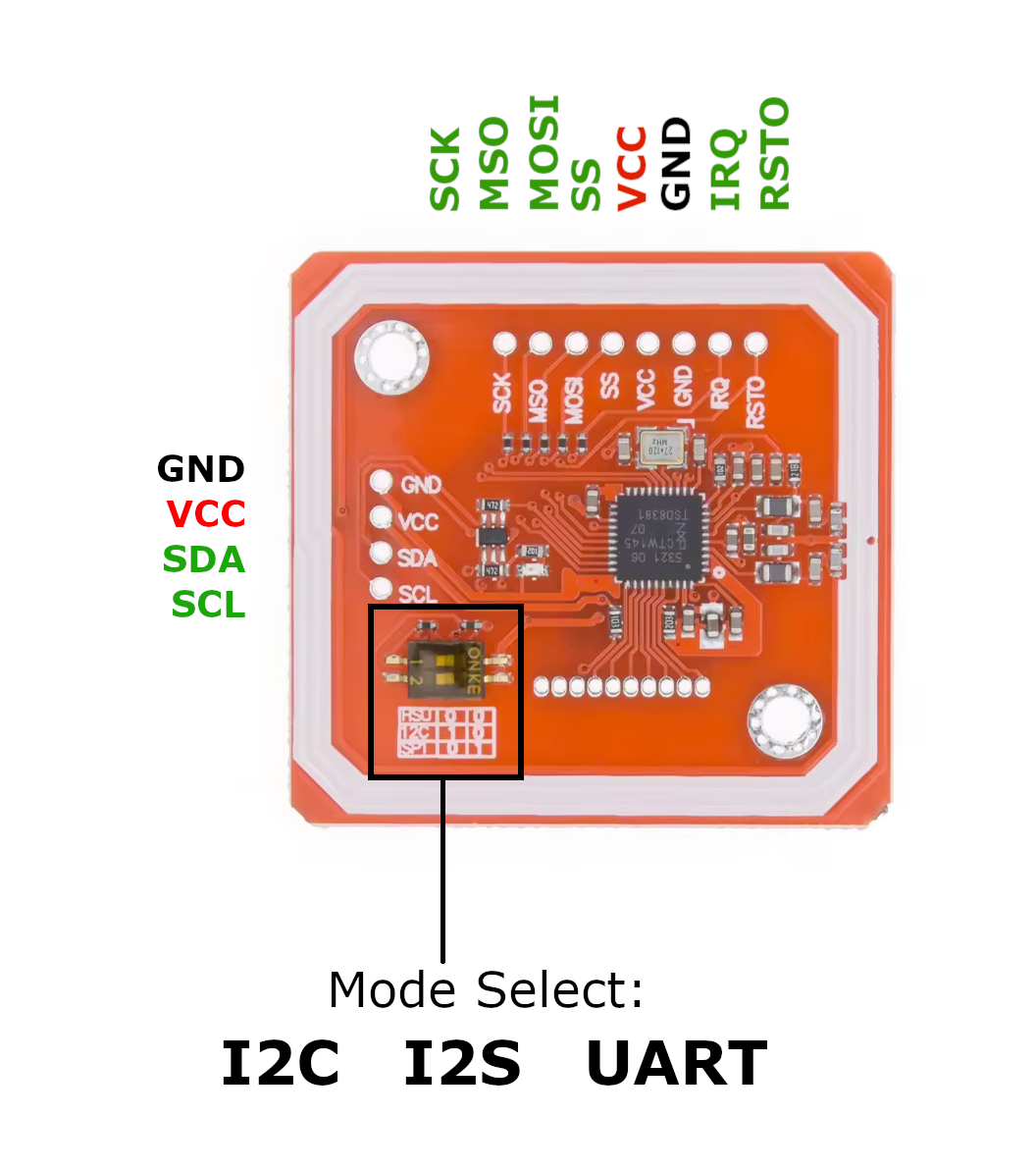
| Pin | Type | Description | Notes |
|---|---|---|---|
| VCC | Power | Power supply (3.3V or 5V) - pin 1 | Works with both 3.3V and 5V logic levels |
| VCC | Power | Power supply (3.3V or 5V) - pin 2 | Both VCC pins should be connected for stable power |
| GND | Power | Ground connection (pin 1) | Connect to ESP32 ground |
| GND | Power | Ground connection (pin 2) | Both GND pins should be connected for stability |
| SDA | Communication | I²C Data / UART TX (mode-dependent) | I²C mode = Data line | UART mode = TX to ESP32 RX |
| SCL | Communication | I²C Clock / UART RX (mode-dependent) | I²C mode = Clock line | UART mode = RX from ESP32 TX |
| MISO | Communication | SPI Master In Slave Out | Used only in SPI mode |
| MOSI | Communication | SPI Master Out Slave In | Used only in SPI mode |
| SCK | Communication | SPI Serial Clock | Used only in SPI mode |
| SS (NSS) | Communication | SPI Slave Select / Chip Select | Used only in SPI mode |
| IRQ | Control | Interrupt output (optional) | Triggers when NFC event occurs - can improve efficiency |
| RSTO | Control | Reset control (optional) | Hardware reset for the module |
I²C Mode: Switch 1 ON, Switch 2 OFF - Uses SDA/SCL pins (address 0x24)
SPI Mode: Switch 1 OFF, Switch 2 ON - Uses MISO/MOSI/SCK/SS pins (fastest)
UART Mode: Both switches OFF - SDA becomes TX, SCL becomes RX
Choose only ONE communication mode at a time by setting switches correctly
IRQ and RSTO pins are optional but recommended for advanced applications
The module auto-detects 3.3V or 5V operation
Wiring the PN532 to ESP32
PN532 SPI mode wiring
In SPI (Serial Peripheral Interface) mode, the PN532 NFC module communicates with the ESP32 using fast, synchronous data exchange. This mode is ideal for high-speed applications requiring stable communication. Set switches: Switch 1 OFF, Switch 2 ON.
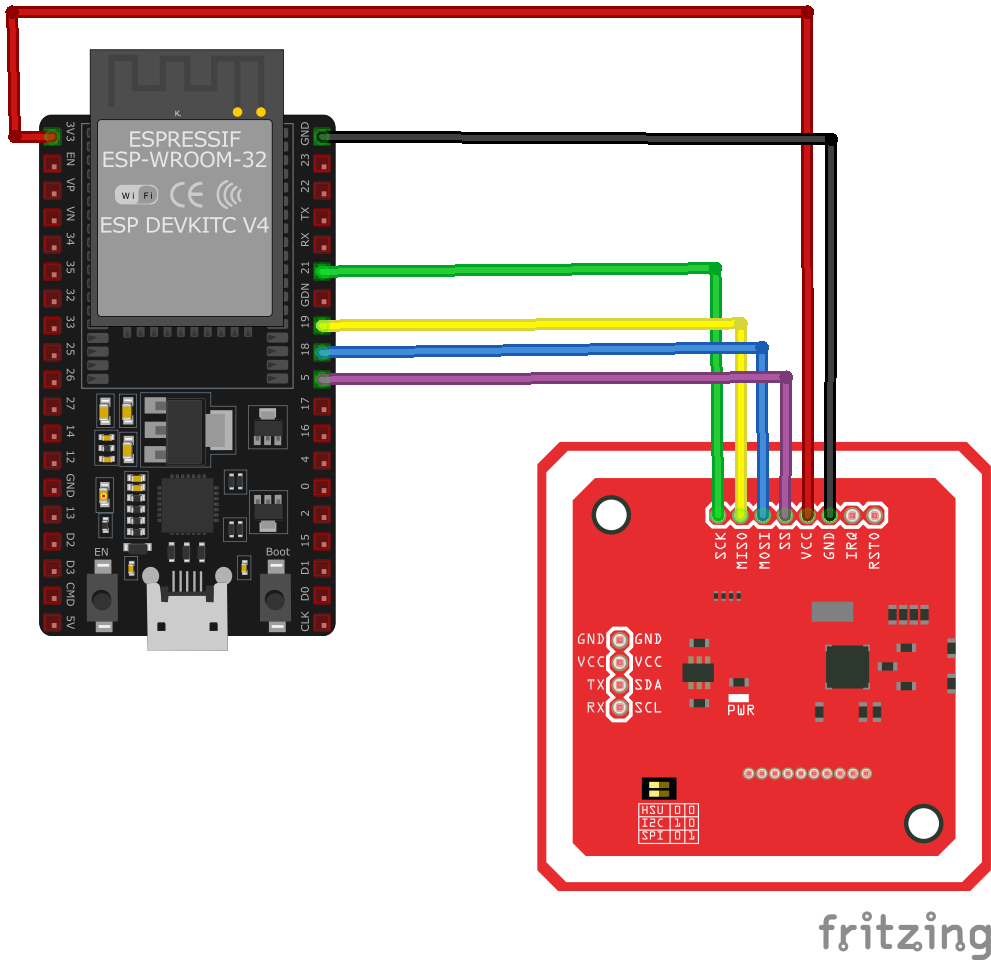
| PN532 pin | ESP32 pin | Purpose |
|---|---|---|
| VCC | 3.3V | Power supply pin |
| GND | GND | Ground connection (connect both GND pins) |
| MISO | GPIO19 | SPI Master In Slave Out |
| MOSI | GPIO23 | SPI Master Out Slave In |
| SCK | GPIO18 | SPI Serial Clock |
| SS (NSS) | GPIO5 | SPI Chip Select / Slave Select |
| IRQ | GPIO4 | Interrupt output for NFC events · optional |
| RSTO | GPIO21 | Hardware reset control · optional |
SPI mode provides the fastest communication speed compared to I²C and UART
Set Switch 1 to OFF and Switch 2 to ON for SPI mode before powering up
Connect both VCC pins and both GND pins for stable power delivery
IRQ pin can improve efficiency by eliminating polling - highly recommended
PN532 I2C mode wiring
In I²C (Inter-Integrated Circuit) mode, the PN532 NFC module communicates with the ESP32 using a simple two-wire interface. This mode requires fewer connections than SPI and allows multiple devices on the same bus. Set switches: Switch 1 ON, Switch 2 OFF.
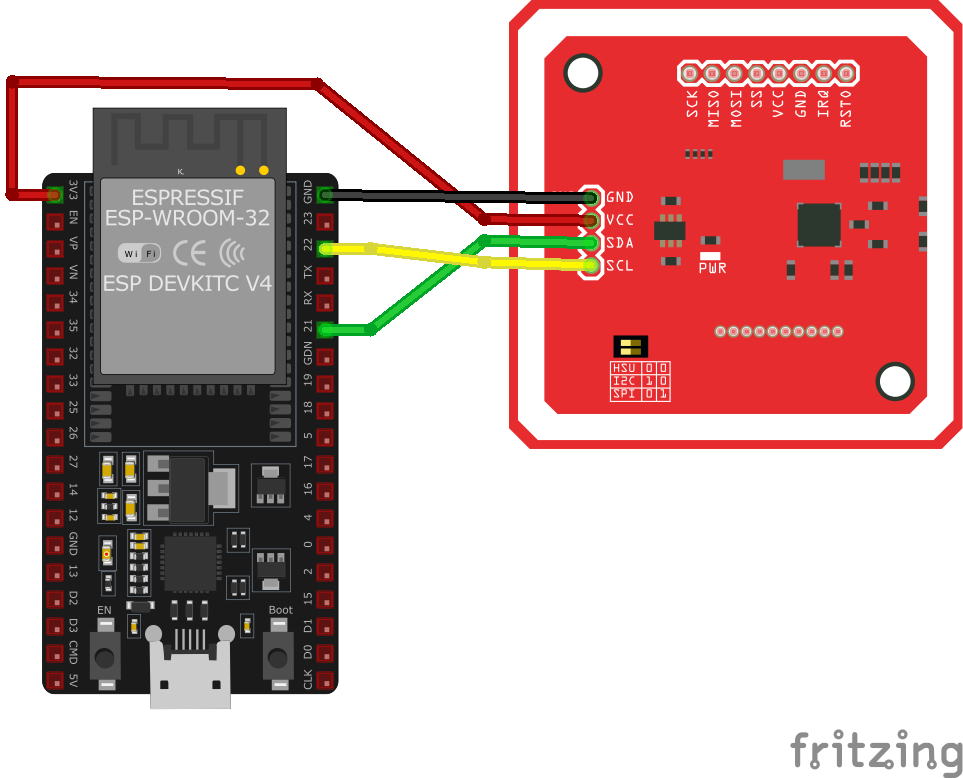
| PN532 pin | ESP32 pin | Purpose |
|---|---|---|
| VCC | 3.3V | Power supply pin |
| GND | GND | Ground connection (connect both GND pins) |
| SDA | GPIO21 | I²C Data line (default ESP32 SDA) |
| SCL | GPIO22 | I²C Clock line (default ESP32 SCL) |
| IRQ | GPIO4 | Interrupt output for NFC events · optional |
| RSTO | GPIO5 | Hardware reset control · optional |
I²C mode uses only two data lines (SDA & SCL) - ideal for minimal wiring
Set Switch 1 to ON and Switch 2 to OFF for I²C mode (address 0x24)
Multiple I²C devices can share the same bus with different addresses
Pull-up resistors (4.7kΩ) on SDA/SCL are usually built-in on ESP32
PN532 UART mode wiring
In HSU (High-Speed UART) mode, the PN532 NFC module communicates with the ESP32 using standard serial UART interface. This mode is simple and widely supported across microcontrollers. Set switches: Both switches OFF.
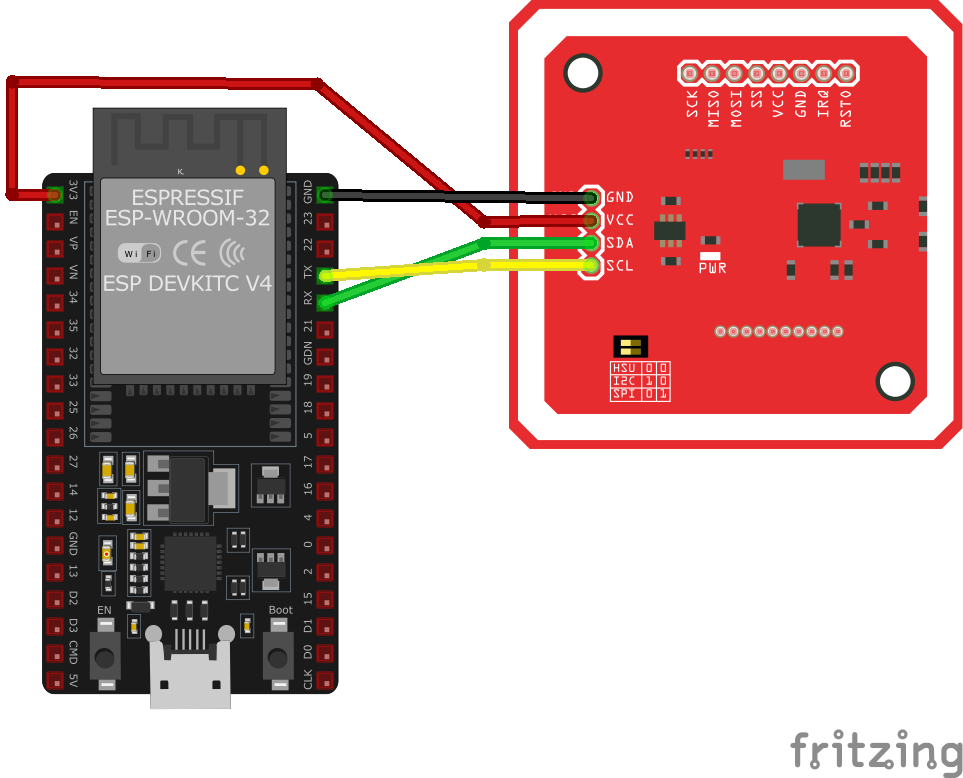
| PN532 pin | ESP32 pin | Purpose |
|---|---|---|
| VCC | 3.3V | Power supply pin |
| GND | GND | Ground connection (connect both GND pins) |
| SDA (TX) | GPIO16 | UART TX from PN532 to ESP32 RX |
| SCL (RX) | GPIO17 | UART RX from ESP32 TX to PN532 |
| IRQ | GPIO4 | Interrupt output for NFC events · optional |
| RSTO | GPIO5 | Hardware reset control · optional |
UART mode provides standard serial communication - widely compatible
Set both switches to OFF for HSU (UART) mode
High-speed data transfer suitable for real-time NFC applications
SDA pin becomes TX, SCL pin becomes RX in UART mode
PN532 code examples
// Requires library: "Adafruit PN532"
#include <SPI.h>
#include <Adafruit_PN532.h>

// Hardware SPI per the wiring above: SCK=GPIO18, MISO=GPIO19, MOSI=GPIO23, SS=GPIO5
#define PN532_SS 5
Adafruit_PN532 nfc(PN532_SS);

void setup() {
    Serial.begin(115200);
    Serial.println("Initializing PN532...");
    nfc.begin();

    uint32_t version = nfc.getFirmwareVersion();
    if (!version) {
        Serial.println("Didn't find PN532 board");
        while (1);
    }

    nfc.SAMConfig();
    Serial.println("PN532 initialized!");
}

void loop() {
    Serial.println("Waiting for NFC tag...");
    uint8_t uid[7] = {0}; // ISO14443A UIDs are up to 7 bytes
    uint8_t uidLength;

    if (nfc.readPassiveTargetID(PN532_MIFARE_ISO14443A, uid, &uidLength)) {
        Serial.print("Found NFC tag with UID: ");
        for (uint8_t i = 0; i < uidLength; i++) {
            Serial.print(uid[i], HEX);
            Serial.print(" ");
        }
        Serial.println();
    }
    delay(1000);
}
The example drives the PN532 over hardware SPI, matching the wiring above (SCK GPIO18, MISO GPIO19, MOSI GPIO23, SS GPIO5) - set the module's DIP switches to SPI mode. After SAMConfig() the loop polls for ISO14443A cards with readPassiveTargetID() and prints each card's UID (up to 7 bytes). The same Adafruit PN532 library also supports I2C mode with a different constructor if you prefer two wires.
// Requires the esp-idf-pn532 driver from the ESP Component Registry:
//   idf.py add-dependency "garag/esp-idf-pn532^0.2.1"

#include <stdio.h>
#include <stdlib.h>
#include <esp_log.h>

#include "freertos/FreeRTOS.h"
#include "freertos/task.h"

#include "sdkconfig.h"
#include "pn532_driver_i2c.h"
#include "pn532_driver_hsu.h"
#include "pn532.h"


// select ONLY ONE interface for the PN532
#define PN532_MODE_I2C 1
#define PN532_MODE_HSU 0
#define PN532_MODE_SPI 0

#if PN532_MODE_I2C

// I2C mode needs only SDA, SCL and IRQ pins. RESET pin will be used if valid.
// IRQ pin can be used in polling mode or in interrupt mode. Use menuconfig to select mode.
#define SCL_PIN    (22) // ESP32 default I2C clock
#define SDA_PIN    (21) // ESP32 default I2C data
#define RESET_PIN  (-1)
#define IRQ_PIN    (4)  // matches the wiring above

#elif PN532_MODE_HSU

// HSU mode needs only RX/TX pins. RESET pin will be used if valid.
#define RESET_PIN      (-1)
#define IRQ_PIN        (-1)
#define HSU_HOST_RX    (4)
#define HSU_HOST_TX    (5)
#define HSU_UART_PORT  UART_NUM_1
#define HSU_BAUD_RATE  (921600)

#elif PN532_MODE_SPI

#error SPI is not implemented

#endif

static const char *TAG = "ntag_read";

void app_main()
{
    pn532_io_t pn532_io;
    esp_err_t err;

    printf("APP MAIN\n");

#if 0
    // Enable DEBUG logging
    esp_log_level_set("PN532", ESP_LOG_DEBUG);
    esp_log_level_set("pn532_driver", ESP_LOG_DEBUG);
    esp_log_level_set("pn532_driver_i2c", ESP_LOG_DEBUG);
    esp_log_level_set("pn532_driver_hsu", ESP_LOG_DEBUG);
    esp_log_level_set("i2c.master", ESP_LOG_DEBUG);
#endif

    vTaskDelay(1000 / portTICK_PERIOD_MS);

#if PN532_MODE_I2C

    ESP_LOGI(TAG, "init PN532 in I2C mode");
    ESP_ERROR_CHECK(pn532_new_driver_i2c(SDA_PIN, SCL_PIN, RESET_PIN, IRQ_PIN, 0, &pn532_io));

#elif PN532_MODE_HSU

    ESP_LOGI(TAG, "init PN532 in HSU mode");
    ESP_ERROR_CHECK(pn532_new_driver_hsu(HSU_HOST_RX,
                                         HSU_HOST_TX,
                                         RESET_PIN,
                                         IRQ_PIN,
                                         HSU_UART_PORT,
                                         HSU_BAUD_RATE,
                                         &pn532_io));

#endif

    do {
        err = pn532_init(&pn532_io);
        if (err != ESP_OK) {
            ESP_LOGW(TAG, "failed to initialize PN532");
            pn532_release(&pn532_io);
            vTaskDelay(1000 / portTICK_PERIOD_MS);
        }
    } while(err != ESP_OK);

    ESP_LOGI(TAG, "get firmware version");
    uint32_t version_data = 0;
    do {
        err = pn532_get_firmware_version(&pn532_io, &version_data);
        if (ESP_OK != err) {
            ESP_LOGI(TAG, "Didn't find PN53x board");
            pn532_reset(&pn532_io);
            vTaskDelay(1000 / portTICK_PERIOD_MS);
        }
    } while (ESP_OK != err);

    // Log firmware infos
    ESP_LOGI(TAG, "Found chip PN5%x", (unsigned int)(version_data >> 24) & 0xFF);
    ESP_LOGI(TAG, "Firmware ver. %d.%d", (int)(version_data >> 16) & 0xFF, (int)(version_data >> 8) & 0xFF);

    ESP_LOGI(TAG, "Waiting for an ISO14443A Card ...");
    while (1)
    {
        uint8_t uid[] = {0, 0, 0, 0, 0, 0, 0}; // Buffer to store the returned UID
        uint8_t uid_length;                     // Length of the UID (4 or 7 bytes depending on ISO14443A card type)

        // Wait for an ISO14443A type cards (Mifare, etc.).  When one is found
        // 'uid' will be populated with the UID, and uid_length will indicate
        // if the uid is 4 bytes (Mifare Classic) or 7 bytes (Mifare Ultralight)
        err = pn532_read_passive_target_id(&pn532_io, PN532_BRTY_ISO14443A_106KBPS, uid, &uid_length, 0);

        if (ESP_OK == err)
        {
            // Display some basic information about the card
            ESP_LOGI(TAG, "\nFound an ISO14443A card");
            ESP_LOGI(TAG, "UID Length: %d bytes", uid_length);
            ESP_LOGI(TAG, "UID Value:");
            ESP_LOG_BUFFER_HEX_LEVEL(TAG, uid, uid_length, ESP_LOG_INFO);

            err = pn532_in_list_passive_target(&pn532_io);
            if (err != ESP_OK) {
                ESP_LOGI(TAG, "Failed to inList passive target");
                continue;
            }

            NTAG2XX_MODEL ntag_model = NTAG2XX_UNKNOWN;
            err = ntag2xx_get_model(&pn532_io, &ntag_model);
            if (err != ESP_OK)
                continue;

            int page_max;
            switch (ntag_model) {
                case NTAG2XX_NTAG213:
                    page_max = 45;
                    ESP_LOGI(TAG, "found NTAG213 target (or maybe NTAG203)");
                    break;

                case NTAG2XX_NTAG215:
                    page_max = 135;
                    ESP_LOGI(TAG, "found NTAG215 target");
                    break;

                case NTAG2XX_NTAG216:
                    page_max = 231;
                    ESP_LOGI(TAG, "found NTAG216 target");
                    break;

                default:
                    ESP_LOGI(TAG, "Found unknown NTAG target!");
                    continue;
            }

            for(int page=0; page < page_max; page+=4) {
                uint8_t buf[16];
                err = ntag2xx_read_page(&pn532_io, page, buf, 16);
                if (err == ESP_OK) {
                    ESP_LOG_BUFFER_HEXDUMP(TAG, buf, 16, ESP_LOG_INFO);
                }
                else {
                    ESP_LOGI(TAG, "Failed to read page %d", page);
                    break;
                }
            }
            vTaskDelay(1000 / portTICK_PERIOD_MS);
        }
    }
}
ESP-IDF ships no PN532 driver of its own, so this example uses the garag/esp-idf-pn532 driver from the ESP Component Registry. Install it into your project first with idf.py add-dependency "garag/esp-idf-pn532^0.2.1", then build as usual.
The example supports the PN532's different wiring options: set exactly one of PN532_MODE_I2C, PN532_MODE_HSU (UART) or PN532_MODE_SPI to 1 and adjust the pin defines for your setup - also make sure the DIP switches on the module match the chosen interface. After initialisation the code reads the firmware version, configures the SAM, and then loops waiting for ISO14443A cards, printing the UID of each card it detects.
spi:
  clk_pin: GPIO18
  mosi_pin: GPIO23
  miso_pin: GPIO19

pn532_spi:
  cs_pin: GPIO5
  update_interval: 1s
  on_tag:
    - logger.log:
        format: "Tag scanned: %s"
        args: ['x.c_str()']

binary_sensor:
  - platform: pn532
    uid: 74-10-37-94  # replace with your tag's UID (see the log line above)
    name: "PN532 Known Tag"

# The module also supports I2C: set its DIP switches and use pn532_i2c with an i2c: block.
ESPHome's PN532 support uses a bus-specific hub - pn532_spi here, matching the SPI wiring above (set the module's DIP switches to SPI). Every scanned tag fires on_tag, and a binary_sensor with a specific UID turns on while that tag is present; scan once and copy the UID from the log. For I2C mode use pn532_i2c with an i2c: block instead.
[env:esp32dev]
platform = espressif32
board = esp32dev
framework = arduino
monitor_speed = 115200
lib_deps =
adafruit/Adafruit PN532 @ ^1.3.4#include <Arduino.h>
#include <SPI.h>
#include <Adafruit_PN532.h>
// Hardware SPI per the wiring above: SCK=GPIO18, MISO=GPIO19, MOSI=GPIO23, SS=GPIO5
#define PN532_SS 5
Adafruit_PN532 nfc(PN532_SS);
void setup() {
Serial.begin(115200);
Serial.println("Initializing PN532...");
nfc.begin();
uint32_t version = nfc.getFirmwareVersion();
if (!version) {
Serial.println("Didn't find PN532 board");
while (1);
}
nfc.SAMConfig();
Serial.println("PN532 initialized!");
}
void loop() {
Serial.println("Waiting for NFC tag...");
uint8_t uid[7] = {0}; // ISO14443A UIDs are up to 7 bytes
uint8_t uidLength;
if (nfc.readPassiveTargetID(PN532_MIFARE_ISO14443A, uid, &uidLength)) {
Serial.print("Found NFC tag with UID: ");
for (uint8_t i = 0; i < uidLength; i++) {
Serial.print(uid[i], HEX);
Serial.print(" ");
}
Serial.println();
}
delay(1000);
}This PlatformIO example uses the Adafruit PN532 library over hardware SPI, matching the wiring above (SCK GPIO18, MISO GPIO19, MOSI GPIO23, SS GPIO5 - set the module's DIP switches to SPI mode). The loop polls for ISO14443A cards with readPassiveTargetID() and prints each card's UID. The same library also supports I2C mode with a different constructor.
# Requires driver: pn532.py - install with: mpremote mip install github:insighio/micropython-pn532-uart/pn532.py
# Set the module's DIP switches to HSU (UART) mode.
from pn532 import PN532Uart
import time

# UART2: PN532 TX -> GPIO16 (RX2), PN532 RX -> GPIO17 (TX2)
rf = PN532Uart(2, tx=17, rx=16)
rf.SAM_configuration()

ic, ver, rev, support = rf.get_firmware_version()
print("Found PN532 with firmware version: {}.{}".format(ver, rev))

while True:
    uid = rf.read_passive_target()
    if uid is not None:
        print("Found NFC tag with UID:", [hex(b) for b in uid])
    time.sleep(0.5)
The example uses the insighio/micropython-pn532-uart driver (mip-installable, written for the ESP32), which talks to the PN532 over UART - set the module's DIP switches to HSU mode and wire TX/RX to GPIO16/17. After SAM_configuration(), read_passive_target() polls for ISO14443A cards and returns the UID. For I2C or SPI mode, community ports of Adafruit's driver exist (e.g. snwng/MPY_PN532 for I2C).
PN532 specifications
About the PN532
The PN532 is a breakout for NXP’s most widely used NFC controller chip, and it has become the default way to add contactless card reading to a microcontroller project. It reads and writes ISO/IEC 14443 Type A and B cards (MIFARE Classic included), talks to NFC-enabled phones, and can even emulate a card itself. Read range is a few centimeters, as with any 13.56 MHz reader of this size.
The module’s practical advantage over cheaper readers is flexibility: two DIP switches select I2C, SPI, or UART, so it fits whatever pins your project has left, and it accepts both 3.3 V and 5 V supplies. The IRQ output is worth wiring too - it fires when a tag arrives, so your code does not have to poll.
If all you need is to scan MIFARE badges for a door lock, the cheaper RC522 will do the job over SPI. Pick the PN532 when you want to interact with phones (NDEF tags, peer-to-peer), need the interface choice, or want the better-documented library ecosystem that comes with the NXP chip.
PN532 troubleshooting
Module Fails to Power On
›
Issue: The PN532 module does not power up or respond to commands.
Possible causes include insufficient power supply, incorrect wiring, or faulty hardware.
Solution: Ensure the module is connected to a stable power source within the recommended voltage range of 3.3V to 5V. Verify that all connections are secure and correctly configured. If the problem persists, consider testing the module with a different power source or replacing it.
Communication Interface Not Working
›
Issue: The module fails to communicate with the microcontroller over the chosen interface (I2C, SPI, or UART).
Possible causes include incorrect wiring, improper interface selection, or incompatible voltage levels.
Solution: Double-check the wiring to ensure correct connections for the chosen interface. For I2C, ensure that the SDA and SCL lines are properly connected, and for SPI, verify the MOSI, MISO, SCK, and SS lines. If using I2C, ensure that pull-up resistors are present on the SDA and SCL lines.
Unable to Read Tags
›
Issue: The module initializes correctly but fails to read NFC or RFID tags.
Possible causes include incorrect antenna orientation, insufficient power supply, or interference from nearby electronic devices.
Solution: Ensure the module's antenna is properly oriented and positioned near the tags. Verify that the power supply provides adequate current for the module's operation. Keep the module away from sources of electromagnetic interference.
Inconsistent Tag Detection
›
Issue: The module detects tags intermittently or with delays.
Possible causes include low-quality tags, environmental interference, or firmware issues.
Solution: Test with different tags to rule out tag quality issues. Ensure the operating environment is free from strong electromagnetic interference. Update the module's firmware to the latest version to benefit from bug fixes and improvements.
Library or Software Issues
›
Issue: The module operates erratically or produces errors during operation.
Possible causes include outdated or incompatible libraries, incorrect initialization, or software bugs.
Solution: Ensure that the latest version of the PN532 library is installed and compatible with your development environment. Review the initialization code to confirm that the module is set up correctly. Consult the module's documentation and community forums for guidance on proper usage.
Where to buy the PN532


