
SHT41 / SHT41-D / GY-SHT41-D Temperature and Humidity Sensor
The SHT41 sensor is part of Sensirion's SHT4x series and offers high-accuracy temperature and humidity measurements. It is factory calibrated and provides digital I2C output for easy integration. The SHT41 is a robust and reliable solution for applications requiring precise environmental monitoring.

SHT41 / SHT41-D / GY-SHT41-D pinout
The SHT41 uses standard I²C communication with 4 pins, offering high accuracy with wide voltage range.
| Pin | Type | Description | Notes |
|---|---|---|---|
| VDD | Power | Power supply input (2.4V to 5.5V) | Wide voltage range for flexible applications |
| GND | Power | Ground connection | Connect to ESP32 ground |
| SDA | Communication | I²C data line | Bidirectional data communication |
| SCL | Communication | I²C clock line | Clock signal from master device |
Standard I²C interface for easy integration
Default I²C address is 0x44
High accuracy: ±0.2°C temp, ±1.8% humidity
Wide voltage range (2.4V-5.5V) works with 3.3V and 5V
Professional-grade sensor for reliable measurements
Wiring the SHT41 / SHT41-D / GY-SHT41-D to ESP32
Connect the SHT41 using standard I²C interface for accurate environmental sensing.
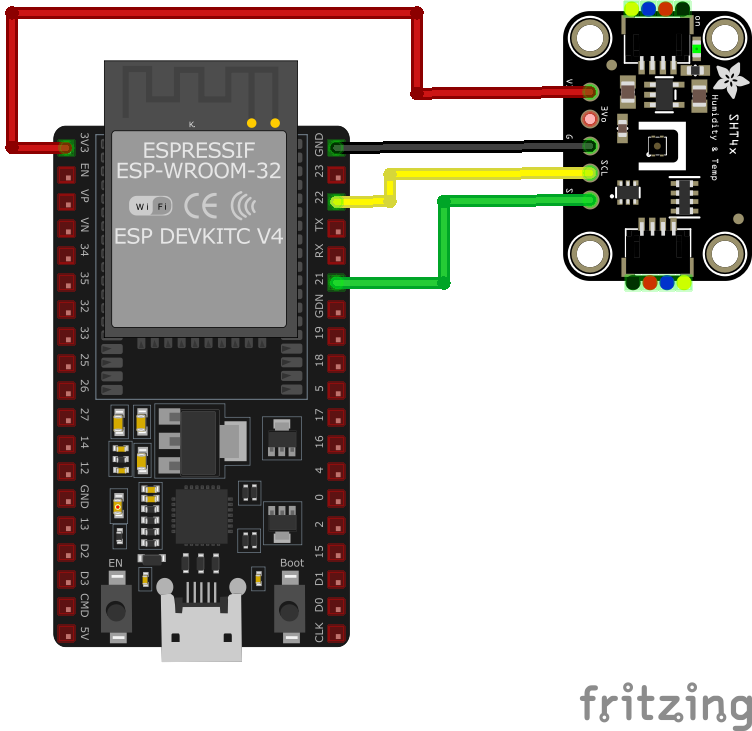
| SHT41 / SHT41-D / GY-SHT41-D pin | ESP32 pin | Purpose |
|---|---|---|
| VDD | 3.3V | Power supply (2.4V to 5.5V supported) |
| GND | GND | Ground connection |
| SDA | GPIO21 | I²C data line (default SDA) |
| SCL | GPIO22 | I²C clock line (default SCL) |
GPIO21/22 are default I²C pins on ESP32
I²C address is 0x44 (fixed)
Add 10kΩ pull-up resistors on SDA/SCL if needed
Can share I²C bus with other devices
SHT41 / SHT41-D / GY-SHT41-D code examples
#include <Wire.h>
#include "Adafruit_SHT4x.h"

Adafruit_SHT4x sht4;

void setup() {
  Serial.begin(115200);
  if (!sht4.begin()) {
    Serial.println("Couldn't find SHT41 sensor!");
    while (1) delay(10);
  }
  sht4.setPrecision(SHT4X_HIGH_PRECISION);
  Serial.println("SHT41 initialized");
}

void loop() {
  sensors_event_t humidity, temp;
  if (!sht4.getEvent(&humidity, &temp)) {
    Serial.println("Failed to read sensor data");
    return;
  }
  Serial.print("Temperature: "); Serial.print(temp.temperature); Serial.println(" °C");
  Serial.print("Humidity: "); Serial.print(humidity.relative_humidity); Serial.println(" %");
  delay(2000);
}
This Arduino sketch demonstrates how to use the SHT41 sensor with the Adafruit SHT4x library. It initializes the sensor, configures it for high precision, and reads temperature and humidity values every 2 seconds. The readings are printed to the Serial Monitor.
#include <stdio.h>
#include "freertos/FreeRTOS.h"
#include "freertos/task.h"
#include "driver/i2c.h"

#define I2C_MASTER_SCL_IO    22    /*!< GPIO number for I2C master clock */
#define I2C_MASTER_SDA_IO    21    /*!< GPIO number for I2C master data */
#define I2C_MASTER_NUM       I2C_NUM_0 /*!< I2C master port */
#define I2C_MASTER_FREQ_HZ   100000     /*!< I2C master clock frequency */
#define SHT41_SENSOR_ADDR    0x44       /*!< SHT41 I2C address */

static esp_err_t i2c_master_init(void) {
    i2c_config_t conf = {
        .mode = I2C_MODE_MASTER,
        .sda_io_num = I2C_MASTER_SDA_IO,
        .scl_io_num = I2C_MASTER_SCL_IO,
        .sda_pullup_en = GPIO_PULLUP_ENABLE,
        .scl_pullup_en = GPIO_PULLUP_ENABLE,
        .master.clk_speed = I2C_MASTER_FREQ_HZ,
    };
    ESP_ERROR_CHECK(i2c_param_config(I2C_MASTER_NUM, &conf));
    return i2c_driver_install(I2C_MASTER_NUM, conf.mode, 0, 0, 0);
}

void read_sht41_sensor() {
    uint8_t data[6];
    uint8_t cmd[] = {0xFD}; // High precision measurement command
    i2c_master_write_to_device(I2C_MASTER_NUM, SHT41_SENSOR_ADDR, cmd, 1, pdMS_TO_TICKS(1000));
    vTaskDelay(pdMS_TO_TICKS(10));
    i2c_master_read_from_device(I2C_MASTER_NUM, SHT41_SENSOR_ADDR, data, 6, pdMS_TO_TICKS(1000));

    uint16_t temp_raw = (data[0] << 8) | data[1];
    uint16_t hum_raw = (data[3] << 8) | data[4];

    float temperature = -45 + 175 * ((float)temp_raw / 65535.0);
    float humidity = 100 * ((float)hum_raw / 65535.0);

    printf("Temperature: %.2f °C, Humidity: %.2f %%\n", temperature, humidity);
}

void app_main() {
    ESP_ERROR_CHECK(i2c_master_init());

    while (1) {
        read_sht41_sensor();
        vTaskDelay(pdMS_TO_TICKS(2000));
    }
}
This ESP-IDF code initializes the I2C master, sends a command to the SHT41 sensor to perform high-precision measurements, reads the raw temperature and humidity data, and converts it into human-readable values. The results are printed every 2 seconds.
i2c:
  sda: GPIO21
  scl: GPIO22

sensor:
  - platform: sht4x
    address: 0x44
    temperature:
      name: "Room Temperature"
    humidity:
      name: "Room Humidity"
    update_interval: 60s
This ESPHome configuration defines the SHT41 sensor using the sht4x platform. It configures the sensor to read and update temperature and humidity values every 60 seconds, with user-friendly names like ‘Room Temperature’ and ‘Room Humidity.’
[env:esp32dev]
platform = espressif32
board = esp32dev
framework = arduino
monitor_speed = 115200
lib_deps =
adafruit/Adafruit SHT4x Library @ ^1.0.5#include <Arduino.h>
#include <Wire.h>
#include "Adafruit_SHT4x.h"
Adafruit_SHT4x sht4;
void setup() {
Serial.begin(115200);
if (!sht4.begin()) {
Serial.println("Couldn't find SHT41 sensor!");
while (1) delay(10);
}
sht4.setPrecision(SHT4X_HIGH_PRECISION);
Serial.println("SHT41 initialized");
}
void loop() {
sensors_event_t humidity, temp;
if (!sht4.getEvent(&humidity, &temp)) {
Serial.println("Failed to read sensor data");
return;
}
Serial.print("Temperature: "); Serial.print(temp.temperature); Serial.println(" °C");
Serial.print("Humidity: "); Serial.print(humidity.relative_humidity); Serial.println(" %");
delay(2000);
}This PlatformIO code uses the Adafruit SHT4x library to interface with the SHT41 sensor. The sensor is initialized in high-precision mode, and temperature and humidity readings are obtained and printed every 2 seconds.
from machine import I2C, Pin
from time import sleep

# Initialize I2C interface
i2c = I2C(0, scl=Pin(22), sda=Pin(21))

# SHT41 I2C address
SHT41_ADDR = 0x44

# Command for high-precision measurement
MEASURE_CMD = b'\xFD'

while True:
    try:
        i2c.writeto(SHT41_ADDR, MEASURE_CMD)
        sleep(0.01)  # Wait for measurement to complete
        data = i2c.readfrom(SHT41_ADDR, 6)
        raw_temp = (data[0] << 8) | data[1]
        raw_hum = (data[3] << 8) | data[4]
        temperature = -45 + 175 * (raw_temp / 65535.0)
        humidity = 100 * (raw_hum / 65535.0)
        print("Temperature: {:.2f} °C".format(temperature))
        print("Humidity: {:.2f} %".format(humidity))
    except Exception as e:
        print("Error reading SHT41: ", e)
    sleep(2)
This MicroPython script interfaces with the SHT41 sensor using I2C. It sends a command for high-precision measurement, reads the raw data, processes it, and prints the temperature and humidity values every 2 seconds.
SHT41 / SHT41-D / GY-SHT41-D specifications
About the SHT41 / SHT41-D / GY-SHT41-D
The SHT41 sits in Sensirion’s fourth-generation SHT4x lineup alongside the already-covered SHT40 and the premium SHT45: identical fixed I2C address 0x44, identical 1.08 V to 3.6 V supply, and the same command set, so code written for any one of the three drops onto the others unchanged. Where it actually differs from the base SHT40 is subtle: both share the same ±0.2 degC / ±1.8 %RH typical accuracy in the comfortable 25-75 %RH band, but the SHT41 holds a tighter ±2 %RH typical (±3 %RH max) across the full 0-100 %RH range, against the SHT40’s worst-case ±3 %RH typical and ±6 %RH max at the extremes.
That makes the SHT41 the better pick for anything that might see very dry or very humid air - a bathroom, a greenhouse, an outdoor enclosure - while the plain SHT40 is fine for a climate-controlled room where readings rarely leave the middle of the range. Sensirion also names the SHT41 as the direct successor to the second-generation SHT21, which the company has marked not recommended for new designs.
For genuinely tighter numbers rather than just a wider guaranteed range, the SHT45 is the next step up at ±0.1 degC / ±1.0 %RH.
SHT41 / SHT41-D / GY-SHT41-D troubleshooting
Intermittent Sensor Functionality on ESP32
›
Issue: The SHT41 sensor exhibits unreliable behavior when connected to an ESP32. Some sensors function without issues, while others intermittently stop working or cause the ESP32 to freeze. The error message observed is: Recovery failed: SCL is held LOW on the i2c.
Possible causes include insufficient pull-up resistors on the I2C lines, leading to communication instability.
Solution: Ensure that appropriate pull-up resistors are present on the SDA and SCL lines. If the sensor board lacks built-in pull-ups, add external resistors (typically 4.7kΩ to 10kΩ) to stabilize the I2C communication. Additionally, verify that the power supply is stable and that all connections are secure. ([forum.arduino.cc](https://forum.arduino.cc/t/what-causes-my-sht41-to-stop-working-on-esp32/1304760))
Inaccurate Temperature Readings Due to Self-Heating
›
Issue: The SHT41 sensor reports temperature readings higher than the actual ambient temperature. This discrepancy is often due to self-heating caused by nearby components on the PCB, such as microcontrollers, voltage regulators, or LEDs.
Possible causes include heat generated by adjacent components affecting the sensor's measurements.
Solution: To minimize self-heating effects, consider the following approaches:
- Isolate the sensor from heat-generating components by placing it on a separate PCB or using physical barriers.
- Implement duty-cycling in your code to reduce the sensor's active time, thereby decreasing heat accumulation.
- Ensure adequate ventilation around the sensor to dissipate heat effectively.
Communication Error: OSError: [Errno 19] ENODEV
›
Issue: When attempting to read data from the SHT41 sensor using an ESP32 with MicroPython, the following error occurs: OSError: [Errno 19] ENODEV. This error arises during the I2C read operation, despite the sensor being detected at address 0x44 during scanning.
Possible causes include improper I2C communication sequences or timing issues.
Solution: Implement a soft reset of the sensor before initiating data reads. This can be achieved by sending the appropriate reset command as specified in the sensor's datasheet. Additionally, ensure that the I2C communication follows the correct sequence and adheres to the timing requirements outlined by the manufacturer. ([github.com](https://github.com/orgs/micropython/discussions/9844))
Incorrect Readings on SHT4x Smart Gadget
›
Issue: When using the SHT4x Smart Gadget to read data from an external SHT41-AD1B sensor, the display shows values like 3.0 for temperature and 0.1 for humidity, which are incorrect.
Possible causes include improper connection or configuration of the external sensor.
Solution: Verify that the external sensor is correctly connected to the Smart Gadget, ensuring proper alignment and secure connections. Consult the Smart Gadget's user manual to confirm that it supports the specific sensor model and that any necessary configuration settings are correctly applied. ([forum.digikey.com](https://forum.digikey.com/t/what-causes-sht4x-smart-gadget-reading-error-how-to-fix-it/28248))
Where to buy the SHT41 / SHT41-D / GY-SHT41-D

Resources
Similar sensors


