
SIM900 / SIM900A GSM/GPRS Module
The SIM900 is a versatile GSM/GPRS module that provides reliable communication capabilities for various applications. Its compact design and multiple interfaces make it an ideal choice for projects requiring cellular connectivity.

SIM900 / SIM900A pinout
The SIM900 pinout includes power, UART communication, control, status indication, antenna connection, and SIM card interface pins for quad-band GSM/GPRS connectivity. This is the original and widely-used GSM/GPRS module.
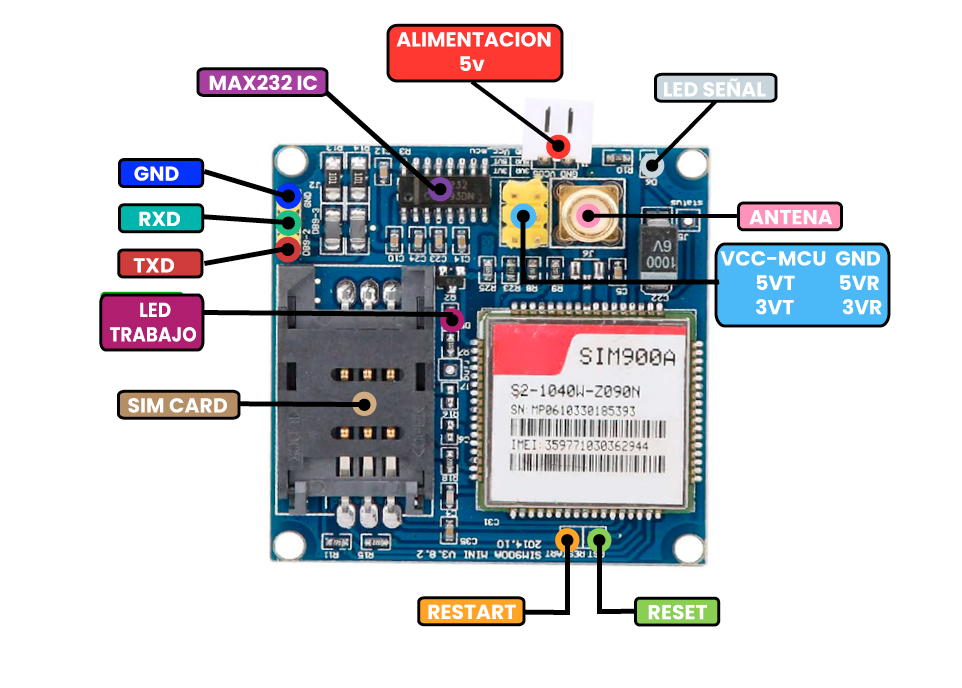
| Pin | Type | Description | Notes |
|---|---|---|---|
| VBAT | Power | Power supply input (3.2V to 4.8V) | Requires stable power supply with peak current up to 2A |
| GND | Ground | Ground connection | Connect to common ground |
| TXD | UART TX | UART Transmit Data (connects to microcontroller RX) | Default baud rate: 9600 bps |
| RXD | UART RX | UART Receive Data (connects to microcontroller TX) | Default baud rate: 9600 bps |
| PWRKEY | Control | Power on/off control (active low) | Pull low for at least 1 second to power on |
| NETLIGHT | Status | Network status indication | LED indicator for network registration status |
| STATUS | Status | Module operating status indication | Shows module power state |
| ANT | Antenna | Antenna connection | Requires external GSM antenna |
Original and widely-used quad-band GSM/GPRS module (850/900/1800/1900MHz)
Supports voice calls, SMS, GPRS data transfer, and fax transmission
GPRS multi-slot class 10
GPRS mobile station class B
Wider voltage range: 3.2V to 4.8V
Requires SIM card for cellular connectivity
Power consumption: 2A peak during transmission
Default baud rate: 9600 bps (configurable via AT commands)
Wiring the SIM900 / SIM900A to ESP32
Connect the SIM900 to your ESP32 via UART for AT command communication. The module requires a stable 3.2V-4.8V power supply with sufficient current capacity (peak 2A). An external GSM antenna is required for network connectivity.
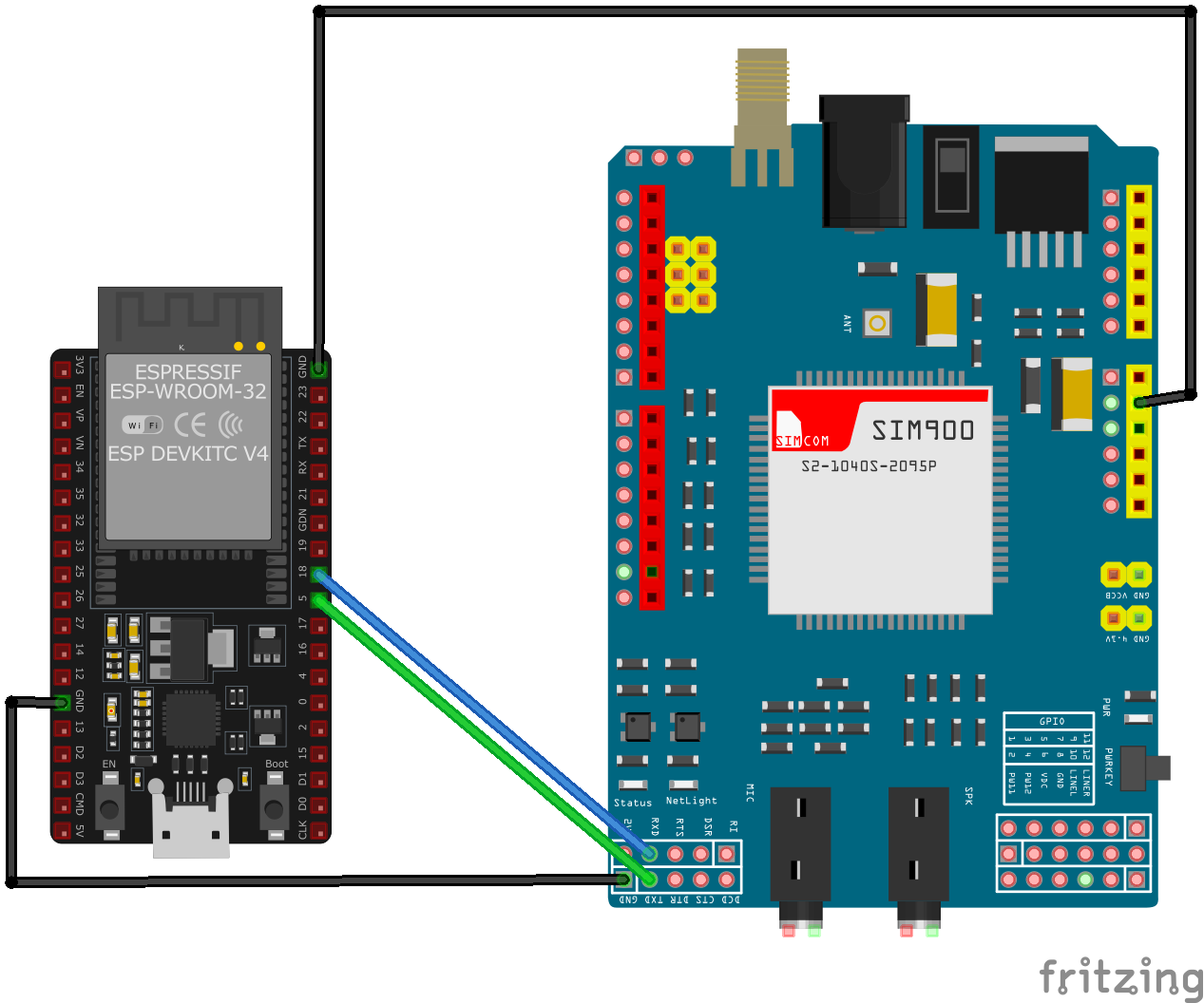
| SIM900 / SIM900A pin | ESP32 pin | Purpose |
|---|---|---|
| VBAT | 3.7V-4.8V Power Supply | Provide stable power (NOT from ESP32 pin) |
| GND | GND | Common ground connection |
| TXD | GPIO16 (RX2) | SIM900 TX to ESP32 RX |
| RXD | GPIO17 (TX2) | SIM900 RX to ESP32 TX |
| PWRKEY | GPIO4 | Power control (pull low to power on) · optional |
| ANT | External GSM Antenna | Connect GSM antenna |
CRITICAL: Use a dedicated power supply (3.2V-4.8V, 2A peak) - DO NOT power from ESP32 pin!
Original GSM/GPRS module with proven reliability
Wider voltage range (3.2V-4.8V) compared to newer SIM800 series
Default UART baud rate is 9600 bps
External GSM antenna is mandatory for network connectivity
Pull PWRKEY low for at least 1 second to power on the module
Monitor NETLIGHT pin for network registration status
Insert active SIM card before powering on
Ensure good antenna placement for optimal signal reception
Supports fax transmission in addition to voice and data
SIM900 / SIM900A code examples
// SIM900 on ESP32 UART2: module TXD -> GPIO16 (RX2), RXD -> GPIO17 (TX2), PWRKEY -> GPIO4
#define PWRKEY_PIN 4
#define MODEM_BAUD 9600

HardwareSerial modem(2); // UART2

void powerOnModem() {
    pinMode(PWRKEY_PIN, OUTPUT);
    digitalWrite(PWRKEY_PIN, LOW);
    delay(1200); // Hold PWRKEY low to power the module on
    digitalWrite(PWRKEY_PIN, HIGH);
    delay(5000); // Give the module time to boot and register
}

void sendATCommand(const char *command) {
    modem.println(command);
    delay(500);
    while (modem.available()) {
        Serial.write(modem.read());
    }
}

void setup() {
    Serial.begin(115200);
    modem.begin(MODEM_BAUD, SERIAL_8N1, 16, 17); // RX=GPIO16, TX=GPIO17

    powerOnModem();

    Serial.println("Testing AT communication...");
    sendATCommand("AT");       // Should answer OK
    sendATCommand("ATI");      // Module identification
    sendATCommand("AT+CSQ");   // Signal quality
    sendATCommand("AT+CREG?"); // Network registration status
}

void loop() {
    // Bridge the Serial Monitor and the modem so you can type AT commands directly
    while (Serial.available()) modem.write(Serial.read());
    while (modem.available()) Serial.write(modem.read());
}
This sketch talks to the SIM900 over the ESP32's second hardware UART (UART2, RX on GPIO16, TX on GPIO17) - the ESP32 has three hardware UARTs, so the AVR-style SoftwareSerial library is neither available nor needed. GPIO4 pulses the module's PWRKEY to power it on, then a few basic AT commands verify communication, signal quality and network registration. The loop bridges the Serial Monitor to the module so you can type further AT commands interactively. Power the module from a supply that can deliver its transmit-burst current - not from the ESP32's 3.3V regulator.
#include <stdio.h>
#include <string.h>
#include "driver/uart.h"
#include "driver/gpio.h"
#include "freertos/task.h"

#define TX_PIN 17
#define RX_PIN 16
#define PWRKEY_PIN 4
#define UART_PORT UART_NUM_1

void init_uart() {
    uart_config_t uart_config = {
        .baud_rate = 9600,
        .data_bits = UART_DATA_8_BITS,
        .parity = UART_PARITY_DISABLE,
        .stop_bits = UART_STOP_BITS_1,
        .flow_ctrl = UART_HW_FLOWCTRL_DISABLE
    };

    uart_param_config(UART_PORT, &uart_config);
    uart_set_pin(UART_PORT, TX_PIN, RX_PIN, UART_PIN_NO_CHANGE, UART_PIN_NO_CHANGE);
    uart_driver_install(UART_PORT, 1024, 0, 0, NULL, 0);
}

void power_on_sim900() {
    gpio_set_direction(PWRKEY_PIN, GPIO_MODE_OUTPUT);
    gpio_set_level(PWRKEY_PIN, 0);
    vTaskDelay(1000 / portTICK_PERIOD_MS); // Hold PWRKEY low for 1 second
    gpio_set_level(PWRKEY_PIN, 1);
    vTaskDelay(5000 / portTICK_PERIOD_MS); // Wait for the module to initialize
}

void app_main(void) {
    init_uart();
    power_on_sim900();

    char *test_cmd = "AT\r\n";
    uart_write_bytes(UART_PORT, test_cmd, strlen(test_cmd));

    while (true) {
        char data[128];
        int len = uart_read_bytes(UART_PORT, data, sizeof(data), 100 / portTICK_PERIOD_MS);
        if (len > 0) {
            data[len] = '\0';
            printf("Response: %s\n", data);
        }
        vTaskDelay(1000 / portTICK_PERIOD_MS);
    }
}
This ESP-IDF example initializes UART communication with the SIM900 module and powers it on using the PWRKEY pin (GPIO4). The UART interface is configured with GPIO17 as TX and GPIO16 as RX. An AT command is sent to test communication, and responses from the module are printed to the console. This code can be extended to handle SMS, GPRS, or other functionalities provided by the SIM900 module.
uart:
  tx_pin: GPIO17  # module RXD
  rx_pin: GPIO16  # module TXD
  baud_rate: 9600

# ESPHome's sim800l component speaks the generic SIM AT command set
sim800l:
  on_sms_received:
    - logger.log:
        format: "Received '%s' from %s"
        args: [ 'message.c_str()', 'sender.c_str()' ]
ESPHome's sim800l component speaks the SIM800/SIM900 AT command set, which the SIM900 shares - the old custom-platform example no longer works (that component was removed from ESPHome in 2025). Wire UART2 as shown (9600 baud) and you get on_sms_received triggers plus sim800l.send_sms and USSD actions. Power the module from a supply that can deliver its transmit-burst current.
[env:sim900]
platform = espressif32
board = esp32dev
framework = arduino
monitor_speed = 115200#include <HardwareSerial.h>
#include <Arduino.h>
HardwareSerial sim900(1);
#define PWRKEY 4
void power_on_sim900() {
pinMode(PWRKEY, OUTPUT);
digitalWrite(PWRKEY, LOW);
delay(1000); // Hold PWRKEY low for 1 second
digitalWrite(PWRKEY, HIGH);
delay(5000); // Wait for initialization
}
void setup() {
Serial.begin(115200);
sim900.begin(9600, SERIAL_8N1, 16, 17); // RX, TX
power_on_sim900();
// Test AT command
sim900.println("AT");
delay(1000);
while (sim900.available()) {
Serial.write(sim900.read());
}
// Send SMS
sim900.println("AT+CMGF=1"); // Set SMS to text mode
delay(1000);
sim900.println("AT+CMGS=\"+1234567890\""); // Replace with recipient's number
delay(1000);
sim900.print("Hello from SIM900");
sim900.write(26); // CTRL+Z to send SMS
delay(5000);
}
void loop() {
// Handle incoming data or other functionalities
}This PlatformIO code interfaces with the SIM900 module using HardwareSerial on an ESP32. The power_on_sim900 function toggles the PWRKEY pin (GPIO4) to activate the module. The AT command is sent to test communication, and SMS functionality is implemented in the setup. Additional functionalities like GPRS or data handling can be added in the loop.
from machine import UART, Pin
import time

# Initialize UART
uart = UART(2, baudrate=9600, tx=17, rx=16)
pwrkey = Pin(4, Pin.OUT)

def power_on_sim900():
    pwrkey.value(0)
    time.sleep(1)  # Hold PWRKEY low for 1 second
    pwrkey.value(1)
    time.sleep(5)  # Wait for module to initialize

def send_at(command):
    uart.write(command + '\r\n')
    time.sleep(1)
    while uart.any():
        print(uart.read().decode('utf-8'), end='')

# Power on the module
power_on_sim900()

# Test communication
send_at('AT')

# Send SMS
send_at('AT+CMGF=1')  # Set SMS to text mode
send_at('AT+CMGS="+1234567890"')  # Replace with recipient's number
uart.write("Hello from MicroPython" + chr(26))
This MicroPython code communicates with the SIM900 module over UART. The power_on_sim900 function activates the module using the PWRKEY pin (GPIO4). The send_at function sends AT commands and prints the responses. The script initializes the module, tests communication, and demonstrates how to send an SMS. Additional logic for handling GPRS data or incoming messages can be added.
SIM900 / SIM900A specifications
About the SIM900 / SIM900A
The SIM900 predates the SIM800 family and is the module that put cellular connectivity into the Arduino world in the first place. Seeedstudio’s GPRS Shield, built around it, went through its first beta release in 2011 and a hardware revision (v1.4) in August 2012 - years before the ESP32 existed - and became the default answer to “how do I add a SIM card to my microcontroller” for most of that decade. The plain SIM900 is quad-band (850/900/1800/1900 MHz) at 24 x 24 x 3 mm, while SIM900A is a cheaper dual-band variant (900/1800 MHz only) sold mainly into China and India; an SIM900A will simply never register on a North or South American 850/1900 MHz network, so the two are not interchangeable outside markets that only need the 900/1800 pair.
By 2026 the module is old enough that 2G’s own availability matters more than the band question. US carriers have retired 2G entirely - T-Mobile, the last one running a GSM network, shut it down on August 3, 2026 - so a SIM900 there has nothing to connect to regardless of band support. Several EU carriers still plan to keep some 2G running into the late 2020s or beyond for fallback and IoT use, and 2G in India, one of SIM900A’s core markets, remains commercially active with no announced shutdown date as of 2026. Checking the specific carrier and country, not just “does 2G still exist,” is the only reliable way to know if a new SIM900 design will work.
TinyGSM’s supported-modem list names SIM900A, SIM900D, SIM908 and SIM968 explicitly; the plain SIM900 isn’t listed by name but speaks the same AT command set and works the same way in practice. For a new build without existing SIM900 shield hardware to reuse, the smaller, lower-power SIM800L or SIM800C covers the same quad-band GSM/GPRS ground with less power-supply hassle; for anything meant to outlast 2G shutdowns, SIM7600G or SIM7000 is the better long-term pick.
SIM900 / SIM900A troubleshooting
Module Fails to Power On
›
Issue: The SIM900 module does not power up or respond to commands.
Possible causes include insufficient power supply, incorrect wiring, or faulty hardware.
Solution: Ensure the module is connected to a stable power source within the recommended voltage range of 3.2V to 4.8V, with a typical value of 4.0V. Verify that all connections are secure and correctly configured. If the problem persists, consider testing the module with a different power source or replacing it.
SIM Card Not Recognized
›
Issue: The module fails to detect or register the SIM card.
Possible causes include improper SIM card insertion, unsupported SIM card type, or SIM card lock.
Solution: Ensure the SIM card is properly inserted into the module's SIM card slot and is compatible with the GSM network. Verify that the SIM card is active and unlocked. If necessary, test the SIM card in another device to confirm its functionality.
Poor Network Signal or Connectivity Issues
›
Issue: The module experiences weak signal strength or fails to maintain a stable network connection.
Possible causes include improper antenna connection, environmental interference, or network coverage limitations.
Solution: Ensure the GSM antenna is securely connected to the module and positioned for optimal signal reception. Avoid placing the module near sources of electromagnetic interference. Check the network coverage in your area to ensure adequate signal strength.
AT Commands Not Responding
›
Issue: The module does not respond to AT commands sent from the microcontroller or computer.
Possible causes include incorrect baud rate settings, faulty serial connections, or improper command syntax.
Solution: Verify that the baud rate of the module matches that of the microcontroller or computer; the default baud rate is 9600 bps. Check that the TX and RX lines are correctly connected and that there are no loose connections. Ensure that AT commands are correctly formatted and terminated with a carriage return.
Module Overheating
›
Issue: The SIM900 module becomes excessively hot during operation.
Possible causes include overvoltage, excessive current draw, or continuous high-power transmission.
Solution: Confirm that the power supply voltage is within the recommended range (3.2V to 4.8V). Monitor the current consumption to ensure it does not exceed the module's specifications. If the module is transmitting continuously, consider implementing power-saving modes or reducing the transmission frequency to prevent overheating.
Where to buy the SIM900 / SIM900A

Resources
Similar sensors


