
TOF050C Time-of-Flight Sensor
The TOF050C is a short-range laser-ranging sensor using the VL6180 chip, offering highly accurate distance measurements up to 50 cm. It is optimized for applications such as gesture recognition, proximity detection, and short-distance object tracking.

TOF050C pinout
The TOF050C pinout includes I2C communication pins (SDA, SCL), power supply (VIN, GND), interrupt pin (INT), and shutdown pin (SHUT) for short-range distance measurements up to 50 cm. Based on the VL6180X chip.
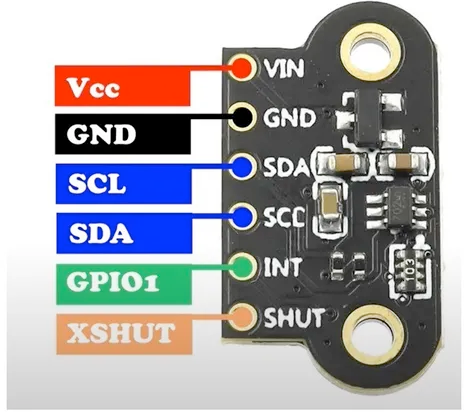
| Pin | Type | Description | Notes |
|---|---|---|---|
| VIN | Power | Power supply input (3.0V to 5.0V) | Typically 3.3V or 5V |
| GND | Ground | Ground connection | Common ground |
| SDA | I2C Data | I2C Serial Data line | Bidirectional data (requires pull-up) |
| SCL | I2C Clock | I2C Serial Clock line | Clock signal (requires pull-up) |
| INT | Interrupt | Interrupt output pin | Optional for event-driven measurements |
| SHUT | Control | Shutdown pin (active low) | Tie high to enable sensor, low to disable |
Based on VL6180X Time-of-Flight sensor chip
Short-range distance measurement: 0 cm to 50 cm
Resolution: 1 mm accuracy
Field of View: 25°
Operating voltage: 3.0V to 5.0V
I2C address: 0x29 (default)
IR wavelength: 850 nm
Current consumption: ~40 mA typical
Integrated ambient light sensor (ALS)
Ideal for gesture recognition and proximity detection
Wiring the TOF050C to ESP32
Connect the TOF050C to your ESP32 via I2C (SDA and SCL pins). This sensor is based on the VL6180X chip and provides short-range distance measurements up to 50 cm with integrated ambient light sensing. Pull-up resistors are typically included on modules.
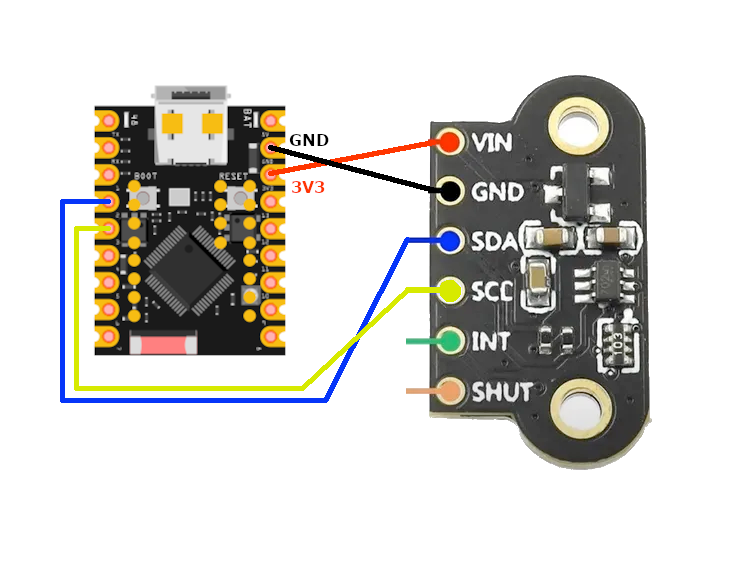
| TOF050C pin | ESP32 pin | Purpose |
|---|---|---|
| VIN | 3.3V or 5V | Power supply (3.0V to 5.0V) |
| GND | GND | Ground connection |
| SDA | GPIO21 | I2C data line (with pull-up) |
| SCL | GPIO22 | I2C clock line (with pull-up) |
| INT | GPIO (optional) | Interrupt output for measurement ready · optional |
| SHUT | 3.3V or GPIO | Shutdown control (tie high to enable) · optional |
Based on VL6180X chip - compatible with VL6180X libraries
Short-range sensor: 0-50 cm (best for proximity)
I2C address: 0x29 (same as VL53L0X/VL53L1X)
Pull-up resistors typically included on module
SHUT pin: Tie high (3.3V/5V) to enable sensor
INT pin can signal measurement ready or threshold alerts
Use Adafruit_VL6180X library for Arduino/ESP32
Integrated ambient light sensor (ALS) included
Ideal for gesture recognition in close range
850 nm IR wavelength (different from VL53 series)
Better suited for close-range than VL53L0X
Can replace VL6180X in existing projects
TOF050C code examples
#include <Wire.h>
#include <Adafruit_VL53L0X.h>

Adafruit_VL53L0X lox = Adafruit_VL53L0X();

void setup() {
    Serial.begin(115200);
    Wire.begin();

    if (!lox.begin()) {
        Serial.println("Failed to initialize VL53L0X! Check connections.");
        while (1);
    }
    Serial.println("VL53L0X Initialized.");
}

void loop() {
    VL53L0X_RangingMeasurementData_t measure;
    lox.rangingTest(&measure, false);

    if (measure.RangeStatus != 4) { // Status 4 means no object detected
        Serial.print("Distance: ");
        Serial.print(measure.RangeMilliMeter);
        Serial.println(" mm");
    } else {
        Serial.println("Out of range.");
    }

    delay(500);
}
This Arduino code demonstrates how to use the VL53L0X sensor with the Adafruit library. It initializes the sensor using the lox.begin() method. In the loop(), the rangingTest() method measures the distance to an object in millimeters, which is printed to the Serial Monitor every 500 ms. If no object is detected or the object is out of range, a corresponding message is displayed. The I2C protocol facilitates communication with the sensor. The TOF050C is a VL53L0X-based module ranged for short distances - the VL53L0X driver applies unchanged.
// Minimal raw-I2C single-shot ranging for the VL53L0X (address 0x29).
// The chip boots with usable default settings; this reads uncalibrated
// distance directly. For production accuracy, use ST's VL53L0X API.
#include <stdio.h>
#include "freertos/FreeRTOS.h"
#include "freertos/task.h"
#include "driver/i2c.h"
#define I2C_MASTER_SCL_IO 22
#define I2C_MASTER_SDA_IO 21
#define I2C_MASTER_NUM I2C_NUM_0
#define I2C_MASTER_FREQ_HZ 100000
#define VL53L0X_ADDR 0x29
#define REG_SYSRANGE_START 0x00
#define REG_RESULT_INTERRUPT_STATUS 0x13
#define REG_RESULT_RANGE_MM 0x1E // RESULT_RANGE_STATUS + 10
#define REG_SYSTEM_INTERRUPT_CLEAR 0x0B
static esp_err_t wr8(uint8_t reg, uint8_t val) {
uint8_t buf[2] = {reg, val};
return i2c_master_write_to_device(I2C_MASTER_NUM, VL53L0X_ADDR, buf, 2, pdMS_TO_TICKS(1000));
}
static esp_err_t rd(uint8_t reg, uint8_t *data, size_t len) {
return i2c_master_write_read_device(I2C_MASTER_NUM, VL53L0X_ADDR, ®, 1, data, len, pdMS_TO_TICKS(1000));
}
void app_main(void) {
i2c_config_t conf = {
.mode = I2C_MODE_MASTER,
.sda_io_num = I2C_MASTER_SDA_IO,
.scl_io_num = I2C_MASTER_SCL_IO,
.sda_pullup_en = GPIO_PULLUP_ENABLE,
.scl_pullup_en = GPIO_PULLUP_ENABLE,
.master.clk_speed = I2C_MASTER_FREQ_HZ,
};
ESP_ERROR_CHECK(i2c_param_config(I2C_MASTER_NUM, &conf));
ESP_ERROR_CHECK(i2c_driver_install(I2C_MASTER_NUM, conf.mode, 0, 0, 0));
uint8_t model_id = 0;
if (rd(0xC0, &model_id, 1) != ESP_OK || model_id != 0xEE) {
printf("VL53L0X not found (model id 0x%02X) - check wiring\n", model_id);
return;
}
printf("VL53L0X found.\n");
while (1) {
wr8(REG_SYSRANGE_START, 0x01); // Start a single-shot measurement
// Wait for the result (interrupt status bits 0-2 set when ready)
uint8_t status = 0;
for (int i = 0; i < 50; i++) {
rd(REG_RESULT_INTERRUPT_STATUS, &status, 1);
if (status & 0x07) break;
vTaskDelay(pdMS_TO_TICKS(5));
}
if (status & 0x07) {
uint8_t range[2];
rd(REG_RESULT_RANGE_MM, range, 2);
uint16_t distance = (range[0] << 8) | range[1];
if (distance < 8190) {
printf("Distance: %u mm\n", distance);
} else {
printf("Out of range\n");
}
wr8(REG_SYSTEM_INTERRUPT_CLEAR, 0x01);
} else {
printf("Measurement timeout\n");
}
vTaskDelay(pdMS_TO_TICKS(500));
}
}This is a minimal raw-I2C example: the VL53L0X boots with usable default settings, so writing 0x01 to the SYSRANGE_START register triggers a single-shot measurement, the interrupt-status register signals completion, and the 16-bit range in millimeters is read from the result registers (values around 8190 mean out of range). This gives functional but uncalibrated readings - for production accuracy (calibration, long-range/high-accuracy profiles), port ST's official VL53L0X API as an ESP-IDF component. The TOF050C is a VL53L0X-based module ranged for short distances - the VL53L0X driver applies unchanged.
i2c:
  sda: GPIO21
  scl: GPIO22

sensor:
  - platform: vl53l0x
    name: "VL53L0X Distance"
    update_interval: 500ms
This ESPHome configuration uses the vl53l0x platform to interface with the sensor. The sensor’s name, ‘VL53L0X Distance,’ makes it easily identifiable in home automation platforms like Home Assistant. The update_interval of 500 ms ensures frequent updates for applications requiring real-time distance measurements. The TOF050C is a VL53L0X-based module ranged for short distances - the VL53L0X driver applies unchanged.
[env:esp32dev]
platform = espressif32
board = esp32dev
framework = arduino
monitor_speed = 115200
lib_deps =
adafruit/Adafruit_VL53L0X @ ^1.2.4#include <Arduino.h>
#include <Wire.h>
#include <Adafruit_VL53L0X.h>
Adafruit_VL53L0X lox = Adafruit_VL53L0X();
void setup() {
Serial.begin(115200);
Wire.begin();
if (!lox.begin()) {
Serial.println("Failed to initialize VL53L0X! Check connections.");
while (1);
}
Serial.println("VL53L0X Initialized.");
}
void loop() {
VL53L0X_RangingMeasurementData_t measure;
lox.rangingTest(&measure, false);
if (measure.RangeStatus != 4) { // Status 4 means no object detected
Serial.print("Distance: ");
Serial.print(measure.RangeMilliMeter);
Serial.println(" mm");
} else {
Serial.println("Out of range.");
}
delay(500);
}The PlatformIO code uses the Adafruit VL53L0X library to interface with the sensor. After initializing I2C communication with Wire.begin(), the sensor is configured using lox.begin(). The rangingTest() function retrieves distance measurements in millimeters, which are printed to the Serial Monitor every 500 ms. A status check ensures meaningful data is displayed, and the code gracefully handles ‘out of range’ cases. The TOF050C is a VL53L0X-based module ranged for short distances - the VL53L0X driver applies unchanged.
# Requires driver: VL53L0X.py from https://github.com/uceeatz/VL53L0X
# Copy it to the board: mpremote cp VL53L0X.py :
from machine import I2C, Pin
import time
import VL53L0X

# Initialize I2C (SDA=GPIO21, SCL=GPIO22)
i2c = I2C(0, scl=Pin(22), sda=Pin(21))

# Initialize VL53L0X sensor
tof = VL53L0X.VL53L0X(i2c)
tof.start()

while True:
    distance = tof.read()  # Distance in mm
    print("Distance: {} mm".format(distance))
    time.sleep(0.5)
The example uses the uceeatz/VL53L0X MicroPython driver (copy VL53L0X.py to the board). After start() begins ranging, read() returns the distance in millimeters. The sensor sits at address 0x29 on the default I2C pins. The TOF050C is a VL53L0X-based module ranged for short distances - the VL53L0X driver applies unchanged.
About the TOF050C
The TOF050C is a Chinese breakout board built around STMicroelectronics’s VL6180X chip - the same combo IR-emitter, time-of-flight sensor and ambient-light sensor confirmed by multiple independent module listings, and reflected in the board sharing the VL6180X’s own datasheet. Any VL6180X library (Pololu’s, Adafruit’s, or a plain register-level driver) works on it unchanged, since it is the identical silicon on a small PCB with its own pin labeling.
The “050” in the name suggests a 50 cm range, and that is indeed how it is marketed, but it is worth knowing that figure reaches past what ST’s own VL6180X datasheet specifies: the chip’s documented maximum reportable range is 200 mm at full 1 mm resolution, or 400 mm at coarser 2 mm resolution with its scaling factor enabled. Treat readings past roughly 20-40 cm as a rough estimate rather than a precise one. There is also a documented near-field dead zone of about 0-2 cm right in front of the sensor where it cannot report a reliable distance at all.
For gesture sensing, proximity triggers, or short-range robotics obstacle detection, the TOF050C’s tight 25-degree field of view and 1 mm resolution near the sensor make it a solid, cheap choice. If a project actually needs to see further than 20-30 cm reliably, the VL53L0X-based TOF200C (about 2 m) or VL53L1X-based TOF400C (about 4 m) are the better-matched siblings in this product family - same board style, different chip inside.
TOF050C troubleshooting
Always Reads 0 mm
›
Issue: Always reads 0 mm.
Solution: Make sure object is more than 2 cm away. This is a known blind zone of the VL6180 chip.
Sensor Not Detected
›
Issue: Sensor not found on I²C bus.
Solution: Check wiring and I²C pull-ups. Ensure SHUT pin is high.
Power Issues
›
Issue: Sensor unstable or resets frequently.
Solution: Use stable 3.3V/5V power supply capable of handling 40mA or more.
Where to buy the TOF050C

Resources
Similar sensors


