
TOF10120 Laser Distance (Time of Flight) Sensor
The TOF10120 is an advanced, high-performance laser distance sensor that uses time-of-flight technology to measure distances with remarkable accuracy and speed. Its versatility in supporting both I2C and UART communication makes it ideal for a wide range of applications, including robotics, smart devices, and industrial automation.

TOF10120 pinout
The TOF10120 features 6 pins supporting both I²C and UART communication modes for flexible integration.
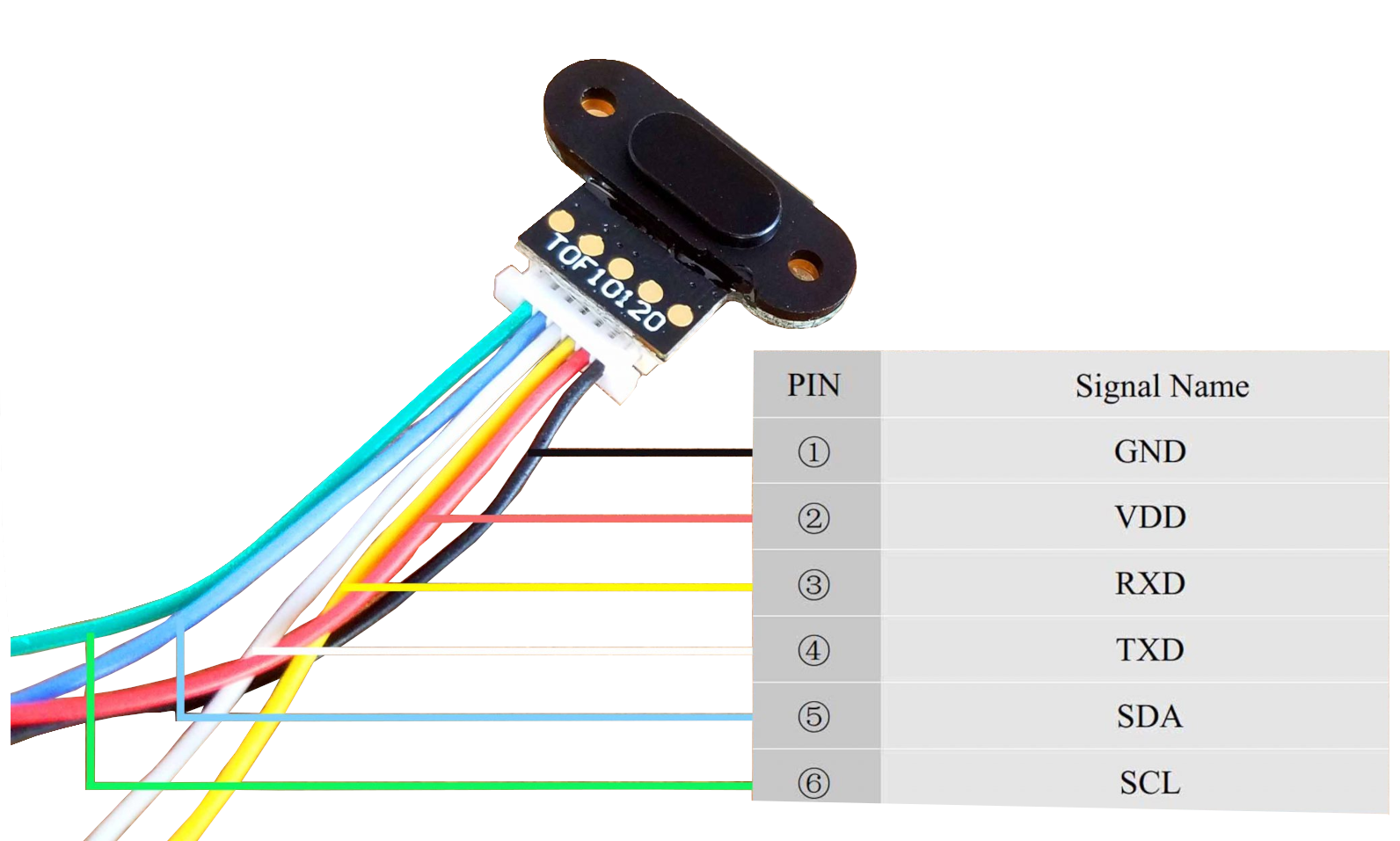
| Pin | Type | Description | Notes |
|---|---|---|---|
| VCC | Power | Power supply input (3.3V to 5V) | Compatible with both 3.3V and 5V systems |
| GND | Power | Ground connection | Connect to ESP32 ground |
| SDA | Communication | I²C data line | Bidirectional data for I²C mode |
| SCL | Communication | I²C clock line | Clock signal for I²C mode |
| TX | Communication | UART transmit pin | Serial data output for UART mode |
| RX | Communication | UART receive pin | Serial data input for UART mode |
Supports both I²C and UART communication
I²C address is 0x52 (fixed)
Choose protocol based on your application needs
Low power consumption (<30mA)
Measures 10-180cm with ±2cm accuracy
Wiring the TOF10120 to ESP32
TOF10120 I2C mode wiring
Connect the TOF10120 using I²C mode for multi-device bus sharing and easy integration.
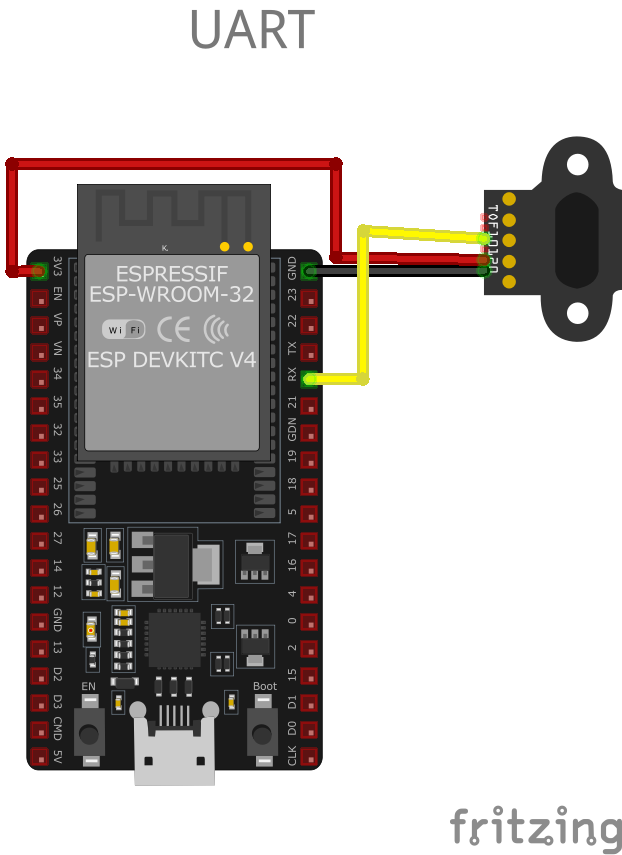
| TOF10120 pin | ESP32 pin | Purpose |
|---|---|---|
| VCC | 3.3V | Power supply (3.3V or 5V) |
| GND | GND | Ground connection |
| SDA | GPIO21 | I²C data line (default SDA) |
| SCL | GPIO22 | I²C clock line (default SCL) |
GPIO21/22 are default I²C pins on ESP32
I²C address is 0x52 (not configurable)
Most modules have built-in pull-up resistors
Can share I²C bus with other devices
TOF10120 UART mode wiring
Alternatively, connect the TOF10120 using UART mode for dedicated serial communication.
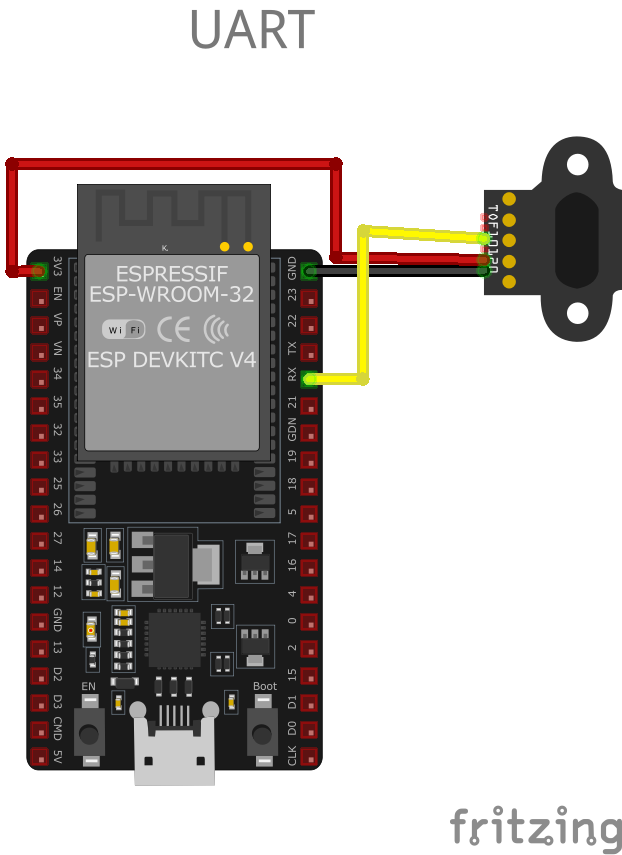
| TOF10120 pin | ESP32 pin | Purpose |
|---|---|---|
| VCC | 3.3V | Power supply (3.3V or 5V) |
| GND | GND | Ground connection |
| TX | GPIO16 | UART transmit (connect to ESP32 RX) |
| RX | GPIO17 | UART receive (connect to ESP32 TX) |
UART provides dedicated communication channel
Configure baud rate in your code (typically 9600)
Use UART when I²C bus is busy or unavailable
GPIO16/17 commonly used for serial communication
TOF10120 code examples
#include <Wire.h>

#define TOF10120_ADDR 0x52

uint16_t getDistance(); // PlatformIO does not auto-generate prototypes

void setup() {
  Serial.begin(115200);
  Wire.begin();

  Serial.println("TOF10120 Distance Sensor Example");
}

void loop() {
  uint16_t distance = getDistance();

  if (distance != 0) {
    Serial.print("Distance: ");
    Serial.print(distance);
    Serial.println(" mm");
  } else {
    Serial.println("Sensor error or no object detected.");
  }

  delay(500);
}

uint16_t getDistance() {
  Wire.beginTransmission(TOF10120_ADDR);
  Wire.write(0x00);
  Wire.endTransmission();

  Wire.requestFrom(TOF10120_ADDR, 2);
  if (Wire.available() == 2) {
    uint16_t distance = Wire.read() << 8 | Wire.read();
    return distance;
  }

  return 0;
}
This Arduino sketch demonstrates how to use the TOF10120 sensor with I2C communication. It begins by setting up the I2C interface using the Wire library and defines the TOF10120 I2C address (0x52). The getDistance() function sends a request to the sensor to initiate a distance measurement and then reads the resulting two-byte data. The calculated distance (in millimeters) is displayed on the Serial Monitor, with a 500 ms delay between readings.
#include <stdio.h>
#include "driver/i2c.h"
#include "esp_log.h"
#define I2C_MASTER_NUM I2C_NUM_0
#define I2C_MASTER_SDA_IO 21
#define I2C_MASTER_SCL_IO 22
#define I2C_MASTER_FREQ_HZ 100000
#define TOF10120_ADDR 0x52
static const char *TAG = "TOF10120";
void app_main() {
i2c_config_t i2c_config = {
.mode = I2C_MODE_MASTER,
.sda_io_num = I2C_MASTER_SDA_IO,
.scl_io_num = I2C_MASTER_SCL_IO,
.sda_pullup_en = GPIO_PULLUP_ENABLE,
.scl_pullup_en = GPIO_PULLUP_ENABLE,
.master.clk_speed = I2C_MASTER_FREQ_HZ,
};
ESP_ERROR_CHECK(i2c_param_config(I2C_MASTER_NUM, &i2c_config));
ESP_ERROR_CHECK(i2c_driver_install(I2C_MASTER_NUM, I2C_MODE_MASTER, 0, 0, 0));
uint8_t data[2];
while (1) {
uint8_t reg = 0x00; // Real-time distance register
i2c_master_write_read_device(I2C_MASTER_NUM, TOF10120_ADDR, ®, 1, data, 2, 1000 / portTICK_PERIOD_MS);
uint16_t distance = (data[0] << 8) | data[1];
ESP_LOGI(TAG, "Distance: %d mm", distance);
vTaskDelay(500 / portTICK_PERIOD_MS);
}
}The code sets up I2C communication using the ESP-IDF framework. The sensor is configured with its I2C address (0x52). A loop sends a command to read distance data from the sensor and parses the response into a 16-bit distance value (in millimeters). The distance is logged every 500 ms. Error handling ensures the loop continues if communication issues occur.
i2c:
  sda: GPIO21
  scl: GPIO22

sensor:
  - platform: tof10120
    name: "TOF10120 Distance"
    update_interval: 500ms
The ESPHome configuration uses the tof10120 platform to interface with the sensor. The name assigns a user-friendly label (‘TOF10120 Distance’) to the sensor data, making it identifiable in smart home platforms. The update_interval is set to 500 ms for frequent distance updates.
[env:esp32dev]
platform = espressif32
board = esp32dev
framework = arduino
monitor_speed = 115200#include <Arduino.h>
#include <Wire.h>
#define TOF10120_ADDR 0x52
uint16_t getDistance(); // PlatformIO does not auto-generate prototypes
void setup() {
Serial.begin(115200);
Wire.begin();
Serial.println("TOF10120 Distance Sensor Example");
}
void loop() {
uint16_t distance = getDistance();
if (distance != 0) {
Serial.print("Distance: ");
Serial.print(distance);
Serial.println(" mm");
} else {
Serial.println("Sensor error or no object detected.");
}
delay(500);
}
uint16_t getDistance() {
Wire.beginTransmission(TOF10120_ADDR);
Wire.write(0x00);
Wire.endTransmission();
Wire.requestFrom(TOF10120_ADDR, 2);
if (Wire.available() == 2) {
uint16_t distance = Wire.read() << 8 | Wire.read();
return distance;
}
return 0;
}This PlatformIO code demonstrates how to interface with the TOF10120 sensor using I2C communication. The code initializes the I2C bus and continuously requests distance measurements from the sensor. The getDistance() function sends a command to the sensor and retrieves a 2-byte distance value, which is then displayed on the Serial Monitor every 500 ms. The 0x52 I2C address is used for communication. This example is compatible with Arduino-compatible ESP32 boards using the PlatformIO environment.
from machine import I2C, Pin
from time import sleep

# Initialize I2C communication (SDA = GPIO21, SCL = GPIO22)
i2c = I2C(0, scl=Pin(22), sda=Pin(21))

# TOF10120 I2C Address
tof_address = 0x52

def read_distance():
    # Request distance measurement
    i2c.writeto(tof_address, b'\x00')
    data = i2c.readfrom(tof_address, 2)
    # Parse two-byte response
    distance = (data[0] << 8) | data[1]
    return distance

print("TOF10120 Distance Sensor Example")

while True:
    distance = read_distance()
    print("Distance: {} mm".format(distance))
    sleep(0.5)
The MicroPython script uses I2C communication to interact with the TOF10120 sensor. The read_distance() function sends a command to the sensor and reads a 2-byte response, converting it to a 16-bit distance value. The distance is displayed on the console every 500 ms.
TOF10120 specifications
About the TOF10120
Unlike the TOF050C, TOF200C and TOF400C modules elsewhere on this site, the TOF10120 is not a repackaged STMicroelectronics VL53/VL6180 chip - every independent listing for it markets it as its own standalone infrared time-of-flight part, with no ST die mentioned anywhere. What makes it genuinely useful is the dual interface on one 6-pin header: it answers on I2C at the fixed address 0x52 and, at the same time, streams over UART at 9600 baud, so a project can pick whichever bus is free rather than being locked into one.
Measured range is 10 to 180 cm with roughly plus-or-minus 2 cm accuracy and a response time under 30 ms, drawing about 35 mA from a 3.3-5 V supply - specs that line up consistently across multiple independent resellers. That 10 cm minimum is worth planning around: unlike the VL53L0X-based sensors on this site, which have only a few centimeters of dead zone, the TOF10120 simply does not report anything closer than that.
ESPHome ships a native tof10120 platform in core - no external component needed, which is more convenient than the VL53L1X or VL6180X setups elsewhere in this family. For a similar price and range with a better-documented, ST-branded chip and wider third-party library support, the VL53L0X-based TOF200C is worth comparing against; for straight I2C without the UART option, the plain VL53L0X covers similar ground too.
TOF10120 troubleshooting
Unstable or Incorrect Distance Measurements
›
Issue: The TOF10120 sensor provides fluctuating or inaccurate distance readings, even when the target object is stationary.
Possible causes include electrical noise, improper sensor alignment, or interference from ambient light sources.
Solution: Ensure that the sensor is properly aligned perpendicular to the target surface to receive accurate reflections. Minimize exposure to strong ambient light, especially direct sunlight, which can interfere with the sensor's infrared measurements. Implement filtering algorithms, such as averaging multiple readings, to mitigate the effects of occasional erroneous data.
Sensor Not Detected on I2C Bus
›
Issue: The TOF10120 sensor is not recognized on the I2C bus, leading to communication failures.
Possible causes include incorrect I2C address configuration, improper wiring, or lack of pull-up resistors on the I2C lines.
Solution: Verify that the sensor's I2C address matches the address specified in your code; the default address is 0x52. Ensure that the SDA and SCL lines are correctly connected to the corresponding pins on the microcontroller. Check for the presence of appropriate pull-up resistors (typically 4.7kΩ) on the I2C lines if they are not already included on the sensor module.
Interference Between Multiple Sensors
›
Issue: When using multiple TOF10120 sensors simultaneously, their signals interfere with each other, causing inaccurate readings.
Possible causes include identical I2C addresses for all sensors or overlapping measurement zones.
Solution: Since the TOF10120 sensor has a fixed I2C address, using multiple sensors on the same bus requires additional hardware, such as an I2C multiplexer, to manage communication. Alternatively, consider using the sensor's UART mode for communication, assigning different serial ports for each sensor. Physically space the sensors apart to prevent their measurement zones from overlapping, reducing the chance of cross-talk interference.
Unexpected Output Values
›
Issue: The sensor outputs values that do not correspond to the actual distance, even when the sensor is completely blocked or no object is present.
Possible causes include incorrect data parsing, sensor malfunction, or improper initialization.
Solution: Review the data parsing logic in your code to ensure it correctly interprets the sensor's output format. Confirm that the sensor is properly initialized and that any required calibration procedures are followed. If the issue persists, test the sensor with a known working setup to determine if it is functioning correctly or needs replacement.
Where to buy the TOF10120

Resources
Similar sensors


