

Two Controllers, One SKU: Adding CrowPanel 4.2" v1.2 Support to Our ESPHome E-Paper Driver
Elecrow ships the CrowPanel 4.2" e-paper with two different controllers under one listing. How we added UC8276C support to our ESPHome component, fixed an inverted panel, and cut refresh from ~3s to 448ms.
Back in March we published a custom ESPHome component for the Elecrow CrowPanel e-paper displays, because the existing community one would not work with LVGL. It covered the 4.2" (400x300) and the 5.79" (792x272).
Then people started reporting blank screens on 4.2" boards.
The cause turned out to be simple and annoying: Elecrow sells the 4.2" CrowPanel under one product listing, but has shipped it with two entirely different display controllers. Not two firmware revisions of the same chip - two different command sets that need two different drivers.
This post is the story of adding the second one. It covers how to tell which board you have, a full-screen colour inversion whose cause could not be determined from the panel alone, an experiment that ruled out the easy solution, and a waveform swap that took a refresh from roughly three seconds to 448 milliseconds.
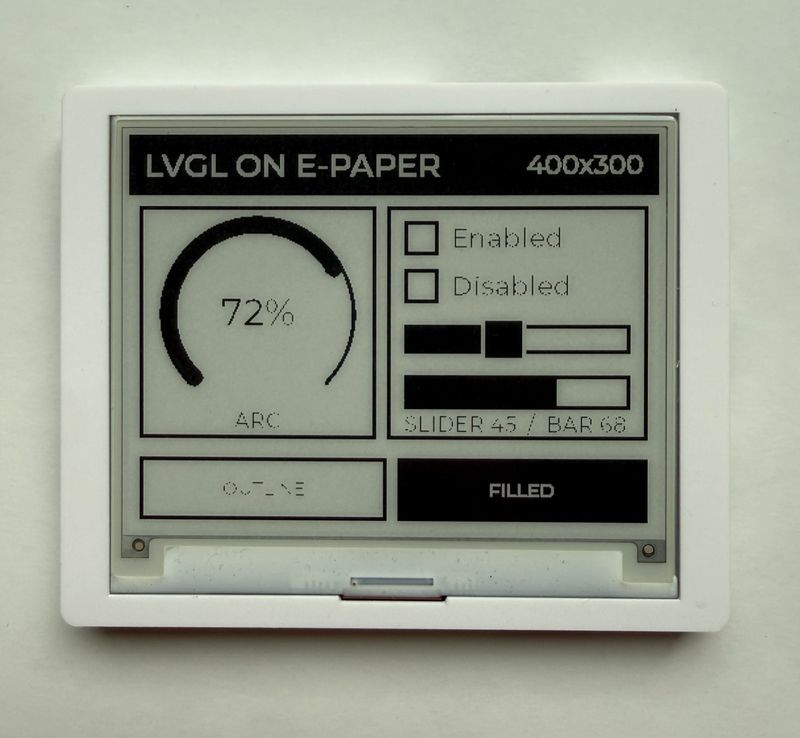
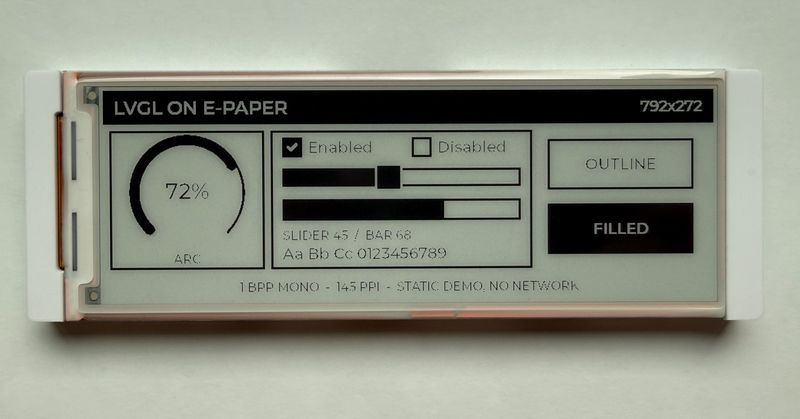
The same LVGL widget set on both panels: 4.2" v1.2 (400x300) on the left, 5.79" (792x272) on the right. One component, three model keys.
The short version
- The 4.2" ships as v1.0 (SSD1683) or v1.2 (UC8276C). Buy one today and you will most likely get a v1.2
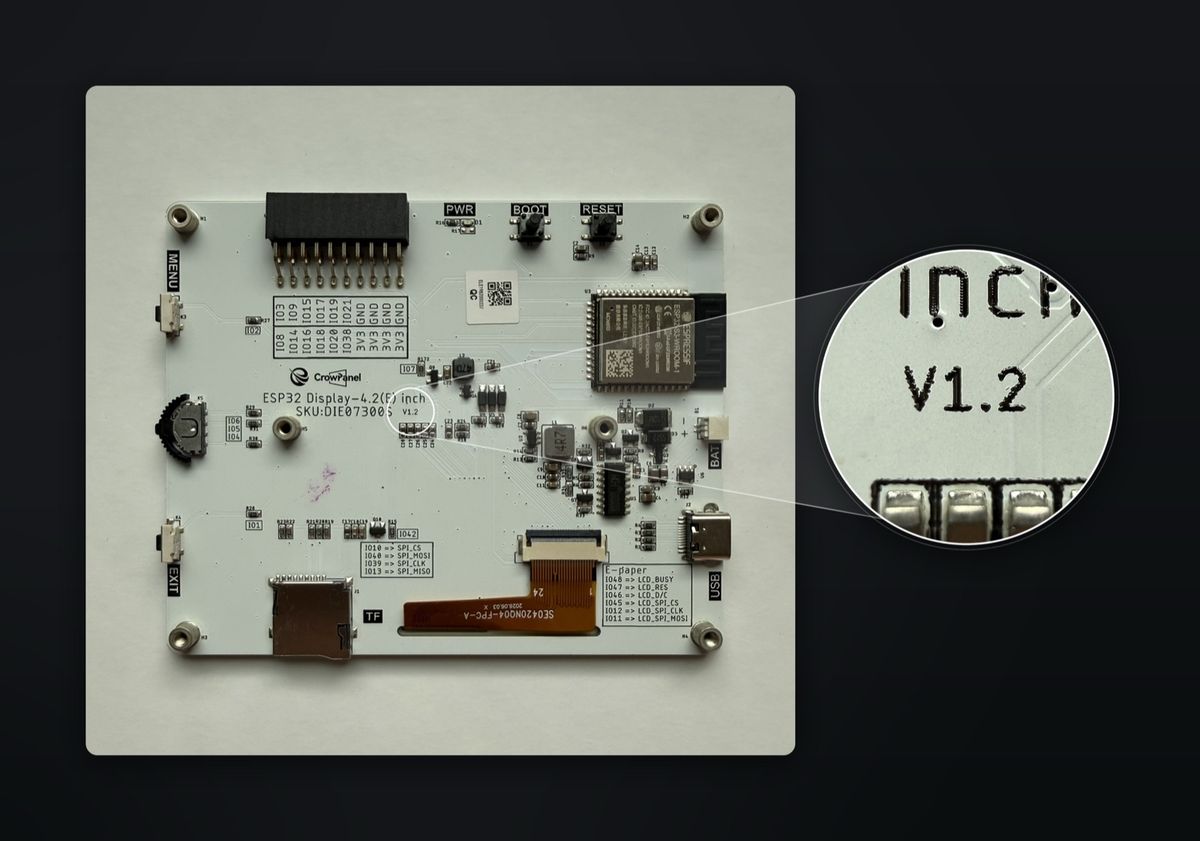
- The revision is not on the listing or the box. It is silkscreened on the board, next to the SKU
- New
model: "4.20in-v1.2"key in the crowpanel_epaper component. Blank or garbled screen on4.20in? Try it - Refresh went from ~3 s to 1056 ms full and 448 ms partial, almost entirely by using Elecrow's waveform tables instead of the ones the driver started with
- Setup, wiring and LVGL config are unchanged - see the original guide. Or jump to the config
Which board do you actually have? #
There is no way to tell from the outside. The listing does not say, the box does not say, and the assembled case hides the answer. You have to open the enclosure and read the silkscreen next to the SKU.
Here is what you are looking for. On our board it sits just under the CrowPanel logo, beside SKU:DIE07300S:
The green sticker that was not there #
Elecrow's own example repo contains two parallel example trees, and the directory names are their identification method:
example/arduino/                                          <- SSD1683 (v1.0)
example/arduino_A_green_circular_sticker_on_the_back/     <- UC8276C (v1.2)
Their answer to "which board do I have" is, literally, "does it have a green circular sticker on the back".
That test did not hold here. Our v1.2 board - UC8276C, V1.2 in silkscreen - arrived with no green sticker anywhere on it. The sticker looks like a production-batch marking that got reused as a revision label, which means a missing sticker tells you nothing. Read the silkscreen.
The split between the two trees is real, though, and it is easy to confirm. The plain arduino/ tree contains zero LUT tables, because the SSD1683 has its waveform in on-chip OTP and never needs one uploaded. Only the green-sticker tree carries waveform tables at all. That asymmetry is itself the evidence that these are different controllers.
Symptom of picking the wrong key
The panel comes up blank or garbled. It is not a wiring fault and not an LVGL fault - the driver is speaking the wrong language at the controller. Swap model: and reflash.
Bug one: the whole screen came out inverted #
With the new driver roughly in place, the first real render was wrong in a very clean way. An LVGL page with bg_color: 0xFFFFFF and text_color: 0x000000 came out as black background, white text.
Geometry correct. Text crisp. No mirroring, no ghosting. Just a total colour inversion and nothing else.
That sounds like a one-line fix, and it nearly was. The problem was working out which one line, because two completely different causes produce exactly this picture:
- The panel's RAM polarity is opposite - a set bit renders black, not white.
- The waveform tables are assigned to swapped registers - so every transition drives the wrong way.
And these are not merely hard to tell apart by eye. With the tables actually in use, they are the same transformation: because the white-target tables are identical to each other and the black-target ones likewise, swapping the two groups is mathematically identical to inverting every data bit. No experiment on the framebuffer could separate them.
The border broke the tie #
The thing that resolved it was a part of the screen that does not come from the framebuffer at all.
Register 0x50 carries VBD[1:0], the border data selection. The border is driven independently of the image data. So it works as a control channel:
The border was white. That pinned it to data polarity and cleared the waveform, which mattered a great deal for what came next - there was no point rearranging LUT registers to chase a bug that was not there.
The fix complements on the way out, so the shared framebuffer convention the other panels rely on stays intact:
void CrowPanelEPaper4P2InUC8276::send_data_() {
  // This controller renders a set bit black, the opposite of the shared
  // framebuffer convention.
  for (uint32_t i = 0, n = get_buffer_length_(); i < n; i++)
    spi_write_byte_(~buffer_[i]);
  spi_end_data_();
}
We deliberately did not route this through the existing invert_colors: YAML option. Panel RAM polarity is a fixed hardware trait, not a user preference, so it belongs with the other per-model overrides in the driver. invert_colors stays available as a genuine user override.
The theory that looked perfect and was wrong
Before the border test, there was a much more satisfying explanation on the table.
GxEPD2's UC8176 driver carries this comment on register 0x50:
//_writeData(0x97); // WBmode:VBDF 17|D7 VBDW 97 VBDB 57 WBRmode:VBDF F7 VBDW 77 VBDB 37 VBDR B7Read it carefully. In black/white mode, the white-border value is 0x97. 0xB7 appears only in the black/white/red list, as the red border value. Our driver runs in B/W mode but uses 0xB7.
And bits 5:4 of 0x50 are DDX[1:0] - data polarity. 0x97 is DDX=01, 0xB7 is DDX=11. A wrong data-polarity bit is exactly the sort of thing that inverts an entire frame. It looked like a smoking gun.
The UC8151c datasheet killed it, §23:
DDX[1:0]: Data polality.
  DDX[1] for RED data, DDX[0] for BW data in the B/W/Red mode.
  DDX[0] for B/W mode.
Only DDX[0] matters in B/W mode, and it is 1 in both values. The difference between 0x97 and 0xB7 is DDX[1], a don't-care on a panel with no red ink. VBD is 10 in both, CDI is 0111 in both. The two bytes are functionally identical here.
Worth including because the reasoning was sound, the citation was real, and the conclusion was still wrong. Register comments written for a sibling controller are a good source of hypotheses and a bad source of answers.
Could we skip uploading waveforms entirely? #
Before choosing waveform tables, it was worth asking whether the driver needs to supply any at all.
An e-paper controller drives pixels using a waveform - a timed sequence of voltages that flips the ink. That waveform has to come from somewhere, and the UC8276C can take it from either of two places. Bit 5 of the panel setting register 0x00 picks which:
Bit 5 set - what we use
0x00 ← 0x3F
Waveform comes from registers 0x20-0x24, uploaded by the driver on every mode change.
Works.
Bit 5 clear - the experiment
0x00 ← 0x1F
Waveform comes from the panel's own OTP. Would give temperature compensation for free, and possibly a vendor partial waveform.
The panel never refreshes at all.
Not a subtle failure - nothing happens on the glass. This particular glass has no usable waveform programmed into OTP, so the tables have to be uploaded. Elecrow's own driver does the same thing, which suggests they hit the same wall.
What that costs is worth stating plainly: no temperature compensation, and no vendor partial waveform to fall back on. Both have to come out of uploaded tables.
The contrast with the v1.0 board is the part that makes the revision split feel less arbitrary. The SSD1683 models in the same component do exactly the opposite - they never upload a table, and just select a built-in OTP waveform by mode:
// crowpanel_epaper.cpp - SSD1683 defaults
CMD_UPDATE_SEQ, 0x01, SEQ_FULL_UPDATE,     // 0x22 <- 0xF7
CMD_UPDATE_SEQ, 0x01, SEQ_PARTIAL_UPDATE,  // 0x22 <- 0xFF
Same product family, same plastic case, two opposite waveform architectures. This is why one model key cannot cover both.
Whose tables, then? #
So the driver must upload waveforms. The version we inherited already had some, and they worked - but they were slow, and their provenance did not survive a check.
A comment attributed them to the Good Display reference driver GxEPD2_420_SE0420NQ04. That file does not exist in GxEPD2 upstream: the URL 404s, and the only 4.2" drivers in the project are for the UC8176, a different controller with a different table format. The tables worked, but where they came from is genuinely unclear.
Elecrow's repo, meanwhile, has two complete and verifiable sets sitting in the green-sticker example tree, both uploaded to registers 0x20-0x24:
- GC ("grayscale clear") - the full refresh
- DU ("direct update") - the fast partial
Switching to them was mostly a matter of trusting the vendor's own numbers over an unverifiable citation. The speed difference was the surprise.
Why GC and DU differ in kind #
The five registers hold one table each, and the second letter of each name is the new colour: WW is white-to-white, BW is black-to-white, and so on. Byte 1 of each phase group encodes the drive levels - and comparing that single byte across the two sets explains everything:
Two consequences fall straight out of that picture:
DU depends on knowing the previous frame. GC does not care what was on the panel before - it drives everything to its destination regardless. DU has to know, in order to decide what to leave alone.
GC and DU have to come from the same source. DU assumes the panel state that its matching GC leaves behind. Pairing Elecrow's DU with the Good Display GC would look fine for a few frames and then start smearing. That is why swapping the waveforms stopped being optional once partial refresh was the goal.
Why you cannot just lift GxEPD2's partial tables
The table format is not portable between controllers, even closely related ones. Each register holds a series of phase groups, and the group size differs:
- UC8151 / UC8176: 6-byte groups, 7 groups per register
- UC8276C: 7-byte groups, 6 groups per register
Both come to 42 bytes per register, so a naive copy compiles, uploads, and produces nonsense - the phases land at the wrong offsets.
The 7-byte figure is inferred rather than documented: Elecrow uploads exactly 42 bytes per register with the tables laid out as 6 rows of 7, and the original driver's declared register lengths (42 and 56) are both multiples of 7. Strong enough to build on, not something we found spelled out.
While in there, we also cleaned up the inherited register lengths, which declared WW at 42 while its identical twin BW was at 56. Elecrow uploads a uniform 42 to all five, so now the driver does too.
The numbers #
Three waveform configurations, measured on the same board:
Almost all of the full-refresh gain is phase count: the tables we inherited ran four active phases, Elecrow's run one. That is roughly 3x on a full refresh before partial refresh enters the picture at all, and about 6x faster for a typical update once it does.
The ~3 s figure is an honest eyeball estimate - the instrumentation did not exist while that waveform was still in use. The other two are measured, by a one-line addition to the state machine that is worth keeping permanently:
case State::UPDATE_WAIT:
  if (!is_busy_()) {
    ESP_LOGD(TAG, "%s refresh done in %u ms", is_full_update_ ? "Full" : "Partial",
             (unsigned) (now - state_start_));
[17:43:51][D][crowpanel_epaper:221]: Full refresh done in 1056 ms
[17:46:38][D][crowpanel_epaper:221]: Partial refresh done in 448 ms
Why the log mattered more than it looks #
Both waveforms are single-phase, so neither flashes dramatically the way the old four-phase one did. To the eye, GC and DU look similar. The panel also showed no ghosting build-up.
Those two observations together are ambiguous in a way that is easy to miss:
- Story A: DU is running, and it is working well.
- Story B: the table swap never reached the panel, GC is running every time, and of course there is no ghosting.
Both predict "looks the same, no ghosting". Only the durations separate them, and 448 ms against 1056 ms is not a close call. Without the measurement, the conclusion would have been a guess wearing the clothes of a result.
"Partial refresh" here means partial waveform, not partial window
The UC8276C does support windowed updates, but this driver does not use them. ESPHome's DisplayBuffer always ships the whole frame, so there is no window to set - the entire screen is rewritten every time. What changes between a full and a partial update is only which waveform drives it. Worth being explicit about, because in e-paper writing "partial refresh" usually means the other thing.
Ghost testing, and the rig that was wrong #
Partial waveforms trade image quality for speed, so the last job was working out how much residue builds up and how often a full refresh is needed to clear it.
The test is an ESPHome config cycling LVGL pages on an interval, with blank white frames as the measurement surface:
scene A -> blank white -> scene B -> blank white -> repeat
Ghosting accumulates, so early frames prove nothing - you need 20 to 30 cycles, inspected under bright light at a shallow angle. Faint residue is invisible head-on.
The first version of this rig was broken, and it took an outside pair of eyes to spot it. It had four frames: solid black, white, pattern, white.
Driving every pixel to black and then every pixel to white is a de-ghosting cycle. The rig was scrubbing the panel clean once per loop, hiding precisely what it was built to detect. Both runs from it were meaningless.
The generalisable version of that lesson: a display test containing a full-field inversion has a built-in reset. If you are measuring retention, never let the rig do anything the panel's own clear routine would do. The fix was to delete the all-black frame, so every frame leaves most of the panel white and only moves the differing regions.
Two failure modes look superficially similar here and mean opposite things:
| What you see | What it is | What to do |
|---|---|---|
| Faint grey shadow of the previous frame | Ghosting. Normal for a partial waveform | Tune full_update_every |
| Previous frame still solidly there, piling up | Stale compositing - the driver is diffing against a frozen baseline | Driver bug, not a config problem |
The second one was a real risk. DU only works if the controller's record of the previous frame is accurate, and it was not obvious from the datasheet whether the controller maintains that itself or the driver has to rewrite it every update. Elecrow's example code implies the former but never says so.
Hardware settled it: 21 consecutive partial updates composited correctly with nothing piling up. The controller maintains its own previous-frame plane, and the driver only needs to prime it once at startup.
With the corrected rig, about 10 partials in, there was minimal residue of the immediately previous screen and - the important part - it was not accumulating. Bounded single-step residue that does not compound is the healthy signature for this kind of waveform.
The component default of full_update_every: 10 lands right about where residue starts becoming noticeable. Given that nothing accumulated, 15-20 would probably also be fine and would halve the number of slow full refreshes. We left the default at 10 as the conservative choice, since other people run this on panels that may not behave identically. If you want to see the partial waveform completely unassisted, set it to 9999 - only the first update is then a full refresh.
What we left alone, on purpose #
The 5.79" still needs invert_colors: true in YAML. It is the same class of problem we just fixed in the driver for the 4.2" v1.2, and it could be fixed the same way - but doing it properly means complementing in four separate write loops across both cascaded controllers, including the previous-frame seeding that exists to fix a real ghosting bug. Getting that wrong would make the first partial after every full refresh diff against an inverted baseline. Nothing is broken today, the flag costs one line, and that path could not be re-tested in the same session. So it is documented in the README rather than silently differing.
The init sequence still differs from Elecrow's in three registers - booster soft start, VCOM_DC, and the border value discussed above. Ours works. Booster and VCOM_DC affect drive strength and common-electrode bias, so they plausibly influence contrast and ghosting, but we have not tested that. It is the obvious thread to pull if someone wants to chase image quality.
Still open, if anyone wants to dig:
- Whether Elecrow's own
do NOT use partial refreshcomment in their partial-refresh example reflects a real problem with this glass, or is leftover caution. It worked fine here. - Whether
full_update_everycan safely go above 10 on this panel. - Where the original Good Display tables actually came from.
Using it #
Nothing about the setup changed - wiring, LVGL config and fonts are all as described in the original guide. Only the model key is new:
esphome:
  name: crowpanel_epaper
  on_boot:
    - priority: 600
      then:
        - switch.turn_on: epd_power
        - delay: 500ms

external_components:
  - source: github://ESPBoards/esphome-lvgl-crowpanel-epaper-5.79-4.2@main

# GPIO7 gates power to the panel - nothing works until this is on
switch:
  - platform: gpio
    pin: 7
    id: epd_power
    restore_mode: ALWAYS_ON
    internal: true

display:
  - platform: crowpanel_epaper
    id: epd
    model: "4.20in-v1.2"      # "4.20in" for v1.0, "5.79in" for the wide panel
    clk_pin: 12
    mosi_pin: 11
    cs_pin: 45
    dc_pin: 46
    reset_pin: 47
    busy_pin: 48
    full_update_every: 10
    auto_clear_enabled: false
    update_interval: never
One thing worth repeating from that guide, since this post is largely about blank panels: GPIO7 switches the display's power rail. If it is not driven high before the first SPI transaction, the panel stays blank no matter how correct everything else is - and it looks exactly like the wrong-model symptom. Check the power switch before you start swapping model keys.
model | Panel | Resolution | Controller |
|---|---|---|---|
4.20in | 4.2" v1.0 | 400x300 | SSD1683 |
4.20in-v1.2 | 4.2" v1.2 | 400x300 | UC8276C |
5.79in | 5.79" | 792x272 | dual SSD1683, cascaded |
Both 4.2" revisions are now correct without invert_colors: - the v1.2 inverts inside the driver, where it belongs. The 5.79" still needs the flag.
The component
crowpanel_epaper
ESPHome external component for the CrowPanel 4.2" and 5.79" e-paper panels, with LVGL support and partial refresh on every model.
Two ESPHome details that cost time along the way, in case they save you some. external_components local paths resolve relative to the YAML file, not your shell's working directory - and when the path is not found, the error complains about github:// URL format rather than the missing directory. And secrets.yaml is only looked for beside the config file, with no parent-directory fallback, so nesting a config one level deeper breaks every !secret in it.
Sources #
- Elecrow's CrowPanel 4.2" example repo - both example trees; the GC and DU tables live in the green-sticker tree's partial-refresh example
- UC8151c datasheet - same command family as the UC8276C; register definitions for the data planes, LUT registers and
0x50 - GxEPD2
GxEPD2_420.cpp- the UC8176 sibling driver, source of both the border-value comment and the falsified DDX theory - semvis123/esphome-crowpanel-4.2-epaper - the community component ours started from, with 5.79" cascade support by siku2