

From CrowPanel 7.0 to the ESP32-P4 Advance 5.0: How Elecrow's HMI Series Evolved
Three generations of Elecrow CrowPanel HMI displays compared - the 7.0, the Advance 7.0 and the new ESP32-P4 Advance 5.0, and what actually changed.
We have been following Elecrow's CrowPanel HMI displays since June 2024, when they sent us a 2.8" and a 7" unit for our first CrowPanel review.
The 7" board turned into a longer project than expected. Getting it running under ESPHome took enough trial and error that it became a separate bring-up guide. In April 2025 we reviewed the CrowPanel Advance 7.0, the version with the swappable radio module socket.
Now the third generation is on the bench: the CrowPanel Advance 5.0 (ESP32-P4), which drops the ESP32-S3 for Espressif's RISC-V application processor and moves the radio off-chip entirely.
Rather than write a third standalone review, this post traces what actually changed across the three boards and why - which complaints Elecrow fixed, which ones it carried forward, and which ones it swapped for new ones. It doubles as our take on the P4 board.
Fair warning up front. The first two generations are incremental refinements of the same idea; the third is a platform change with a first-wave software story attached. None of them is a clean win over the one before it.
Three generations at a glance
- CrowPanel 7.0 (2024): 7" 800x480 on an ESP32-S3 with 4MB flash, $29.40. Good screen, difficult RGB-panel bring-up
- Advance 7.0: same S3, 16MB flash, a swappable radio socket, proper Crowtail ports and a helper MCU. An iteration, not a reinvention
- Advance 5.0 (P4): dual RISC-V at 400 MHz, 32MB PSRAM, Wi-Fi 6 through an onboard ESP32-C6, a camera header - and first-wave software to match
- One complaint survives all three generations: the factory firmware behaves better than anything you build from the published sources
- Just want the numbers? Jump to the spec table
Two hops in two years. The first one is all I/O; the second one is a different processor architecture.
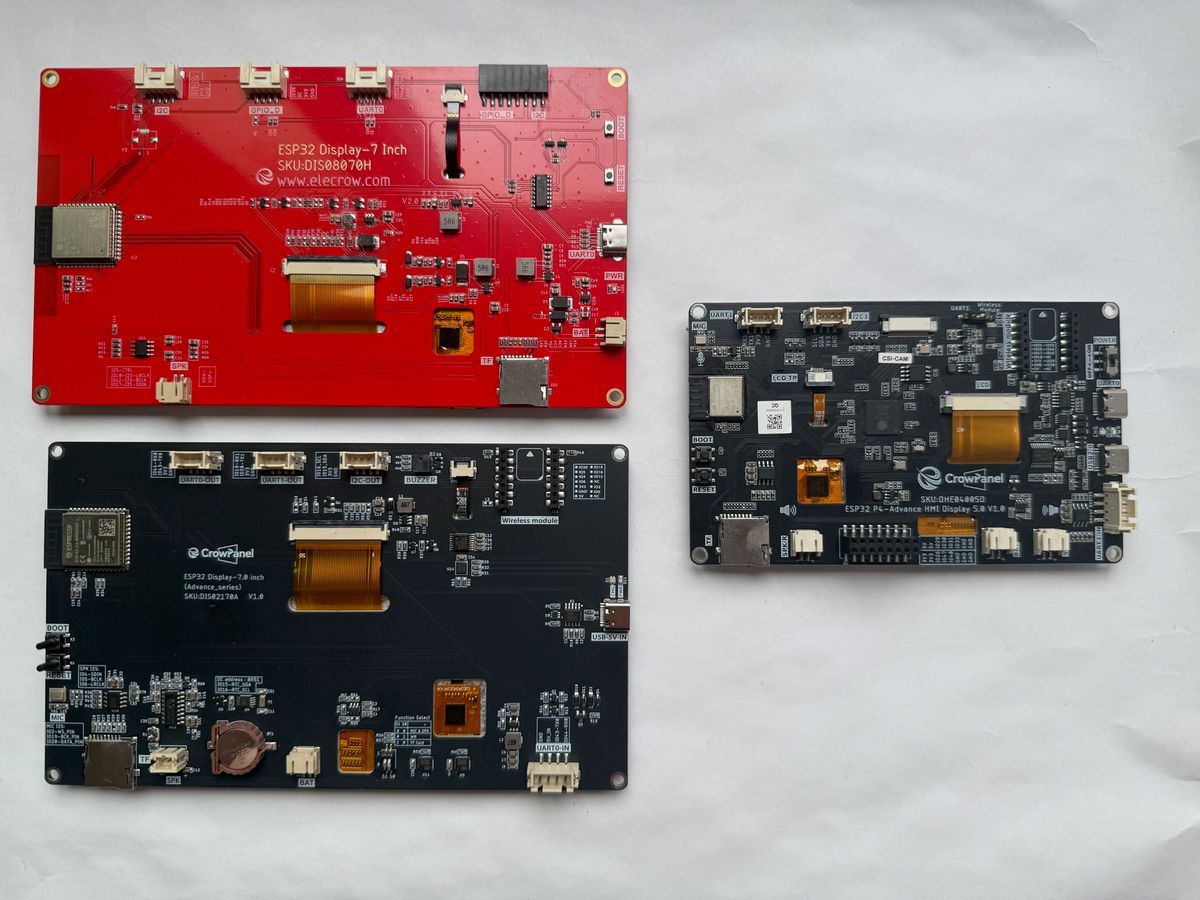
All three generations side by side. The two 7-inch boards share a panel size; the P4 is the small one.
Generation 1: CrowPanel 7.0 (ESP32-S3)

Generation one
Elecrow CrowPanel 7.0 (ESP32-S3)
What Elecrow shipped #
The original 7" CrowPanel is an ESP32-S3-WROOM-1-N4R8 - dual-core LX7 at up to 240 MHz, 4 MB flash, 8 MB PSRAM - wired directly to an 800x480 panel over an RGB parallel bus. The driver ICs are the EK9716BD3 and EK73002ACGB, with a GT911 capacitive touch layer on top.
Wireless is whatever the S3 module gives you: 2.4 GHz Wi-Fi b/g/n and Bluetooth 5.0. Around that sit a microSD slot on its own SPI bus, an I2S speaker output on a PH2.0 connector, a battery connector with onboard charging, and a 5V input.
It currently sells for $29.40, marked down from a $47.40 list price.
One spec worth flagging. Elecrow's own wiki and product page both describe this panel as a TN Panel TFT-LCD, even though plenty of listings around the web call it IPS - our own board page did too until we caught it while researching this comparison.
We have not put a colorimeter on it, but the vendor's own spec sheet is the authority here, and our board entry now follows it.
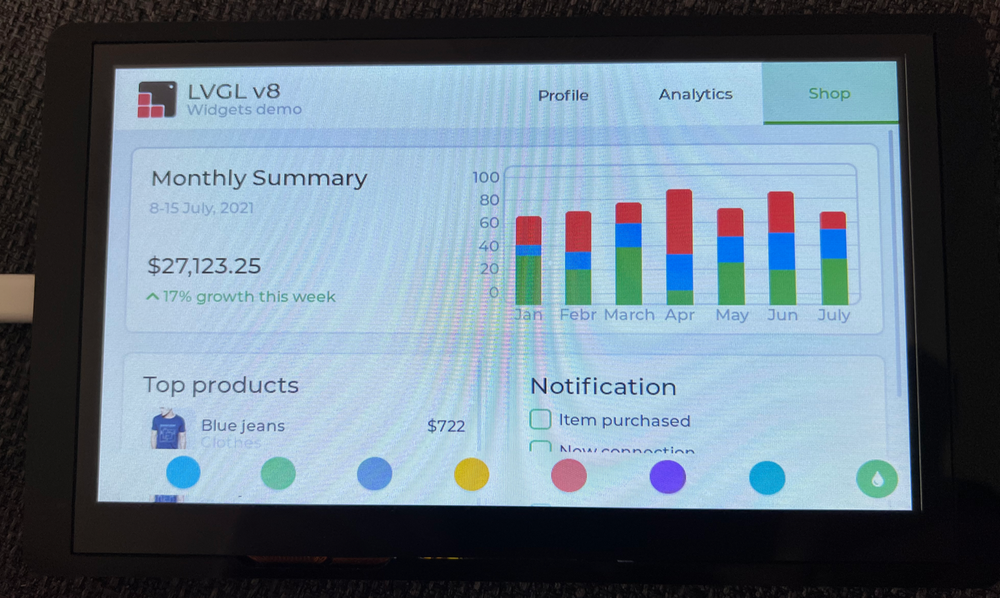
The original 7.0 out of the box, running its preloaded demo firmware. The panel was always the strong part of this product.
What we found #
The board arrived with demo firmware preloaded and a touch-driven settings panel running out of the box. In the box: the module with its case pre-mounted, a USB-A to USB-C cable and one Grove-to-Dupont cable.
First impressions were good, and they still are. The screen is the strong part of this product.
One library warning before anything else. TFT_eSPI does not work on this board - it has no support for RGB-parallel panels, so LovyanGFX or full LVGL are the realistic options. We confirmed that in the 2024 review.
Then there was ESPHome. Getting a picture out of this panel took four attempts, all of them following Elecrow's own documentation:
Four attempts to get a picture
- 01Elecrow's own
7.0-ESPHome.yaml
LVGL compile error, straight out of the box. - 02Strip LVGL down to a bare
lambda
Backlight on, screen blank. Borrowing the ESPHome 5.0" example - same resolution, different pin map - produced garbage instead. - 03Porch values by hand from the datasheet
hsync_front_porch,hsync_pulse_width,hsync_back_porchand the vsync pair, read off the EK9716BD3/EK73002ACGB sheet. A picture at last, with artifacts along the bottom edge. - 04Pin the ESP-IDF framework
platform_version: 6.8.1,version: 5.3.0instead of ESPHome's default. Clean.
Elecrow's pin mapping was right all along. The complete working config, octal-PSRAM sdkconfig flags included, is in the guide - still the fastest way onto this board.
What the community reported #
Our experience was not unusual. Several Home Assistant users hit the same class of problem: flicker, delayed initialization and artifacts under ESPHome, echoed in a second thread.
Elecrow's own forum staff were blunt about the cause:
"the ESP32 clock is too slow, the 7-inch HMI driver IC cannot recognize the RGB signal"
They initially said the 7" display did not support ESPHome at all, with a plan to change the LCD panel in a future hardware version.
Two other community-reported issues, neither of which we hit ourselves:
- Intermittent touch. A GitHub issue describes the GT911 not registering touches reliably across all four units the reporter owned. On the Home Assistant thread, touch "sometimes doesn't work after power on" - one user fixed it with a PCA9554-driven touch-controller reset.
- Boot loop after flashing anything but the factory firmware. The reporter also says the example code is outdated and fails to compile - a single but detailed and still-unanswered GitHub issue.
Where the design ran out of room #
The structural problems are easier to see in hindsight. The RGB panel streams its framebuffer out of PSRAM continuously, so the whole thing is timing-sensitive by construction. That is why datasheet porch values and a pinned IDF version were the difference between artifacts and a clean picture.
PCLK sits on IO0, the boot-strap pin, which is an unusual place for a pixel clock. Flash is 4 MB, which fills quickly once LVGL fonts and assets pile up.
Expansion is thin, and thinner than advertised. Elecrow's spec table lists "2xUART0, 2xGPIO, 2xI2C, 1xBattery" - a string we copied into our own 2024 review table, and one that appears identically in the 5.0" column, so it reads like a generic family table rather than a per-board spec.
The real pin map: one UART0 port shared with the CH340C flashing path, two I2C connectors on a single shared bus that the GT911 also lives on, and one GPIO port exposing exactly one free pin, IO38.
Generation 2: CrowPanel Advance 7.0 (ESP32-S3)

Generation two
Elecrow CrowPanel Advance 7.0 (ESP32-S3)
What changed #
The Advance 7.0 keeps the same processor family and the same panel class - ESP32-S3 at 240 MHz, 7", 800x480. It spends its effort on everything around them.
The headline addition is the swappable wireless module socket. Elecrow documents SX1262 (LoRa, used in their Meshtastic module), ESP32-H2 for Zigbee and Thread, ESP32-C6 for Wi-Fi 6, and nRF2401 for cheap 2.4 GHz links.
We tested all four in our review. Each worked with Elecrow's sample code.
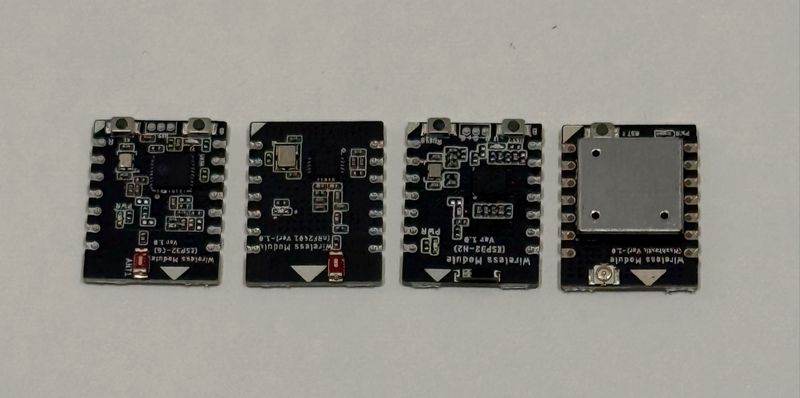
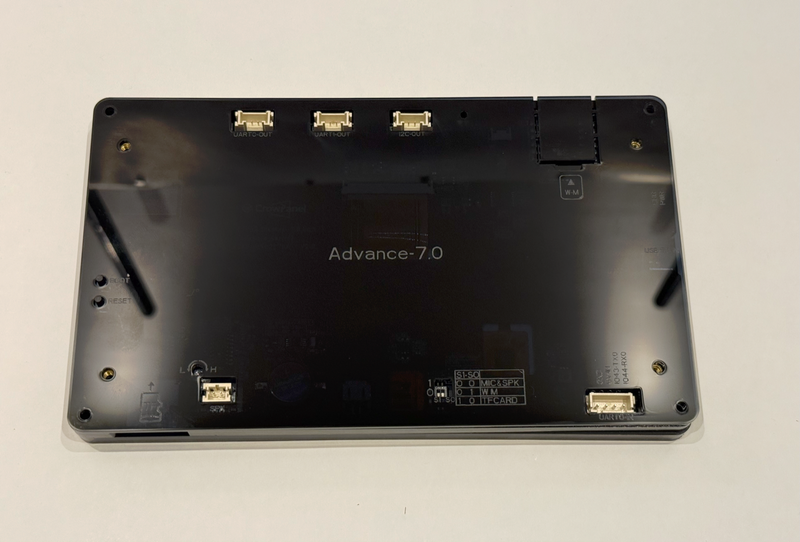
Left: the four modules Elecrow sent with our review unit - ESP32-H2, ESP32-C6, nRF2401 and the Meshtastic LoRa module. Right: where they all plug in. Three Crowtail ports along the top, the module slot, and the S1-S0 switch table that decides which function owns the shared pins.
The rest of the changes are the kind you only notice when you go to wire something up:
- Flash goes from 4 MB to 16 MB (PSRAM stays at 8 MB, plus 512 KB SRAM).
- A proper set of Crowtail ports: UART0-OUT on IO43/IO44 (still shared with the CH340K flashing path), UART1-OUT on IO20/IO19, and I2C-OUT on IO15/IO16, each on its own connector.
- A dedicated 5V power input. UART0-IN accepts up to 5.5 V at 2 A, which matters for panels that live on a wall rather than a desk.
- Housekeeping hardware: an RTC, an I2S MEMS microphone alongside the speaker output, a passive buzzer, and a battery connector with charging.
- A newer panel and driver IC. The SC7277 with an IPS panel and 178-degree viewing angles - no TN/IPS ambiguity this time. In our review, brightness and viewing angles were visibly better than the original 7" unit.
- PCLK moves off IO0 onto IO39 in the V1.3+ mapping, which removes the pixel-clock-on-a-strapping-pin arrangement Gen 1 had.
The cost of fitting all that onto an S3 is multiplexing. Two DIP switches on the back route IO4-IO6 and IO19/IO20 between mic + speaker, the wireless module, and the TF card.
You pick one of the printed combinations. You do not get all three at once.
Which Gen 1 complaints it addressed #
Moving PCLK to a dedicated pin removes the specific flash-time conflict Gen 1 had, and we found no repeat of the Gen 1 flicker reports for this board. But it is the same timing-sensitive 16-bit RGB bus at 800x480 on the same class of processor, so the underlying fragility is reduced rather than gone.
The Advance adds a helper chip (a PCA9557 expander on V1.0, an STC8H1K28 microcontroller on V1.2 and later) whose documented duties include resetting the touch controller. Touch on our review unit was consistently responsive, and no equivalent complaints turned up for this generation. We should be honest that this is inference: Elecrow never published a "this fixes the old touch bug" note, and the absence of reports is not proof.
The specific boot-loop symptom did not recur, but the category did. The Advance repo carries two open compilation-error issues, plus a closed-but-unresolved issue from a developer who tried seven build configurations - including an exact match of Elecrow's stated toolchain - and still got roughly 10 ms of shake and tearing on animated LVGL widgets that the factory-flashed binary does not show. The published source tree is missing ui.h, ui.c and lv_conf.h.
What it added to the complaint list #
The Advance also revved through hardware versions faster than its documentation did, and said so itself:
"some code of version V1.4 is not universal and is still being updated"
Three new complaints, all community-reported rather than things we hit ourselves:
The PCA9557 expander gave effectively on/off control with no PWM - one reviewer called the display unsuitable for his weather station because of it. V1.2 firmware improved this to a coarse six-step scale; V1.3 finally reached 246 steps through the STC8's PWM peripheral.
V1.0 through V1.5 exist with functionally different backlight, touch-reset and buzzer wiring, which is why ESPHome examples come in per-revision folders. V1.4 is the version currently on sale, per the quote above. A user asking about V1.4 GPIO wiring got no maintainer reply.
A request for its source or full spec went unanswered.
Our own reservations were narrower. Outdoor visibility under direct sunlight is limited, which is normal for IPS panels of this class, and there is a moderate learning curve for beginners despite thorough documentation.
At $34.90 (from a $53.70 list), the Advance 7.0 is an iteration, not a reinvention: better I/O, better housekeeping, same ceiling.
Generation 3: CrowPanel Advance 5.0 (ESP32-P4)

Generation three
Elecrow CrowPanel Advance 5.0 (ESP32-P4)
The platform shift #
This is where the series stops iterating. The Advance 5.0 replaces the ESP32-S3 with an ESP32-P4: dual RISC-V high-performance cores at up to 400 MHz plus a low-power core at up to 40 MHz, 768 KB of L2MEM and 16 MB flash.
The memory is the headline: 32 MB of PSRAM, four times what either S3 board had for framebuffers and LVGL assets.
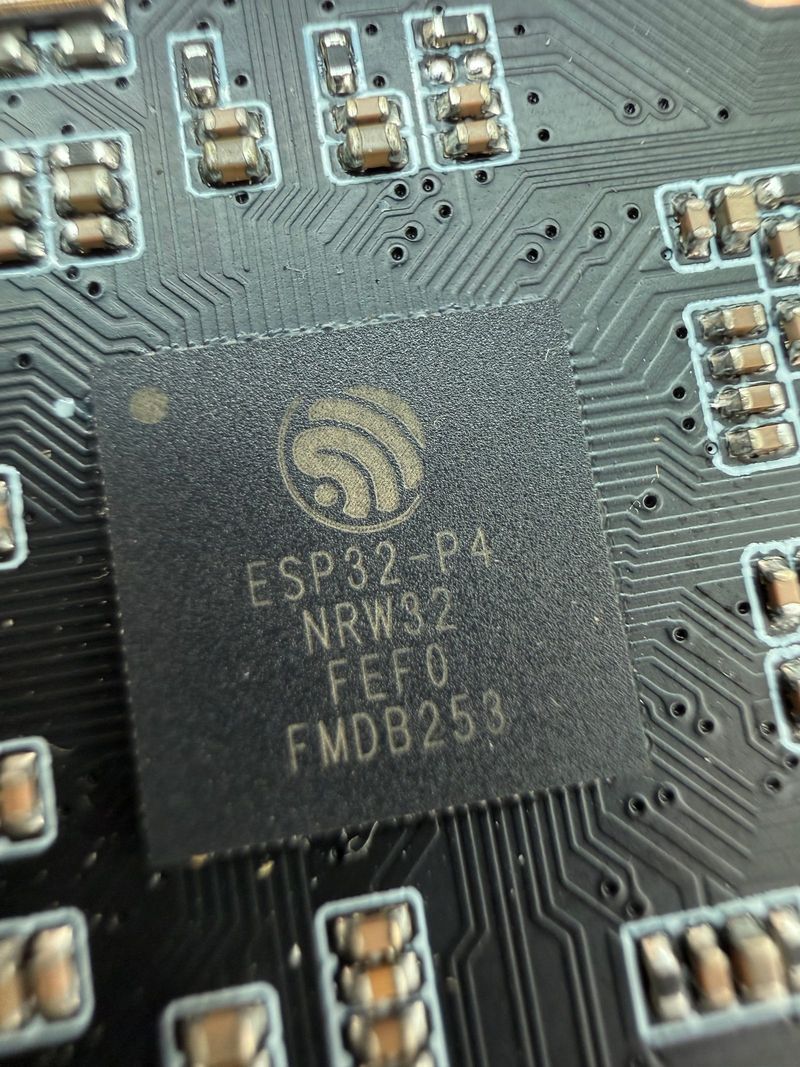
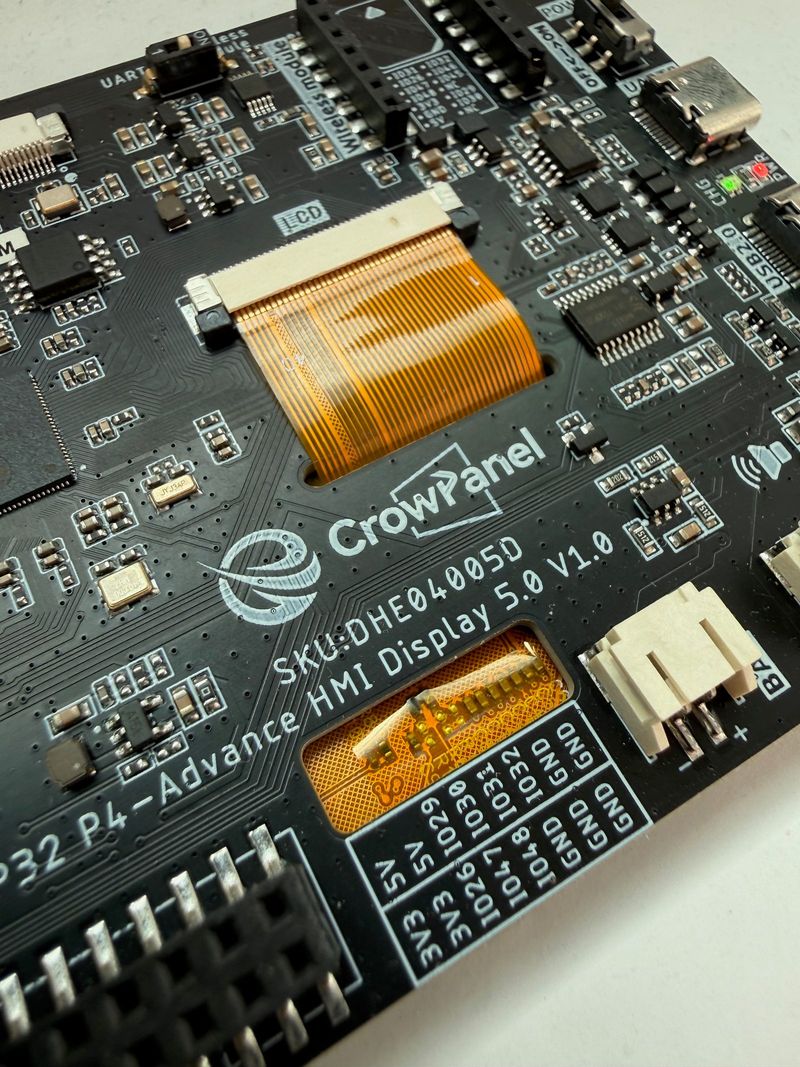
Left: the part that changes everything, with no radio inside it. Right: the same Advance layout on a new platform - module socket and its DIP switch top left, the 2x8 GPIO header with its pin legend, battery connector on the right.
The catch is that the P4 has no radio at all. Wi-Fi comes from a second chip, and that arrangement is the whole generation in one picture:
Wi-Fi is a second chip the P4 talks to over SDIO. The module socket is unrelated to it and hangs off the P4's own pins - which is why plugging in a Zigbee module costs you the UART1 port.
Two consequences worth carrying forward. Bluetooth 5.3 is on the spec sheet because the C6 silicon supports it, but the hosted link is Wi-Fi-first in practice - plan as if BLE is not there. And because the C6's firmware is factory-flashed, it turns into this board's biggest open problem further down.
The panel is 5.0" rather than 7", at the same 800x480. This time Elecrow publishes a brightness figure: 400 cd/m² typical, 178-degree viewing angles, 16.7M colors (8-bit), GT911 five-point capacitive touch.
Shrinking the panel while keeping the resolution is quietly one of the biggest perceived-quality wins of this generation, and it never shows up on a spec sheet.
800x480 is a 933-pixel diagonal: roughly 133 PPI spread over 7 inches, 187 PPI over 5 - about 40% denser. In person both 7" boards read as dated and pixelated to us, where the 5" simply looks crisp.
The base unit is $42.90, with optional radio modules adding $3.50 to $15.90.
What carries over #
Structurally this is still a CrowPanel Advance. The module socket is the same concept - optional Zigbee, LoRa, nRF2401, Matter, Thread or Wi-Fi HaLow modules - and it is still multiplexed.
The socket's SPI bus runs on IO26 (the shared clock), IO47 and IO48 - the same pins as the Crowtail UART1 port - with a DIP switch selecting between them. Module mode and UART1 mode remain mutually exclusive.
The rest of the I/O carries over too: a Crowtail I2C port on IO45/IO46, a UART3-IN port on IO27/IO28 that doubles as a 5V/2A power input, a 2x8 GPIO header, and a microSD slot.
The backlight quirk moved across generations too. Brightness is not a PWM pin: you write register 0x20 with a value of 0-100 to an STC8 housekeeping MCU at I2C address 0x2F on the shared bus, and the same chip handles touch reset.
0x20 a value of 0-100 to the STC8 at address 0x2F in on_boot, the way Elecrow's examples do.The GPIO header looks generous until you read the notes. Of IO26, IO29-IO32, IO47 and IO48, only IO29, IO30 and IO31 are genuinely free general-purpose pins - and the socket claims several of them once a radio module is fitted.
What is genuinely new #
Three things this generation can do that neither S3 board could:
- A MIPI-CSI camera header. No camera included - the DHE04005D SKU is the "Without Camera" variant - but the header takes Elecrow's optional 2MP module, backed by the P4's ISP and H.264 encoder for face recognition and object tracking.
- Real audio hardware. Two 3W/4-ohm speakers on NS4168 amplifiers, plus a PDM MEMS microphone on IO24/IO25. Gen 1 had one speaker output; Gen 2 added a mic that competed with UART1 for pins.
- Memory headroom. 32 MB of PSRAM, against the constraint that shaped both previous generations.
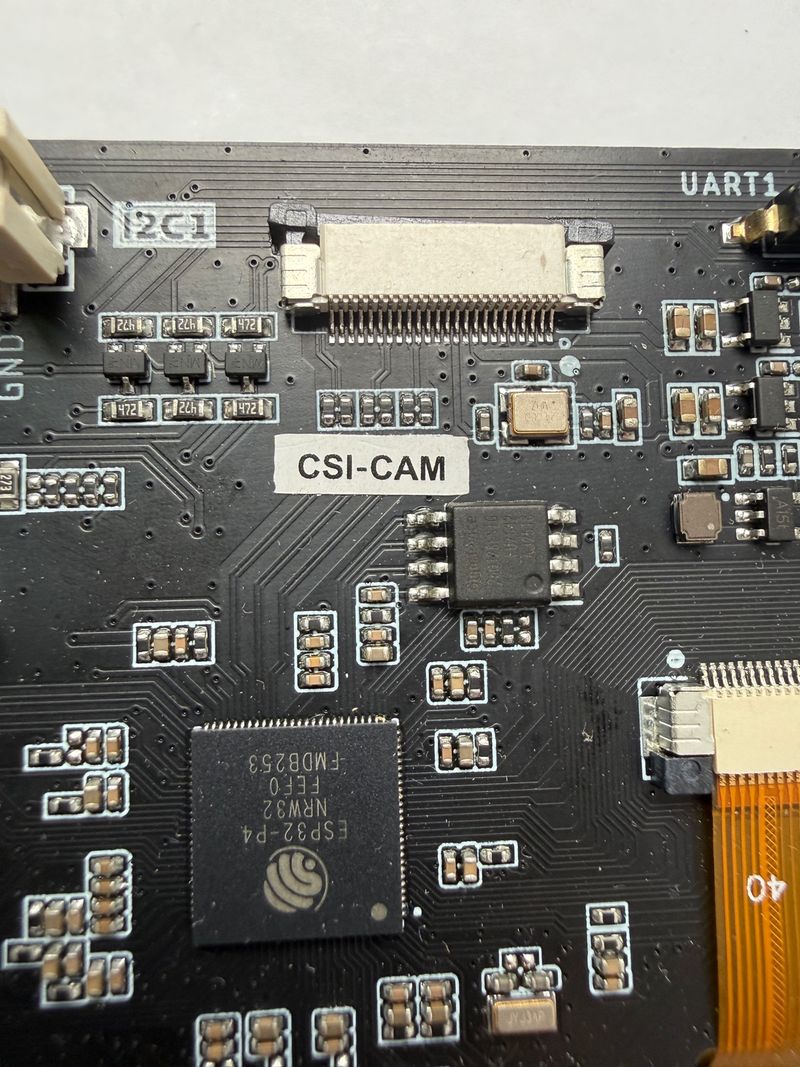
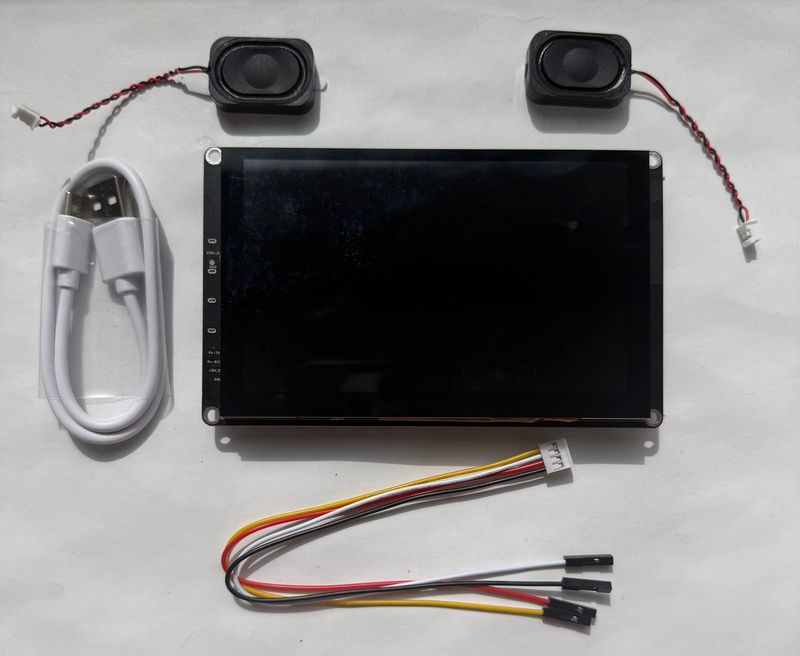
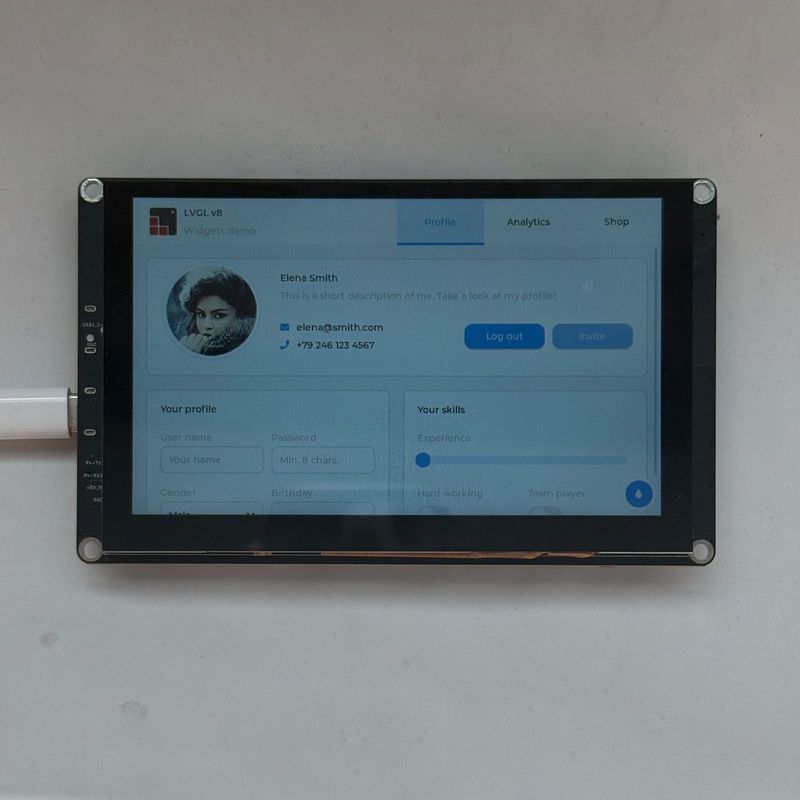
Left: the MIPI-CSI camera header itself, which takes Elecrow's optional 2MP module. Middle: what comes in the box - the panel, two speakers on JST leads, a USB cable and a Grove-to-Dupont pigtail. Right: the factory demo, which is also the binary that behaves better than the ones you build yourself.
What it quietly drops #
Comparing the boards on the bench, we noticed the P4 is missing two things the S3 Advance has: an onboard buzzer, and a coin cell backing up the RTC.
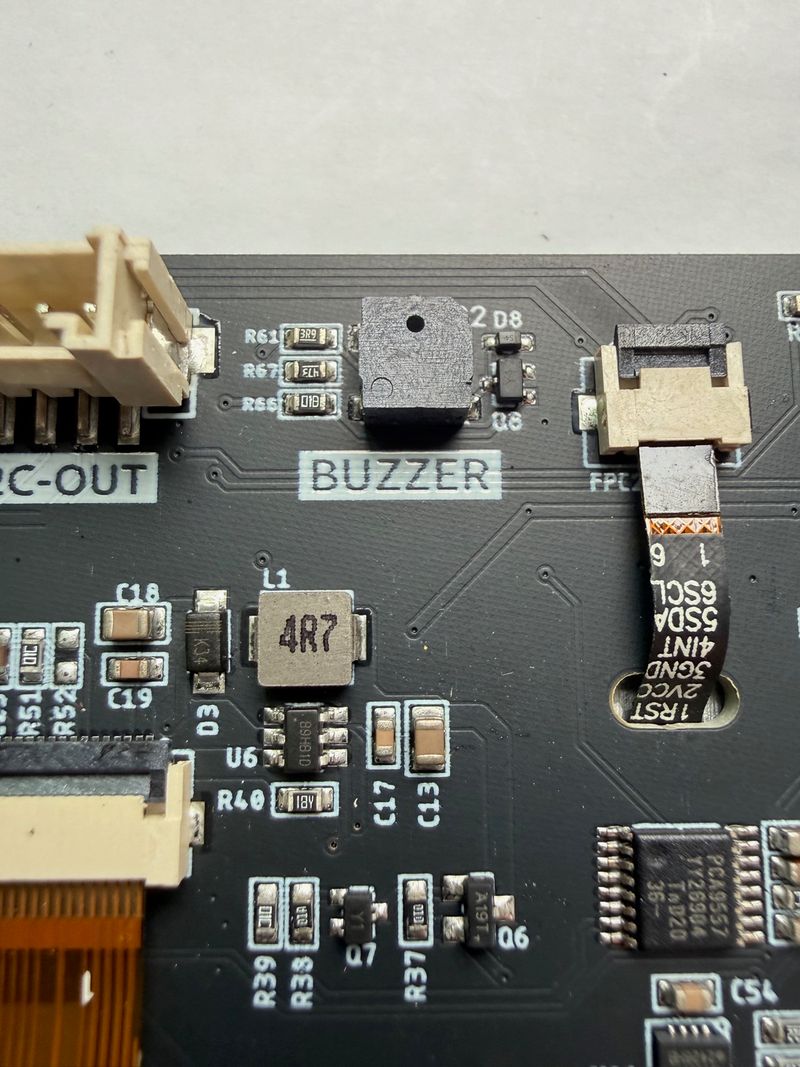
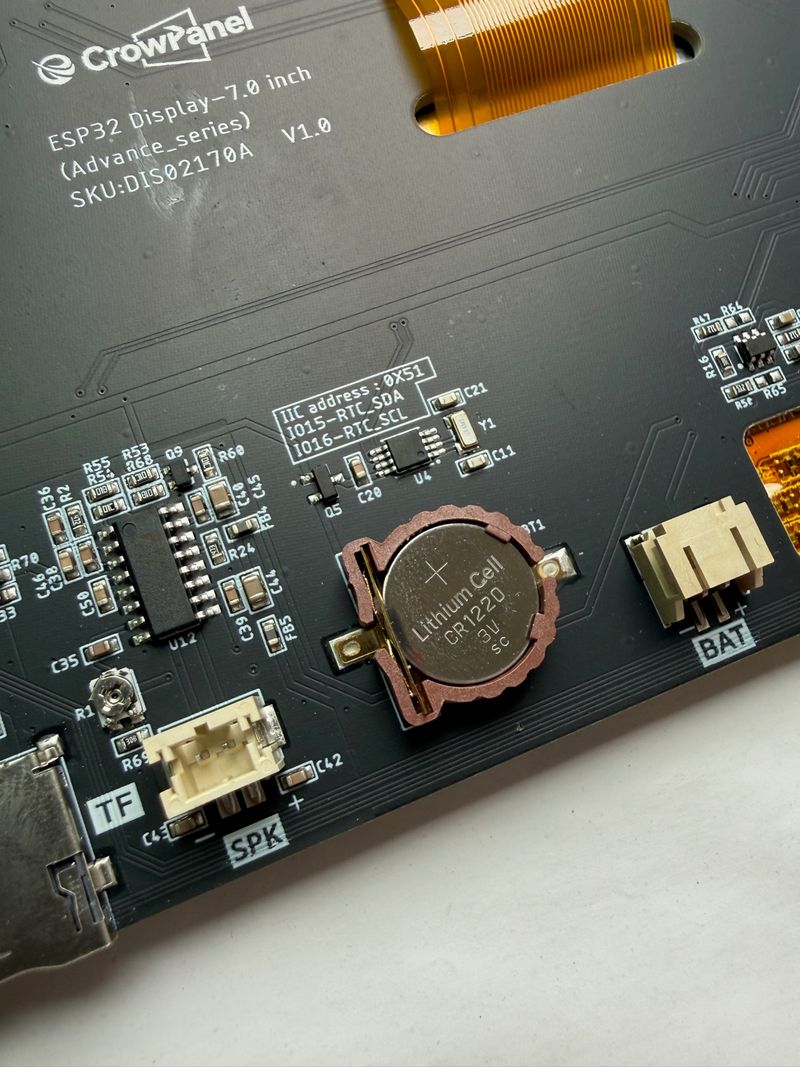
Two parts the P4 generation does not have: the Advance 7.0 S3's passive buzzer, and the CR1220 cell that keeps its PCF8563 RTC running through a power cut.
We checked all four Advance SKUs against Elecrow's own documentation, and the split follows the generation rather than the screen size. Both S3 sizes have a buzzer - IO8 on the 7", and in the 5.0" S3's pin table too - while neither P4 board has one.
Both P4 boards get dual speakers on NS4168 amplifiers and a MIPI-CSI header instead, the 7" P4 included. No S3 board has a camera connector, and the 7" S3's PCF8563 RTC with its CR1220 backup has no counterpart on either P4.
So the trade is explicit. If your build chirps alarms from a buzzer, or needs wall-clock time across a power cut without Wi-Fi, the S3 Advance keeps hardware the P4 dropped.
The maturity tax #
The other side of the ledger is substantial, and most of it is software.
Current units ship engineering-sample P4 silicon, which ESPHome needs an explicit engineering_sample flag to accept. ESP-IDF is the primary path, Arduino support leans on Elecrow's prepared board package, and realistically you copy their worked examples rather than assembling a config from library docs.
There is a power gotcha too. A single computer USB port may not supply enough current, and Elecrow's own documentation warns that "insufficient power may cause the screen to go black." Plug in the second USB-C port as well, or feed 5V/2A into UART3-IN.
Here is the P4's ledger. The first two rows are what the platform change finally solves; the rest are community reports, not our own testing:
Dual RISC-V cores at 400 MHz and 32 MB of PSRAM against the S3's 240 MHz and 8 MB. This is the constraint that shaped both previous generations, and it is the reason the platform changed at all.
The Gen 2 complaint about on/off-only brightness on V1.0 hardware does not recur here: the P4 uses the STC8 approach from the start, with a 0-100 range, and no fresh brightness-granularity complaints turned up for this generation.
The C6 ships with an outdated esp_hosted build (v2.3.0) that cannot be safely updated over SDIO from the P4 host, and the UART test pads needed for a manual reflash are drawn in the schematic but not populated on the PCB. The reported consequence is Wi-Fi dropping after a few minutes with no self-recovery short of a power cycle. This was reported on the Elecrow forum for this exact 5" board, confirmed on the sibling 7" P4 board's repo and in a Home Assistant thread covering the 9" P4, so it appears to span the P4 family rather than one screen size. A community member has published an external SDIO-based OTA tool that works around the broken update path.
Not over the hosted P4-to-C6 link. Elecrow support's own answer was "we haven't worked with ESP-NOW on ESP32 P4 yet," and a community member points out this is an upstream ESP-Hosted limitation with no announced timeline.
By community accounts, and consistent with Elecrow's own guidance that it currently needs the ESP-IDF framework directly rather than working as a drop-in target. Elecrow's own FAQ thread is the reference here.
A user building with a slightly different ESP-IDF version than Elecrow recommends measured less than half the LVGL scroll frame rate of the shipped binary (figures below). Elecrow acknowledged the report without explaining it. Same pattern as the Gen 2 issue above, now on a new platform.
Backlight and touch reset are delegated to an STC8 again, this time at I2C address 0x2F, and there is still no public datasheet for it. You copy the register write out of Elecrow's example and hope it does not move.
esp_hosted firmware, because the in-firmware path is broken and the UART pads are not populated.That last row is the one worth internalizing, because it has outlived two hardware generations. The reported cost of building it yourself:
33 fps → 15 fps
So: the P4 fixes the constraint that defined the first two generations, and introduces a new one in first-wave software.
Full pin assignments, the shared-bus notes and the ESPHome specifics are on the board's profile page.
Three generations side by side #
The trajectory in four numbers, oldest to newest:
Flash
4 → 16 → 16 MB
PSRAM
8 → 8 → 32 MB
Max clock
240 → 240 → 400 MHz
Price
$29.40 → $34.90 → $42.90
CrowPanel 7.0 → Advance 7.0 → Advance 5.0 (P4). Everything else is in the table.
| Spec | CrowPanel 7.0 | Advance 7.0 | Advance 5.0 (P4) |
|---|---|---|---|
| MCU / cores / clock | ESP32-S3-WROOM-1-N4R8, dual-core LX7, up to 240 MHz | ESP32-S3, dual-core LX7, up to 240 MHz | ESP32-P4, dual RISC-V up to 400 MHz + LP core up to 40 MHz |
| Flash | 4 MB | 16 MB | 16 MB |
| PSRAM | 8 MB | 8 MB (+512 KB SRAM) | 32 MB (+768 KB L2MEM) |
| Display | 7.0", 800x480 (~133 PPI) - Elecrow says TN TFT-LCD, EK9716BD3 + EK73002ACGB | 7.0", 800x480 IPS (~133 PPI), 178-degree, SC7277 | 5.0", 800x480 IPS (~187 PPI), 178-degree, 400 cd/m² typ., 16.7M colors |
| Touch | GT911 capacitive | GT911-class capacitive multi-touch (I2C 0x5D) | GT911, 5-point (I2C 0x5D / 0x14) |
| Wireless (built in) | Wi-Fi b/g/n + Bluetooth 5.0 (in the S3 module) | Wi-Fi + Bluetooth 5.0/BLE (in the S3 module) | Wi-Fi 6 + BT 5.3 on paper, via onboard ESP32-C6-MINI-1 over SDIO / ESP-Hosted |
| Wireless (module socket) | None | SX1262 LoRa, ESP32-H2, ESP32-C6, nRF2401 | Zigbee, LoRa, nRF2401, Matter, Thread, Wi-Fi HaLow (optional) |
| Camera | None | None | MIPI-CSI header, optional 2MP module (not included) |
| Audio | I2S speaker output (PH2.0-2P); amp chip not named by Elecrow | I2S speaker output, I2S MEMS mic, passive buzzer; amp chip not named by Elecrow | 2x 3W/4 ohm speakers via NS4168, PDM MEMS mic |
| Buzzer / RTC | Not specified by Elecrow | Passive buzzer / PCF8563 + CR1220 backup | None / None - dual speakers and camera instead |
| Crowtail ports | UART0 (shared with CH340C), 2x I2C connectors on one shared bus, GPIO_D | UART0-OUT, UART0-IN (5V/2A), UART1-OUT, I2C-OUT | I2C (IO45/46), UART1 (IO47/48), UART3-IN (also 5V/2A) |
| Free GPIO | IO38 only | Crowtail ports only; audio, microSD and the module socket multiplexed onto shared pins by DIP switch | 2x8 header; IO29, IO30, IO31 genuinely free |
| Battery / charging | PH2.0-2P, 3.7-4.2 V, onboard charging | PH2.0-2P, 3.7-4.2 V, onboard charging | PH2.0-2P, 3.7-4.2 V, 430 mA max input current |
| USB / power in | 1x USB-C (CH340C), or 5V/2A via UART0 port | 1x USB-C (CH340K), or 5V (up to 5.5 V, 2 A) via UART0-IN | 2x USB-C (CH340K UART + native USB 2.0), or 5V/2A via UART3-IN |
| Price | $29.40 (list $47.40) | $34.90 (list $53.70) | $42.90 base, modules +$3.50-$15.90 |
Which one should you buy? #
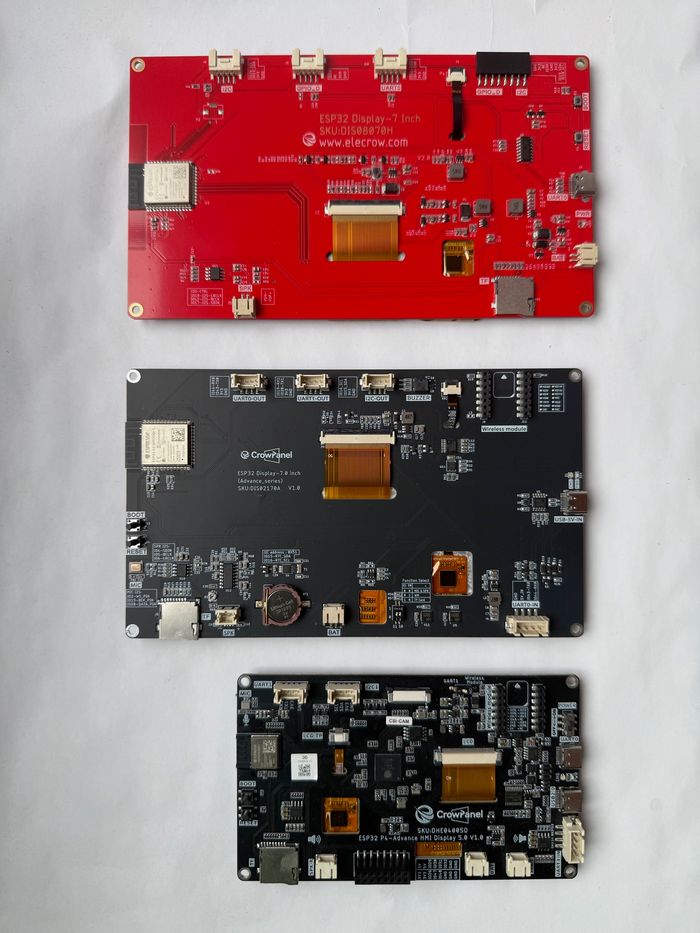
The three of them again, if you are still deciding.
Four ways this usually goes:
A dependable HMI today
Advance 7.0
The most mature software story of the three, four radio options we have actually tested, 16 MB of flash and the best-documented panel. It also keeps two parts the P4 dropped: an onboard buzzer and a battery-backed RTC.
The catch is pixel density: 800x480 stretched over 7 inches is the least crisp screen of the three, at roughly 133 PPI against the 5" P4's 187.
Check the hardware revision printed on the board before copying anyone's config - the backlight and touch-reset wiring genuinely differ between V1.0, V1.2 and V1.3+.
Cheapest way in
The original 7.0
Makes sense on price, or when you want the exact hardware the existing body of CrowPanel tutorials was written against - our ESPHome config included.
You trade away flash, the module socket and the housekeeping hardware to save five dollars. Mostly a "we already have one" decision.
Least ESPHome friction
Either S3 board
Both have working example configs, and for the original 7.0 we published a complete one.
The P4 needs the ESP-IDF framework, the engineering-sample flag, the esp32_hosted component and a custom panel definition. It works, per Elecrow's own tutorial - but "copy their example verbatim" is the honest instruction.
Camera, AI, voice, memory
Advance 5.0 (P4)
Take it if you need what only it has: camera input, on-device AI, voice hardware, or LVGL interfaces that outgrew 8 MB of PSRAM - and if you can tolerate first-wave software.
If a reliable Wi-Fi link is the whole point of your project, weigh the C6 firmware reports above most heavily.
Where the series is heading #
The trajectory is clear enough. Elecrow spent one generation fixing the I/O around the screen, then swapped the compute platform when those improvements ran into the processor's ceiling. Both moves were the right call. Neither was painless.
What we would like the next revision to fix is not hardware. It is the pattern that has now appeared in all three generations: the factory firmware behaves better than anything you build from the published sources, and the housekeeping MCU behind the backlight and touch reset is still undocumented.
On the P4 specifically, a co-processor whose firmware you cannot practically update will age badly. Populated UART pads and a supported reflash path would cost almost nothing, and would close the most serious open complaint against the board.
Full specs, pinouts and per-board notes: