

Battery-Powered E-Paper Climate Display with ESPHome (Waveshare ESP32-S3-ePaper-1.54G)
ESPHome on the Waveshare ESP32-S3-ePaper-1.54G: a battery-powered climate display with deep sleep, the power-latch trick, a 4-color LVGL UI and real battery data.
E-paper and deep sleep are a natural pairing. An e-paper panel holds its last image with no power at all, so a battery display does not need the ESP32 awake to keep a number on screen. It can wake, take a reading, paint the panel once, and sleep again for minutes at a time.
This post builds exactly that: a cased, battery-powered climate display on the Waveshare ESP32-S3-ePaper-1.54G. Every 30 minutes it wakes, reads its onboard SHTC3 temperature and humidity sensor, refreshes a 200x200 four-color panel one time, and drops back into deep sleep. The rest of the time the board draws almost nothing, and the screen keeps showing the last reading.
Waveshare sent this board over for us to try, no strings attached; opinions are our own.
I will walk through the whole ESPHome config, but the parts worth slowing down on are board-specific: a power-latch button you have to hold on in firmware, an inverted panel-power pin, and the GPIO holds that keep both of those alive through deep sleep. Get those wrong and the board either powers itself off the moment you release the button, or corrupts the panel in the middle of a refresh.
The design and the shipped result, side by side:
Left: the 200x200 layout to scale, widget coordinates straight from the config. Right: the same config on the real panel.
The build at a glance
- Wakes every 30 minutes, reads the onboard SHTC3, refreshes the panel once, sleeps
- Survives its own power button: a GPIO17 latch held through deep sleep
- Battery-tested the hard way: a 5-minute cycle drained the cell in under a day, 30 minutes is the answer
- In a hurry? Jump straight to the full config, it is tested on the real device
The board in 60 seconds #
The hardware
Waveshare ESP32-S3-ePaper-1.54G
This build leans on four parts of it: the ESP32-S3 itself (a PICO-1 SiP with 8MB flash and 8MB PSRAM in-package), the 1.54" 200x200 four-color BWRY e-paper panel, the onboard SHTC3 temperature and humidity sensor that feeds the display, and the battery charging circuit that lets the cased board run cordless. It also carries a microphone, speaker, microSD slot and an RTC, none of which this project touches; the board page has the full spec sheet, pinout and buying options.
The one number that shapes everything else is the refresh time. A full four-color refresh on this panel takes about 20 seconds. That is not a fault, it is how color e-paper works, but it means you design around refreshing rarely and never sleeping mid-flash. Almost every decision below traces back to it.
Since everything on this board is wired internally, the pin map is fixed. These are all the pins this project touches:
| GPIO | Role in this project | Watch out for |
|---|---|---|
| 17 | Battery power latch | Must go HIGH at boot, held through deep sleep |
| 18 | PWR button sense, wake pin | Active-low |
| 6 | Panel power | Inverted: LOW is on |
| 8 | Panel busy signal | Inverted on this panel: busy is LOW |
| 4 | Battery voltage ADC | Reads half of VBAT (200K/200K divider) |
| 47 / 48 | I2C SDA / SCL | Shared with the RTC, SHTC3 (0x70) and audio codec |
| 11 / 10 / 9 | Panel CS / DC / RST | SPI control lines |
| 12 / 13 | SPI CLK / MOSI | Display bus |
The three things that will bite you #
Most of this config is ordinary ESPHome. Three things are not, and all three are specific to how this board handles power. If something misbehaves, it is almost certainly one of these.
The PWR button is a firmware power latch
on_boot at priority 600, before anything else runs.There is no hardware power switch: GPIO18 senses the button, and GPIO17 is what actually holds power on. Press PWR and the ESP32 starts booting, but until firmware latches GPIO17 high, the button is the only thing keeping the lights on.
on_boot:
  priority: 600
  then:
    - output.turn_on: vbat_power        # GPIO17 HIGH latches battery power (else it dies when PWR btn released)
    - output.turn_off: epd_power        # GPIO6 must be LOW to power the panel
    # release the deep-sleep pin holds only AFTER re-asserting levels, so GPIO17 never dips low
    - lambda: |-
        gpio_hold_dis(GPIO_NUM_17);
        gpio_hold_dis(GPIO_NUM_6);
        gpio_deep_sleep_hold_dis();
- script.execute: refresh_then_sleepPanel power on GPIO6 is inverted
That is why boot runs output.turn_off: epd_power in the snippet above: low is the "on" state for this rail. Before sleeping you flip it high to cut panel power, and the image stays on screen anyway, because that is exactly what e-paper is for. You save the panel's idle draw and lose nothing visually.
on_shutdown:
  then:
    - output.turn_on: epd_power         # GPIO6 HIGH: panel unpowered during sleep (image persists)
    # hold pin states through deep sleep: GPIO17 high keeps the battery latch alive
    - lambda: |-
        gpio_hold_en(GPIO_NUM_17);
        gpio_hold_en(GPIO_NUM_6);
gpio_deep_sleep_hold_en();GPIO states must survive deep sleep
gpio_hold_en() before sleeping. On wake, re-assert the levels first, then release the holds.During deep sleep the ESP32 releases its GPIO outputs by default, and a released GPIO17 is a cut battery latch. The subtle part is the order on the way back out: if the next boot releases the hold before it has driven GPIO17 high again, the pin dips low for a moment, and that dip is a power-off. Levels first, holds second, in both directions, which is exactly what the two snippets above do.
Once these three are right, the board behaves and you can treat the rest as a normal deep-sleep project.
The wake cycle #
The whole device runs one loop: wake, read, refresh once, sleep. The deep_sleep component sets the timing, and a script named refresh_then_sleep does the actual work so the refresh always finishes before the board sleeps.
Before any YAML, here is what one cycle looks like, laid out to scale. It is also the battery story in one picture: the e-paper refresh dominates the awake window, and the awake window is a sliver of the cycle.
One wake cycle to scale: around 40 seconds awake, then half an hour asleep. The awake sliver is barely visible, which is the whole point.
Now the config that produces it. The deep_sleep component sets the timing:
deep_sleep:
  id: sleeper
  sleep_duration: 30min
  run_duration: 3min                      # backstop only; normal path sleeps via the script below
  wakeup_pin:                             # PWR button (active-low): press to wake on demand
    number: GPIO18
    inverted: true
    mode: INPUT_PULLUP
  wakeup_pin_mode: IGNORE                 # don't block sleep if button happens to be held
sleep_duration: 30min sets the cycle, and the number is not arbitrary: this config originally ran at five minutes, and the battery paid for it, as the results section explains. run_duration: 3min is a backstop, not the normal exit path: if the script ever hangs, the board still sleeps after three minutes rather than staying awake and draining the cell. The wakeup_pin is the PWR button on GPIO18, active-low, so a press wakes the board for an on-demand refresh instead of waiting out the half hour.
The script itself is where the ordering lives. on_boot kicks it off, and it runs top to bottom:
script:
  - id: refresh_then_sleep
    then:
      - logger.log: "WAKE: waiting for sensor data + time sync"
      - wait_until:
          timeout: 45s                    # refresh anyway if WiFi/SNTP is down
          condition:
            lambda: |-
              return !isnan(id(shtc3_temp).state)
                  && !isnan(id(shtc3_hum).state)
                  && !isnan(id(batt_pct).state)
                  && id(sntp_time).now().is_valid();
      - delay: 2s                         # let LVGL render the fresh values into the buffer
      - logger.log: "REFRESH: starting e-paper update"
      - component.update: epd             # the single full refresh for this wake cycle
      - delay: 30s                        # BWRY refresh takes ~21s; don't sleep mid-flash
      - if:
          condition:
            binary_sensor.is_off: stay_awake
          then:
            - logger.log: "SLEEP: entering deep sleep"
            - deep_sleep.enter: sleeper
          else:
            - logger.log: "STAY AWAKE: input_boolean.epaper_stay_awake is on"
Read top to bottom, the script is the diagram in YAML:
- Wait, up to 45 seconds for fresh sensor values and a valid SNTP time. On timeout it refreshes anyway, so a WiFi outage never leaves the screen stale forever.
- Render for 2 seconds so LVGL paints the new values into the buffer before the panel reads it.
- Refresh exactly once with
component.update: epd. One wake, one refresh. - Hold for 30 seconds. Not padding: the BWRY flash takes around 21 seconds, and sleeping mid-flash corrupts the image.
- Enter deep sleep, unless the stay-awake toggle says otherwise.
The one escape hatch is a Home Assistant toggle, input_boolean.epaper_stay_awake, wired to deep_sleep.prevent and deep_sleep.allow in the full config. Deep sleep and OTA do not mix, because the board is asleep almost all the time: flip the toggle on to hold it awake for an update, off to resume the cycle.
input_boolean.epaper_stay_awake helper in Home Assistant before you flash the deep-sleep config, and flip it on for the first OTA. Chasing a device that is awake 40 seconds out of every half hour is not a fun way to push an update.Two smaller settings save real time on every wake. wifi: fast_connect: true skips the network scan and connects straight to the known access point, which shaves seconds off a cycle that is only awake for seconds. And logger: hardware_uart: USB_SERIAL_JTAG is required rather than optional here: the board's only USB is the native USB-JTAG, so logs need to go over that, not a separate UART.
Sensors: battery, SHTC3 and a dew point #
Three readings feed the display. None of them needs much code, but each has one wrinkle worth knowing. Here is who feeds what:
What feeds what. The dew point is the only derived value: it needs both SHTC3 readings, which is why it lives in the humidity callback.
Battery. GPIO4 reads the cell through a 200K/200K divider, so the real voltage is twice what the ADC sees, which is the multiply: 2.0 filter. The percentage maps 3.30V to 4.20V linearly, and it is recomputed only after each fresh voltage sample, so it never runs against a NaN during the boot race.
SHTC3. On the shared I2C bus (GPIO47/48, address 0x70), reporting every 300 seconds, and slow on purpose: every published reading redraws the screen, and every redraw is a 20-second refresh. There is no value in polling a room sensor faster than the panel can show it.
Dew point. Computed with the Magnus approximation, and placed in the humidity on_value deliberately: shtcx publishes temperature before humidity, so by the time the humidity callback runs, the temperature state is guaranteed valid.
# dew point (Magnus approx) → footer. Lives under humidity, not temperature:
# shtcx publishes temperature BEFORE humidity, so by now temp is valid.
- lvgl.label.update:
    id: dew_val
    text: !lambda |-
      float t = id(shtc3_temp).state;
      if (isnan(t)) return std::string("DEW --");
      float g = logf(x / 100.0f) + (17.62f * t) / (243.12f + t);
      float dp = (243.12f * g) / (17.62f - g);
      return str_sprintf("DEW %.0f\xC2\xB0""C", dp);
The rest of the sensor block is plain LVGL glue, label updates and the comfort chip thresholds, all in the full config below.
Designing the 4-color UI #
Laying out for a four-color e-paper panel is not the same as designing for an RGB screen. Five rules keep the UI readable and, just as important, keep it from triggering refreshes you did not ask for.
Black, white, red and yellow: 0x000000, 0xFFFFFF, 0xFF0000, 0xFFFF00. Any other value gets dithered or dropped.
bg_opa: COVER on every fill
Without it the fill is transparent and invisible against the white background, maddening to debug because the widget is clearly there in the config.
animated: false on bars
An animation asks the display to refresh over and over, on a panel that takes 20 seconds per refresh.
update_when_display_idle: false
LVGL never refreshes on its own. The only thing allowed to trigger a refresh here is the refresh_then_sleep script.
Never encode state in color alone
The comfort chip changes color, but it also changes its word. The word carries the meaning, the color reinforces it, and ghosting can never leave the reading ambiguous.
You do not have to keep these rules in your head, because our free ESPHome LVGL designer has a preset for this exact board that bakes them all in: four inks, opaque fills, no animations, 200x200 canvas. This layout came out of it, mockup first, coordinates second.
Remix this UI in your browser
The whole lvgl: block below is importable, so you can start from this exact layout instead of a blank canvas.
- 1Copy the
lvgl:block from the full config below. - 2Open the designer, pick the ESP32-S3-ePaper-1.54G preset, and import the YAML.
- 3Drag things around, rename the room, then export the YAML back into your config.
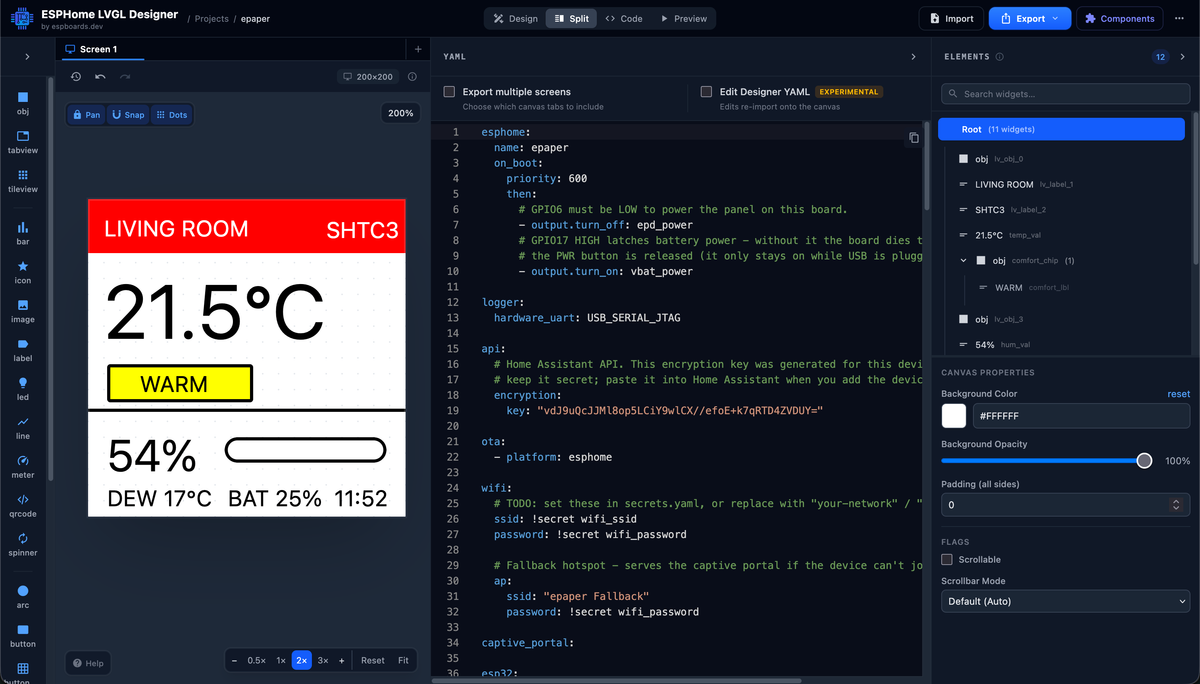
The full config #
Here is the complete configuration from the working device, unedited. The snippets above are all pulled from it. Everything runs on stock ESPHome components: the panel is epaper_spi with model: Waveshare-1.54in-G, the sensor is shtcx, and no external components or forks are needed.
Show the full config, about 360 lines
# Waveshare ESP32-S3-ePaper-1.54G (200x200, 4-colour BWRY)
# SHTC3 temperature + humidity climate readout.
# Design rules baked in: 4 inks only, bg_opa: COVER on fills, animated: false,
# hardware_uart for stable USB, GPIO6 power pin LOW at boot, update_when_display_idle.

esphome:
  name: waveshare-climate
  friendly_name: ePaper Climate
  on_boot:
    priority: 600
    then:
      - output.turn_on: vbat_power        # GPIO17 HIGH latches battery power (else it dies when PWR btn released)
      - output.turn_off: epd_power        # GPIO6 must be LOW to power the panel
      # release the deep-sleep pin holds only AFTER re-asserting levels, so GPIO17 never dips low
      - lambda: |-
          gpio_hold_dis(GPIO_NUM_17);
          gpio_hold_dis(GPIO_NUM_6);
          gpio_deep_sleep_hold_dis();
      - script.execute: refresh_then_sleep
  on_shutdown:
    then:
      - output.turn_on: epd_power         # GPIO6 HIGH: panel unpowered during sleep (image persists)
      # hold pin states through deep sleep: GPIO17 high keeps the battery latch alive
      - lambda: |-
          gpio_hold_en(GPIO_NUM_17);
          gpio_hold_en(GPIO_NUM_6);
          gpio_deep_sleep_hold_en();

esp32:
  board: esp32-s3-devkitc-1
  framework:
    type: esp-idf

logger:
  hardware_uart: USB_SERIAL_JTAG          # this board's only USB is native USB-JTAG

api:
ota:
  - platform: esphome

wifi:
  ssid: !secret wifi_ssid
  password: !secret wifi_password
  fast_connect: true                      # skip scan on wake: shaves seconds off every cycle
  ap:
    ssid: "Climate Fallback"
    password: !secret wifi_password

captive_portal:

# ── deep sleep: wake → read → one refresh → sleep ──
deep_sleep:
  id: sleeper
  sleep_duration: 30min
  run_duration: 3min                      # backstop only; normal path sleeps via the script below
  wakeup_pin:                             # PWR button (active-low): press to wake on demand
    number: GPIO18
    inverted: true
    mode: INPUT_PULLUP
  wakeup_pin_mode: IGNORE                 # don't block sleep if button happens to be held

script:
  - id: refresh_then_sleep
    then:
      - logger.log: "WAKE: waiting for sensor data + time sync"
      - wait_until:
          timeout: 45s                    # refresh anyway if WiFi/SNTP is down
          condition:
            lambda: |-
              return !isnan(id(shtc3_temp).state)
                  && !isnan(id(shtc3_hum).state)
                  && !isnan(id(batt_pct).state)
                  && id(sntp_time).now().is_valid();
      - delay: 2s                         # let LVGL render the fresh values into the buffer
      - logger.log: "REFRESH: starting e-paper update"
      - component.update: epd             # the single full refresh for this wake cycle
      - delay: 30s                        # BWRY refresh takes ~21s; don't sleep mid-flash
      - if:
          condition:
            binary_sensor.is_off: stay_awake
          then:
            - logger.log: "SLEEP: entering deep sleep"
            - deep_sleep.enter: sleeper
          else:
            - logger.log: "STAY AWAKE: input_boolean.epaper_stay_awake is on"

# HA toggle helper (input_boolean.epaper_stay_awake) to keep it awake for OTA
binary_sensor:
  - platform: homeassistant
    id: stay_awake
    entity_id: input_boolean.epaper_stay_awake
    on_state:
      then:
        - if:
            condition:
              binary_sensor.is_on: stay_awake
            then:
              - deep_sleep.prevent: sleeper
            else:
              - deep_sleep.allow: sleeper

# ── SPI: e-paper display ──
spi:
  clk_pin: GPIO12
  mosi_pin: GPIO13

# ── I2C: shared bus (RTC/SHTC3/ES8311/EPD_TP), SHTC3 at 0x70 ──
i2c:
  sda: GPIO47
  scl: GPIO48
  scan: true

output:
  - platform: gpio
    id: epd_power
    pin: GPIO6
  - platform: gpio
    id: vbat_power
    pin: GPIO17

display:
  - platform: epaper_spi
    id: epd
    model: Waveshare-1.54in-G
    cs_pin: GPIO11
    dc_pin: GPIO10
    reset_pin: GPIO9
    busy_pin:
      number: GPIO8
      inverted: true                      # panel is idle=HIGH / busy=LOW
    update_interval: never                # LVGL triggers refreshes
    auto_clear_enabled: false

# ── clock for the footer ──
time:
  - platform: sntp
    id: sntp_time
    on_time_sync:                         # deep-sleep path: stamp the clock as soon as time arrives
      then:
        - lvgl.label.update:
            id: time_lbl
            text: !lambda |-
              auto t = id(sntp_time).now();
              if (!t.is_valid()) return std::string("--:--");
              return t.strftime("%H:%M");
    on_time:
      - seconds: 0
        minutes: /5                       # a per-minute clock would force a refresh every 60s
        then:
          - lvgl.label.update:
              id: time_lbl
              text: !lambda |-
                auto t = id(sntp_time).now();
                if (!t.is_valid()) return std::string("--:--");
                return t.strftime("%H:%M");

# ── SHTC3 → live widget updates ──
sensor:
  # battery: GPIO4 BAT_ADC, 200K/200K divider → VBAT = 2 x VADC
  - platform: adc
    pin: GPIO4
    id: batt_volts
    name: Battery Voltage
    attenuation: 12db
    samples: 16
    update_interval: 300s
    filters:
      - multiply: 2.0
    on_value:
      then:
        - component.update: batt_pct      # recompute % only after a fresh voltage sample (no boot race)
  - platform: template
    id: batt_pct
    name: Battery
    unit_of_measurement: "%"
    device_class: battery
    accuracy_decimals: 0
    update_interval: never                # driven by batt_volts above
    lambda: |-
      float v = id(batt_volts).state;
      if (isnan(v)) return NAN;
      float pct = (v - 3.30f) / (4.20f - 3.30f) * 100.0f;
      return clamp(pct, 0.0f, 100.0f);
    on_value:
      then:
        - lvgl.label.update:
            id: batt_lbl
            text: !lambda |-
              if (isnan(x)) return std::string("BAT --");
              return str_sprintf("BAT %.0f%%", x);
  - platform: shtcx
    update_interval: 300s                 # every reading redraws → full ~20s refresh; keep rare
    temperature:
      id: shtc3_temp
      name: Temperature
      on_value:
        then:
          - lvgl.label.update:
              id: temp_val
              text: !lambda 'return str_sprintf("%.1f\xC2\xB0""C", x);'
          # comfort chip: outline / yellow / red  (colour + word, never colour alone)
          - if:
              condition:
                lambda: 'return x >= 30.0;'
              then:
                - lvgl.widget.update: { id: comfort_chip, bg_color: 0xFF0000, border_color: 0xFF0000 }
                - lvgl.label.update:  { id: comfort_lbl, text: "HOT",  text_color: 0xFFFFFF }
              else:
                - if:
                    condition:
                      lambda: 'return x >= 25.0;'
                    then:
                      - lvgl.widget.update: { id: comfort_chip, bg_color: 0xFFFF00, border_color: 0x000000 }
                      - lvgl.label.update:  { id: comfort_lbl, text: "WARM", text_color: 0x000000 }
                    else:
                      - lvgl.widget.update: { id: comfort_chip, bg_color: 0xFFFFFF, border_color: 0x000000 }
                      - lvgl.label.update:  { id: comfort_lbl, text: "OK",   text_color: 0x000000 }
    humidity:
      id: shtc3_hum
      name: Humidity
      on_value:
        then:
          - lvgl.label.update:
              id: hum_val
              text: !lambda 'return str_sprintf("%.0f%%", x);'
          - lvgl.bar.update:
              id: hum_bar
              value: !lambda 'return (int) x;'
          # dew point (Magnus approx) → footer. Lives here, not under temperature:
          # shtcx publishes temperature BEFORE humidity, so by now temp is valid.
          - lvgl.label.update:
              id: dew_val
              text: !lambda |-
                float t = id(shtc3_temp).state;
                if (isnan(t)) return std::string("DEW --");
                float g = logf(x / 100.0f) + (17.62f * t) / (243.12f + t);
                float dp = (243.12f * g) / (17.62f - g);
                return str_sprintf("DEW %.0f\xC2\xB0""C", dp);

# ── LVGL UI (200x200, 4 inks) ──
lvgl:
  update_when_display_idle: false         # panel refresh is driven only by refresh_then_sleep
  disp_bg_color: 0xFFFFFF
  pages:
    - id: page_main
      bg_color: 0xFFFFFF
      bg_opa: COVER
      widgets:
        # red header bar
        - obj:
            x: 0
            y: 0
            width: 200
            height: 34
            radius: 0
            border_width: 0
            bg_color: 0xFF0000
            bg_opa: COVER
        - label:
            x: 10
            y: 10
            text: "LIVING ROOM"
            text_color: 0xFFFFFF
            text_font: montserrat_14
        - label:
            x: 150
            y: 11
            text: "SHTC3"
            text_color: 0xFFFFFF
            text_font: montserrat_14

        # temperature
        - label:
            id: temp_val
            x: 10
            y: 42
            text: "--.-°C"
            text_color: 0x000000
            text_font: montserrat_48

        # comfort chip (bg + text set live)
        - obj:
            id: comfort_chip
            x: 12
            y: 104
            width: 92
            height: 24
            radius: 2
            border_width: 2
            border_color: 0x000000
            bg_color: 0xFFFFFF
            bg_opa: COVER
            widgets:
              - label:
                  id: comfort_lbl
                  align: CENTER
                  text: "--"
                  text_color: 0x000000
                  text_font: montserrat_14

        # divider
        - obj:
            x: 0
            y: 132
            width: 200
            height: 2
            radius: 0
            border_width: 0
            bg_color: 0x000000
            bg_opa: COVER

        # humidity
        - label:
            id: hum_val
            x: 12
            y: 144
            text: "--%"
            text_color: 0x000000
            text_font: montserrat_28
        - bar:
            id: hum_bar
            x: 86
            y: 150
            width: 102
            height: 16
            min_value: 0
            max_value: 100
            value: 0
            animated: false               # e-paper: never animate → no refresh loop
            radius: 8
            border_width: 2
            border_color: 0x000000
            bg_color: 0xFFFFFF
            bg_opa: COVER                  # track opaque or it's invisible
            indicator:
              bg_color: 0x000000
              bg_opa: COVER

        # footer
        - label:
            id: dew_val
            x: 12
            y: 180
            text: "DEW --"
            text_color: 0x000000
            text_font: montserrat_14
        - label:
            id: batt_lbl
            x: 88
            y: 180
            text: "BAT --"
            text_color: 0x000000
            text_font: montserrat_14
        - label:
            id: time_lbl
            x: 155
            y: 180
            text: "--:--"
            text_color: 0x000000
            text_font: montserrat_14
Results #
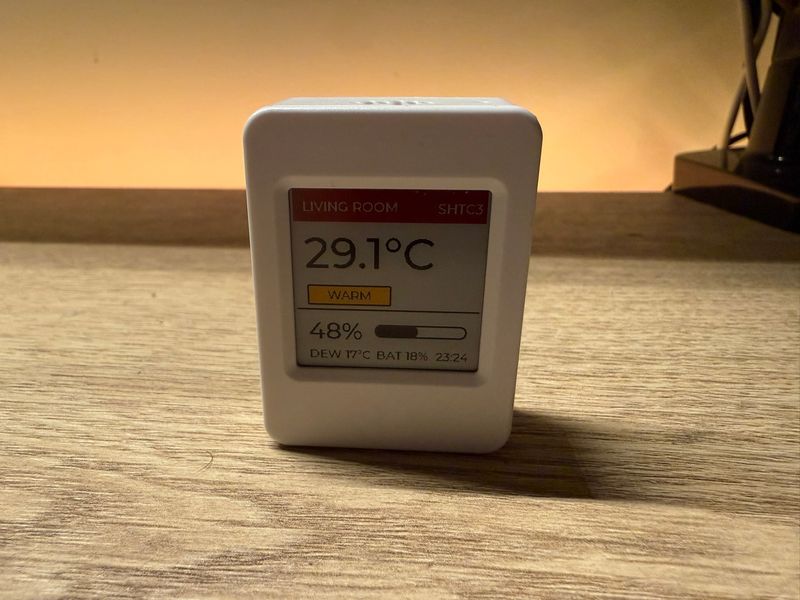
On the desk it does what the config promises. The panel wakes, sits for a moment while the sensor and clock settle, then does its slow color refresh and settles on the new reading. That refresh is the one thing worth setting expectations around: a full BWRY update takes about 20 seconds, and you watch it happen. The panel flashes through its color passes rather than snapping to the final image. For a screen you glance at every few minutes that is fine, but it is not the instant update you get from an LCD, and it is why the whole design refreshes once per wake and no more.
The four-color layout holds up well at 200x200. The red header, the black readouts and the comfort chip give enough separation that the temperature reads at a glance, and the word on the chip means you are never guessing what a color is supposed to say.
The clock in the bottom-right corner earns its footer spot too: it is stamped at the refresh, so it always shows when the readings were taken, not the current time. A glance tells you exactly how fresh the data is, which matters on a half-hour cycle, and it doubles as a health check: if that time is hours old, the board missed a wake and something needs charging.
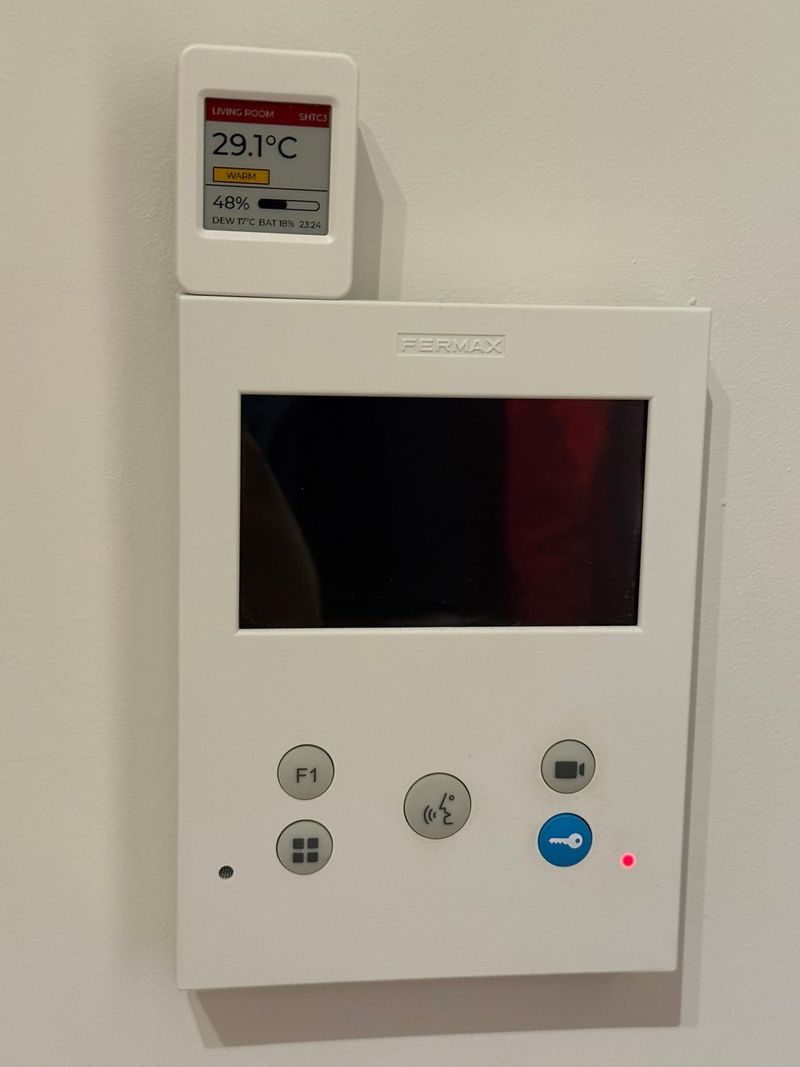
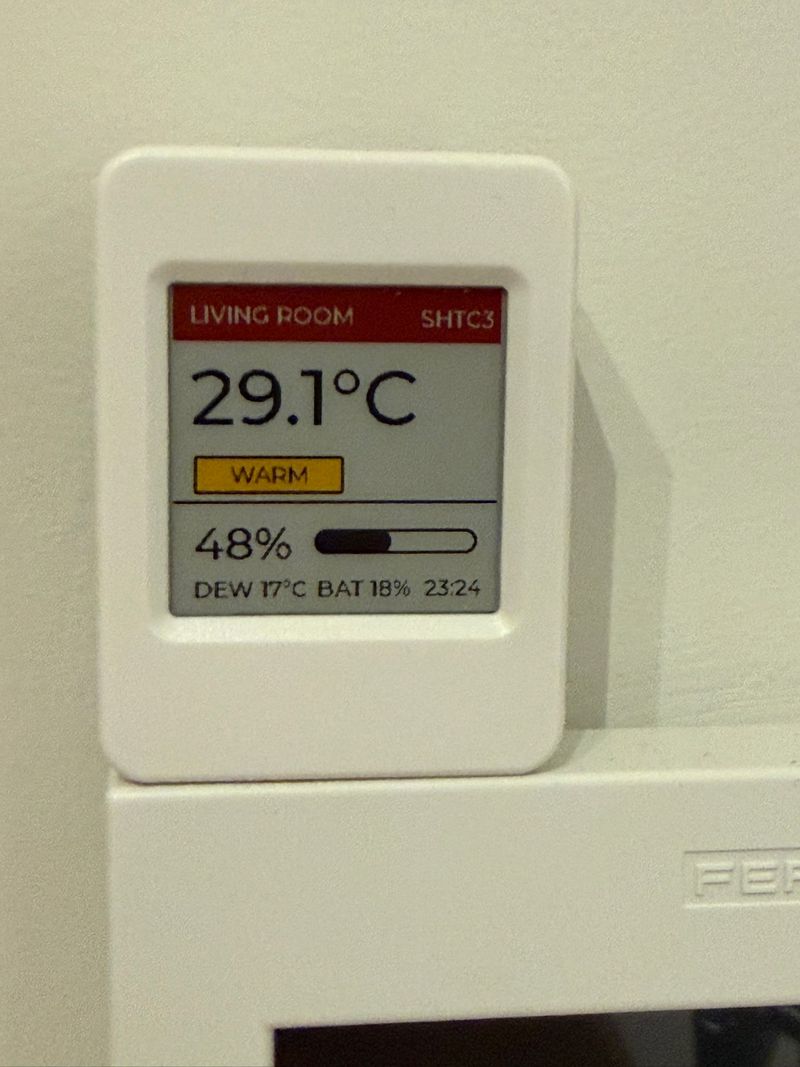
Mine ended up wall-mounted above the intercom, where a thermostat would live if this apartment had one:
On battery life, here is the honest version, learned on the real device rather than on paper. Our first run used a five-minute cycle, and the included cell did not survive a full day. In hindsight the math was always against it: every wake costs 35 to 45 seconds of WiFi-connected uptime, dominated by the fixed 30-second guard around the roughly 21-second BWRY flash. At five-minute intervals that is nearly 300 wakes and well over two hours of radio-on time per day, which no small cell forgives.
That experience is why the config above ships with sleep_duration: 30min. The per-wake cost is identical, but there are six times fewer of them, and for a room climate display a half-hour reading is still more current than the panel deserves credit for. We are measuring the long run now and will update this with real numbers, but the lesson generalizes and is worth stating plainly: the update interval, not the sleep current, decides your runtime. If your use case tolerates an hour, take the hour.
If you want to adapt this, the config is a reasonable starting point for any deep-sleep e-paper build on this board. Swap the SHTC3 readings for whatever you are measuring, keep the power-latch and GPIO-hold blocks intact, and the wake-refresh-sleep loop carries over unchanged. Full specs, the pinout and buying options are on the board page.