
Elecrow CrowPanel E-Paper 4.2 (ESP32-S3)
4.2" 400x300 black-and-white e-paper on an ESP32-S3 N8R8 with a rotary switch, buttons and 12 free header GPIOs - note that it ships with two different panel controllers under one SKU.

Elecrow CrowPanel E-Paper 4.2 (ESP32-S3) Pinout
41 pins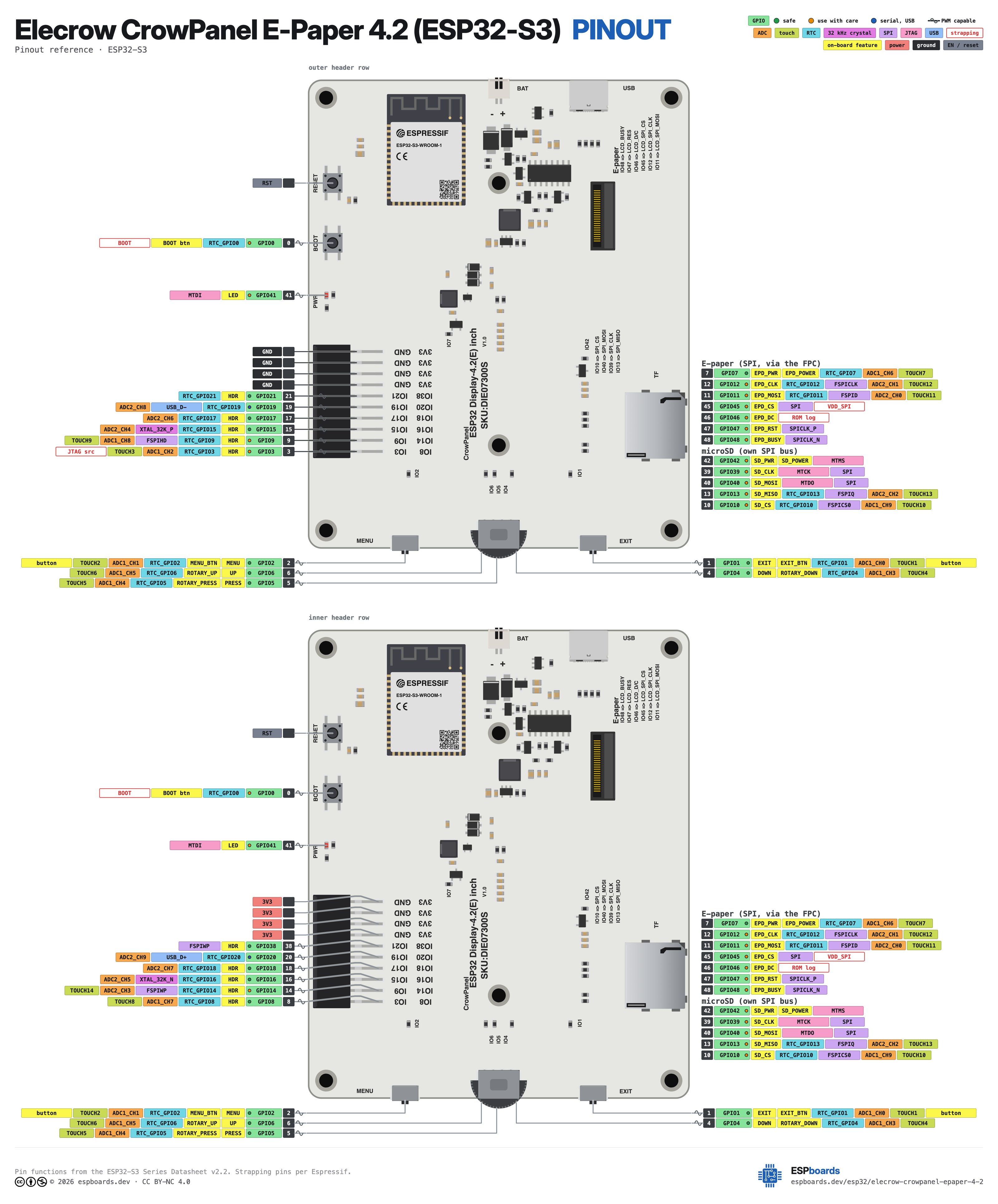
| Pin | GPIO | Labels | Status | Capabilities | Notes |
|---|---|---|---|---|---|
| 1 | 0 | IO0BOOT | strapping | - | BOOT button - hold at power-up for download mode |
| 2 | 1 | IO1EXIT_BTN | safe | - | Exit button - active low |
| 3 | 2 | IO2MENU_BTN | safe | - | Menu button - active low |
| 4 | 3 | IO3HDR | strapping | - | Free GPIO - 2x10 header pin 1 |
| 5 | 4 | IO4ROTARY_DOWN | safe | - | Rotary switch - down, active low |
| 6 | 5 | IO5ROTARY_PRESS | safe | - | Rotary switch - press/confirm, active low |
| 7 | 6 | IO6ROTARY_UP | safe | - | Rotary switch - up, active low |
| 8 | 7 | IO7EPD_POWER | safe | - | Switches the e-paper power rail - must be high before the panel responds to anything |
| 9 | 8 | IO8HDR | safe | - | Free GPIO - 2x10 header pin 20 |
| 10 | 9 | IO9HDR | strapping | - | Free GPIO - 2x10 header pin 2 |
| 11 | 10 | IO10SD_CS | strapping | spi | microSD slot - chip select |
| 12 | 11 | IO11EPD_MOSI | strapping | spi | Internal - e-paper SPI MOSI |
| 13 | 12 | IO12EPD_CLK | strapping | spi | Internal - e-paper SPI clock |
| 14 | 13 | IO13SD_MISO | strapping | spi | microSD slot - MISO |
| 15 | 14 | IO14HDR | strapping | - | Free GPIO - 2x10 header pin 19 |
| 16 | 15 | IO15HDR | safe | - | Free GPIO - 2x10 header pin 3 |
| 17 | 16 | IO16HDR | safe | - | Free GPIO - 2x10 header pin 18 |
| 18 | 17 | IO17HDR | safe | - | Free GPIO - 2x10 header pin 4 |
| 19 | 18 | IO18HDR | safe | - | Free GPIO - 2x10 header pin 17 |
| 20 | 19 | IO19HDR | uart | - | Free GPIO - 2x10 header pin 5 |
| 21 | 20 | IO20HDR | uart | - | Free GPIO - 2x10 header pin 16 |
| 22 | 21 | IO21HDR | safe | - | Free GPIO - 2x10 header pin 6 |
| 23 | 38 | IO38HDR | safe | - | Free GPIO - 2x10 header pin 15 |
| 24 | 39 | IO39SD_CLK | strapping | spi | microSD slot - clock |
| 25 | 40 | IO40SD_MOSI | strapping | spi | microSD slot - MOSI |
| 26 | 45 | IO45EPD_CS | strapping | spi | Internal - e-paper chip select |
| 27 | 46 | IO46EPD_DC | strapping | - | Internal - e-paper data/command |
| 28 | 47 | IO47EPD_RST | strapping | - | Internal - e-paper reset |
| 29 | 48 | IO48EPD_BUSY | strapping | - | Internal - e-paper busy signal |
| 30 | - | GND | ground | - | 2x10 header pin 7 - ground |
| 31 | - | GND | ground | - | 2x10 header pin 8 - ground |
| 32 | - | GND | ground | - | 2x10 header pin 9 - ground |
| 33 | - | GND | ground | - | 2x10 header pin 10 - ground |
| 34 | - | 3V3 | power | - | 2x10 header pin 14 - 3.3V supply |
| 35 | - | 3V3 | power | - | 2x10 header pin 13 - 3.3V supply |
| 36 | - | 3V3 | power | - | 2x10 header pin 12 - 3.3V supply |
| 37 | - | 3V3 | power | - | 2x10 header pin 11 - 3.3V supply |
| 38 | 41 | IO41LED | strapping | - | Internal - the red PWR LED (D1) through a 4.7K resistor, active high |
| 39 | 42 | IO42SD_POWER | strapping | - | Internal - switches the microSD slot ground through an N-MOSFET (Q10); drive high to power the card |
| 40 | 43 | IO43TX | uart | uart | Internal - UART0 TX to the CH340C USB-serial bridge |
| 41 | 44 | IO44RX | uart | uart | Internal - UART0 RX from the CH340C USB-serial bridge |
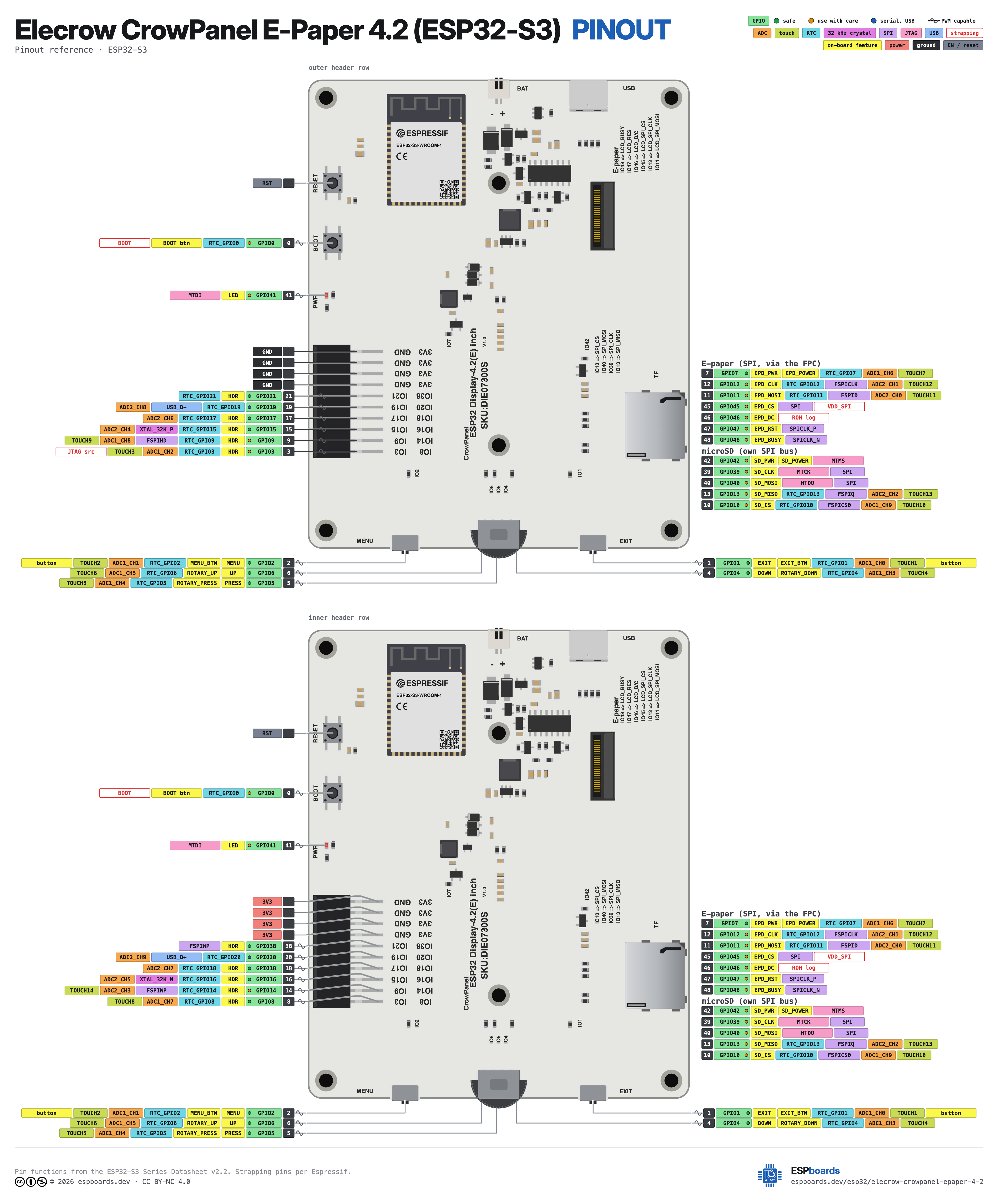
Start with these
13 pins with no boot or system involvementFreely assignable - no strapping, flash, USB or JTAG duties. Ideal first picks for buttons, sensors and LEDs.
Fine - with a little care
18 pins · 12 things to knowIO0 Bootstrapping pin (Chip boot mode selection) Strapping
Must be pulled high (default) or low (to enter UART download mode) at reset. Using it for other functions can interfere with boot mode configuration.
IO3 Bootstrapping pin (controls JTAG signal source) Strapping
Sampled at reset to select JTAG interface (USB Serial/JTAG controller vs. external pins). Improper use can disable external JTAG or alter debug interface.
IO9IO10IO11IO12IO13IO14 General-purpose SPI2 (FSPI) IO MUX pins Other
IO MUX pin of the general-purpose SPI2 (FSPI) bus, not of the in-package flash - that sits on GPIO26-32. The datasheet lists it as a priority-2 pin ("can be freely used without restrictions"), so it is only taken if your board wires flash, an SD card or a display to FSPI.
- IO9General-purpose SPI2 (FSPI) IO MUX pin - hold/data line (FSPIHD)
- IO10General-purpose SPI2 (FSPI) IO MUX pin - chip select (FSPICS0)
- IO11General-purpose SPI2 (FSPI) IO MUX pin - data in (FSPID)
- IO12General-purpose SPI2 (FSPI) IO MUX pin - clock (FSPICLK)
- IO13General-purpose SPI2 (FSPI) IO MUX pin - data out (FSPIQ)
- IO14General-purpose SPI2 (FSPI) IO MUX pin - write-protect/data line (FSPIWP)
IO39 JTAG test clock (MTCK); IO MUX alternates CLK_OUT3 and SUBSPICS1 (chip select on the alternative SUBSPI memory bus, unused on standard modules) JTAG
Default JTAG TCK - keep it free if you debug over JTAG. It is not a flash or PSRAM line on standard modules: those sit on GPIO26-37.
IO40 JTAG test data out pin (MTDO) JTAG
Default JTAG TDO output for debugging. Using it as GPIO will interfere with JTAG debugging functionality.
IO45 Bootstrapping pin (selects VDD_SPI flash voltage) Strapping
Determines flash/PSRAM power voltage (3.3 V vs 1.8 V) at boot. Must match hardware configuration; using as GPIO can upset flash supply setting.
IO46 Bootstrapping pin (used with GPIO0 for boot mode; controls ROM log output) Strapping
Must be at a defined level during reset (with GPIO0) to select normal or download boot and UART/USB print mode. This pin is input-only (no output drive), so it should be left for its intended strapping function.
IO47IO48 Octal SPI differential clock legs (SPICLK_P/N_DIFF), used only by the 1.8 V octal flash/PSRAM variants Other
Only the 1.8 V octal parts (ESP32-S3R8V, ESP32-S3R16V) run the differential memory clock here, and on those the pin works at 1.8 V instead of 3.3 V. On the common 3.3 V modules it is a normal GPIO - several devkits drive their RGB LED from GPIO48.
- IO47Octal SPI differential clock positive leg (SPICLK_P_DIFF), used only by the 1.8 V octal flash/PSRAM variants
- IO48Octal SPI differential clock negative leg (SPICLK_N_DIFF), used only by the 1.8 V octal flash/PSRAM variants
IO41 JTAG test data in pin (MTDI) JTAG
Default JTAG TDI input for debugging. Should be reserved for JTAG or left unused if JTAG is to remain available.
IO42 JTAG test mode select pin (MTMS) JTAG
Default JTAG TMS signal for debugging. Using this pin for other purposes will disable the JTAG interface (unless JTAG is rerouted to USB).
IO43 UART0 transmit pin (U0TXD), default serial console TX UART
Used for bootloader output and UART console logs. If repurposed, you will lose the default serial output (and programming via UART0).
IO44 UART0 receive pin (U0RXD), default serial console RX UART
Used for bootloader input (download mode via serial). If repurposed, you cannot use the default UART0 download mode for programming the chip.
Only if you know the tricks
2 pins · 1 thing to knowIO19IO20 USB OTG differential data pair (D- and D+) USB
By default connected to the on-chip USB Serial/JTAG controller. Using it as general GPIO without reconfiguring IO MUX will interfere with USB functionality.
- IO19USB OTG negative differential data line (USB_D-)
- IO20USB OTG positive differential data line (USB_D+)
Across 41 pins, the Elecrow CrowPanel E-Paper 4.2 (ESP32-S3) exposes 33 GPIO plus GND and 3V3 for power.
Peripheral wiring is straightforward: TX/RX on GPIO43 and GPIO44 cover serial logging and flashing.
18 of the exposed pins carry boot-time or system duties on the ESP32-S3 (IO0, IO3, IO9 and 15 more) - check the guidance above before wiring anything to them. IO1, IO2, IO4, IO5 and 9 more are free of any such role - the safest first picks.
Pinout notes The e-paper panel takes SPI on IO12 (CLK) / IO11 (MOSI) with IO45 (CS), IO46 (DC), IO47 (RST) and IO48 (BUSY). Critically, IO7 switches the display's power…
The e-paper panel takes SPI on IO12 (CLK) / IO11 (MOSI) with IO45 (CS), IO46 (DC), IO47 (RST) and IO48 (BUSY). Critically, IO7 switches the display's power rail - it must be driven high before the panel responds at all, and a board that looks perfectly healthy over serial will show a blank screen until it is. This pin map is identical on both board revisions; only the controller behind the FPC differs.
Physical input sits on IO2 (Menu), IO1 (Exit) and the rotary switch on IO6/IO4/IO5 (up/down/press) - all active-low with pull-ups. The microSD slot runs its own SPI bus on IO39 (CLK), IO40 (MOSI), IO13 (MISO), IO10 (CS).
The 2x10 header exposes 3V3 and GND rails plus twelve free GPIOs - IO3, IO8, IO9, IO14, IO15, IO16, IO17, IO18, IO19, IO20, IO21 and IO38. That is enough for I2C plus a handful of sensors with no bus-sharing gymnastics, and unusually generous for a board of this size.
Getting started
flash your first firmware in ~2 minutesBoard: ESP32S3 Dev Module Flash Size: 8MB (64Mb) PSRAM: QSPI PSRAM Partition Scheme: 8M with spiffs (3MB APP/1.5MB SPIFFS) Upload Speed: 921600
// toggle GPIO1 - wire an LED and resistor to it
void setup() {
  pinMode(1, OUTPUT);
}
void loop() {
  digitalWrite(1, HIGH); delay(500);
  digitalWrite(1, LOW);  delay(500);
}[env:elecrow-crowpanel-epaper-4-2]
platform = espressif32
board = esp32-s3-devkitc-1
framework = arduino
monitor_speed = 115200
upload_speed = 921600
board_build.arduino.memory_type = qio_qspi
build_flags = -DBOARD_HAS_PSRAMesp32-s3-devkitc-1 - or type it after board =.esp32:
board: esp32-s3-devkitc-1
variant: esp32s3
framework:
type: esp-idf
psram:
mode: quad
speed: 80MHz
# blink - GPIO1
output:
- platform: gpio
pin: 1
id: led_out
light:
- platform: binary
name: "LED"
output: led_outesp32-s3-devkitc-1 (same ids as PlatformIO).esptool.py --chip esp32s3 --port /dev/ttyACM0 \
--baud 921600 write_flash 0x0 firmware.bin--port = your /dev/tty* (macOS/Linux) or COMx (Windows).Good to know
board-specific quirks worth 60 seconds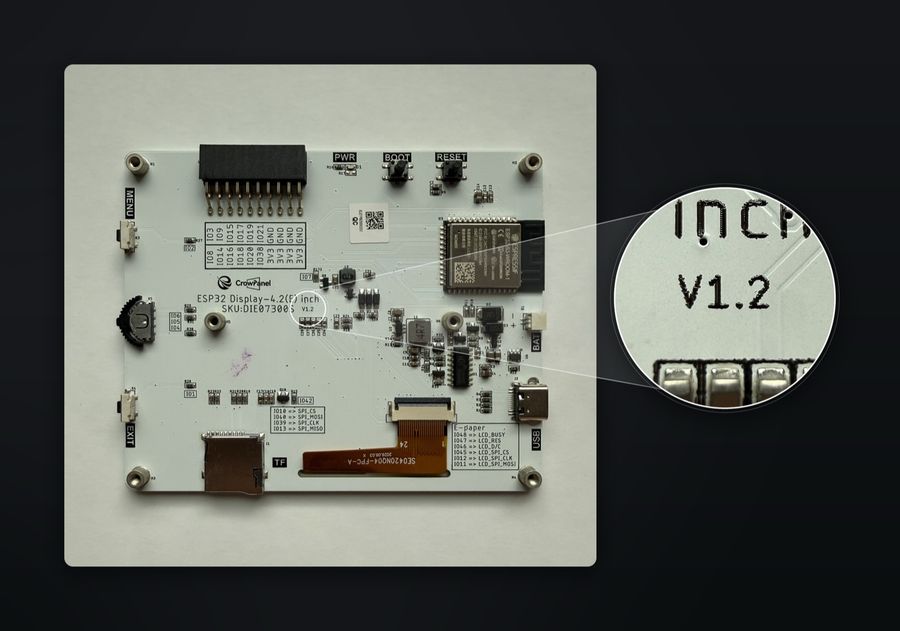
Elecrow sells this board with two different display controllers under one listing: v1.0 uses an SSD1683, v1.2 uses a UC8276C. They need different drivers - different command sets, different init sequences, different refresh mechanics. The revision is printed only on the PCB, next to the SKU, as pictured. Elecrow's wiki still documents the SSD1683 alone. A blank or garbled panel on an otherwise healthy…
Elecrow sells this board with two different display controllers under one listing: v1.0 uses an SSD1683, v1.2 uses a UC8276C. They need different drivers - different command sets, different init sequences, different refresh mechanics. The revision is printed only on the PCB, next to the SKU, as pictured. Elecrow's wiki still documents the SSD1683 alone.
A blank or garbled panel on an otherwise healthy board usually means the driver is set to the wrong revision. Our write-up covers how to tell them apart and what changes between them.
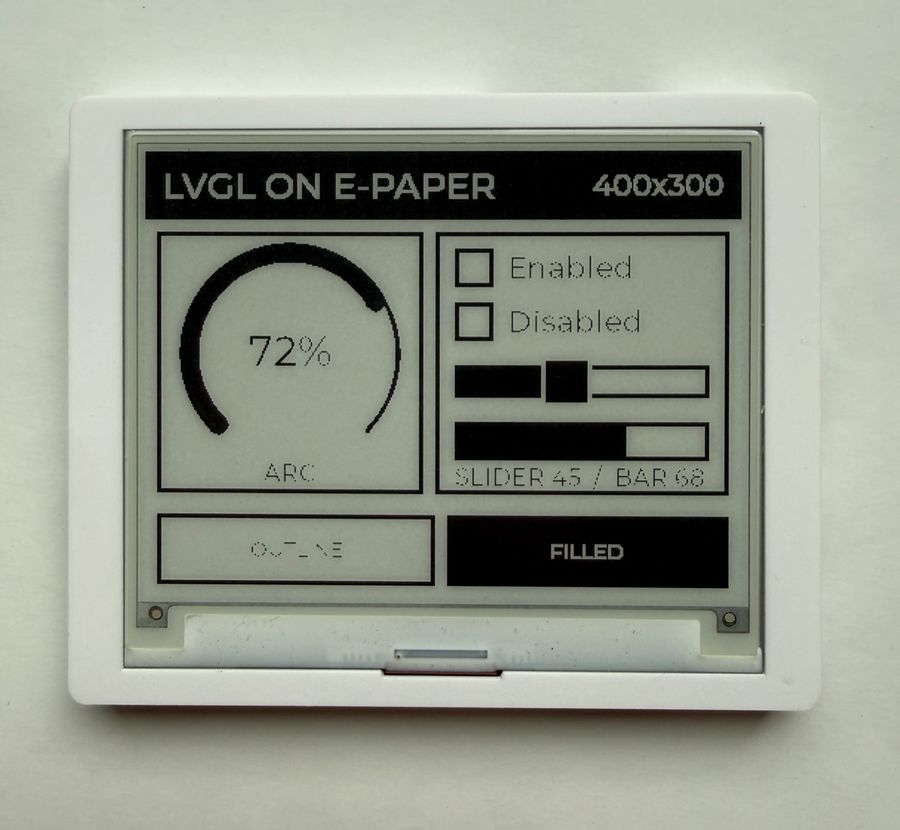
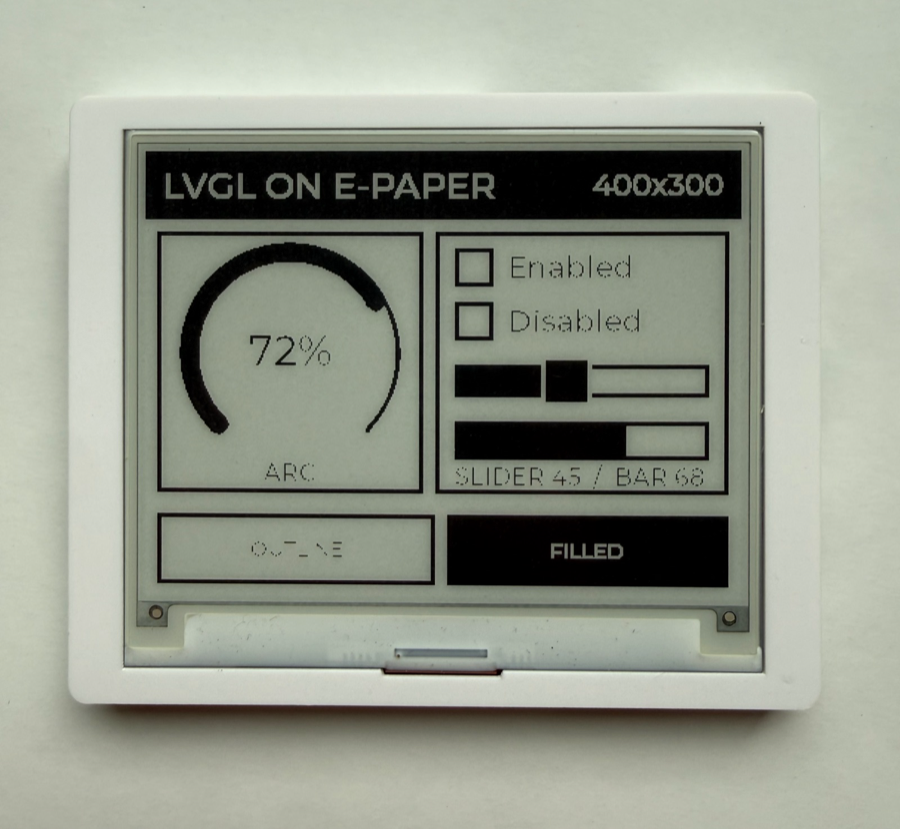
Generic e-paper components do not drive this board under LVGL, so we rewrote the driver from scratch - correct DisplayBuffer inheritance, a non-blocking update state machine, and both board revisions supported by a single model key. It is open source as crowpanel_epaper, and the guide builds a full weather dashboard on it. Set full_update_every: 10 for frequently updating dashboards, or 9999 and trigger full…
Generic e-paper components do not drive this board under LVGL, so we rewrote the driver from scratch - correct DisplayBuffer inheritance, a non-blocking update state machine, and both board revisions supported by a single model key. It is open source as crowpanel_epaper, and the guide builds a full weather dashboard on it.
Set full_update_every: 10 for frequently updating dashboards, or 9999 and trigger full refreshes manually with force_full_update().
IO7 switches the e-paper's power rail. Firmware must drive it high before the first SPI transaction, or the panel stays blank while every symptom points at a wiring or driver problem that is not there. It also means you can hard-cut display power in deep-sleep scenarios for extra savings. Check the IO7 rail before you start swapping driver settings - it produces the same blank screen as picking the wrong…
IO7 switches the e-paper's power rail. Firmware must drive it high before the first SPI transaction, or the panel stays blank while every symptom points at a wiring or driver problem that is not there. It also means you can hard-cut display power in deep-sleep scenarios for extra savings.
Check the IO7 rail before you start swapping driver settings - it produces the same blank screen as picking the wrong board revision.
Downloads
Free for non-commercial use, credit espboards.dev · License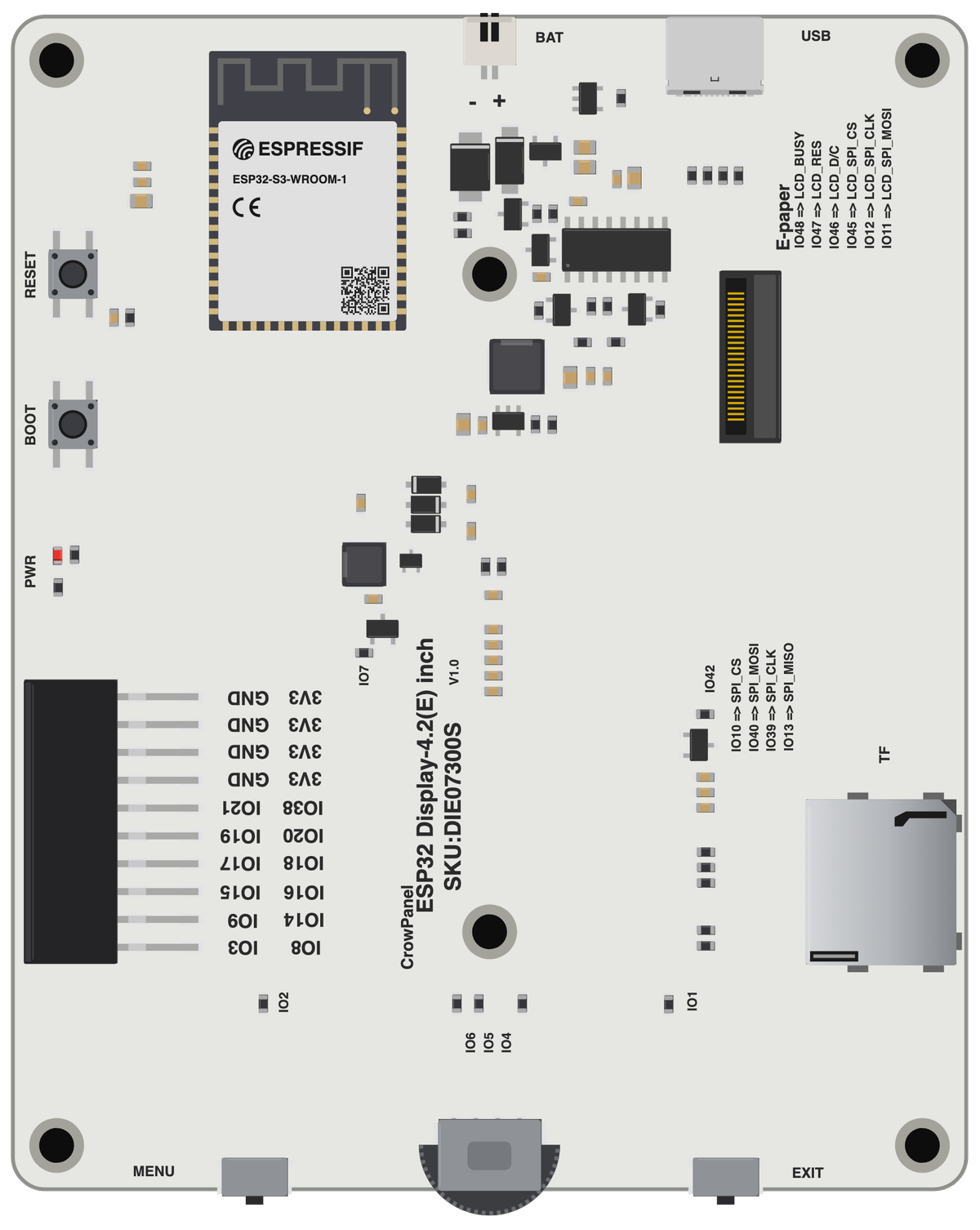
Board illustration
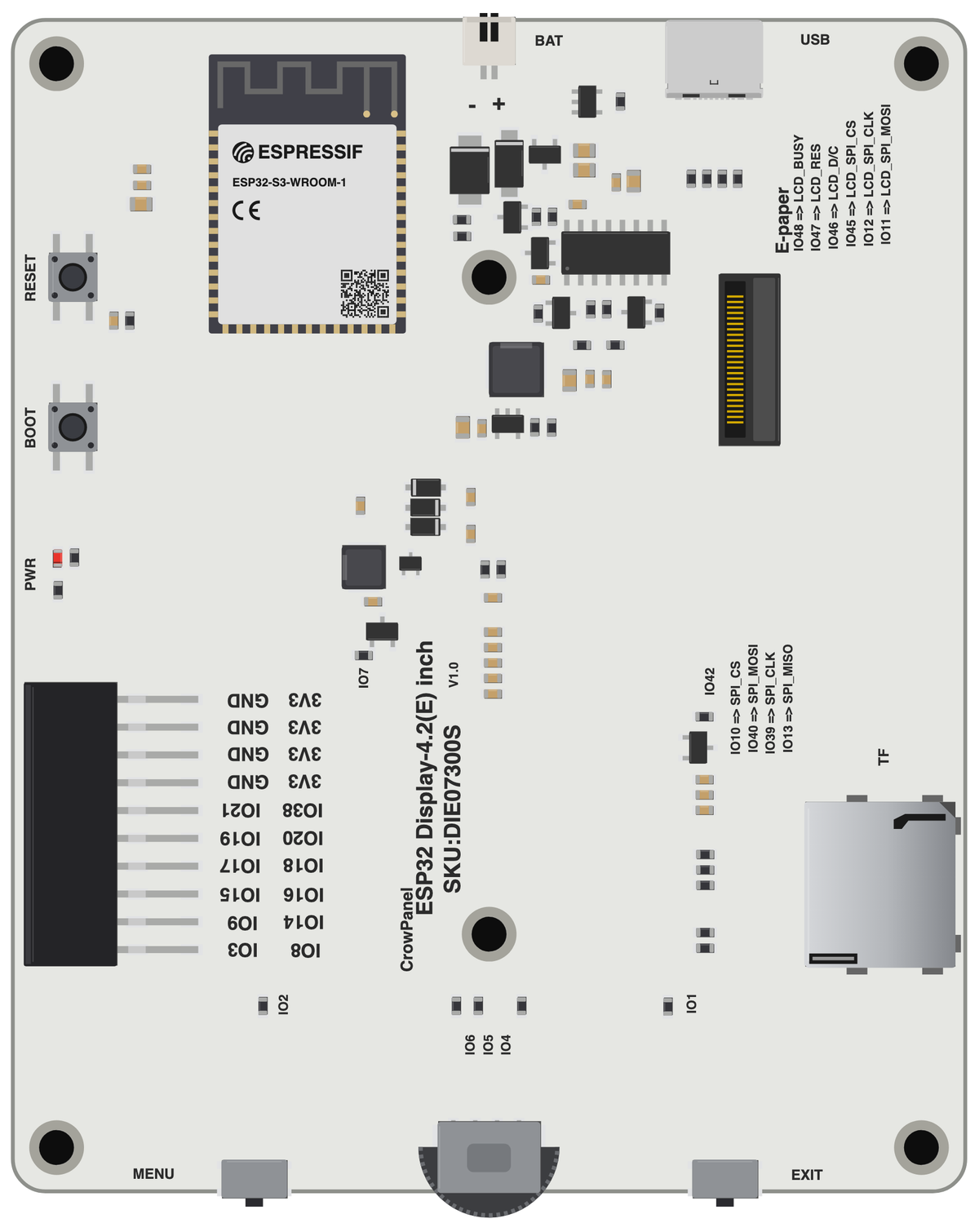
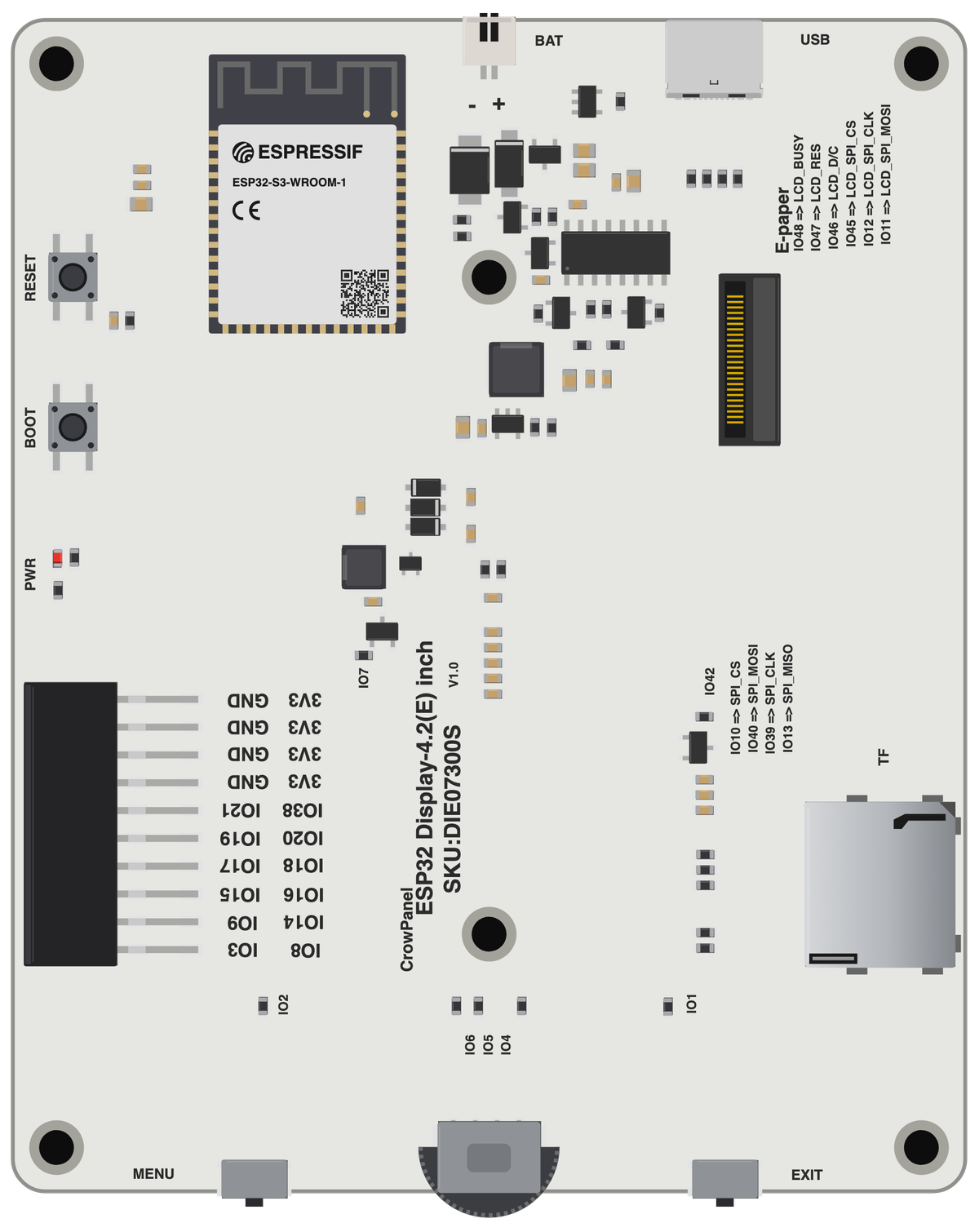
The bare Elecrow CrowPanel E-Paper 4.2 (ESP32-S3) board drawn to scale, with no pin labels on it. Made for slide decks, wiring diagrams and project write-ups where a photo is too busy. Take the scalable SVG for print or editing, the high-resolution PNG to drop straight in, or the transparent PNG when you need it with no background behind it.
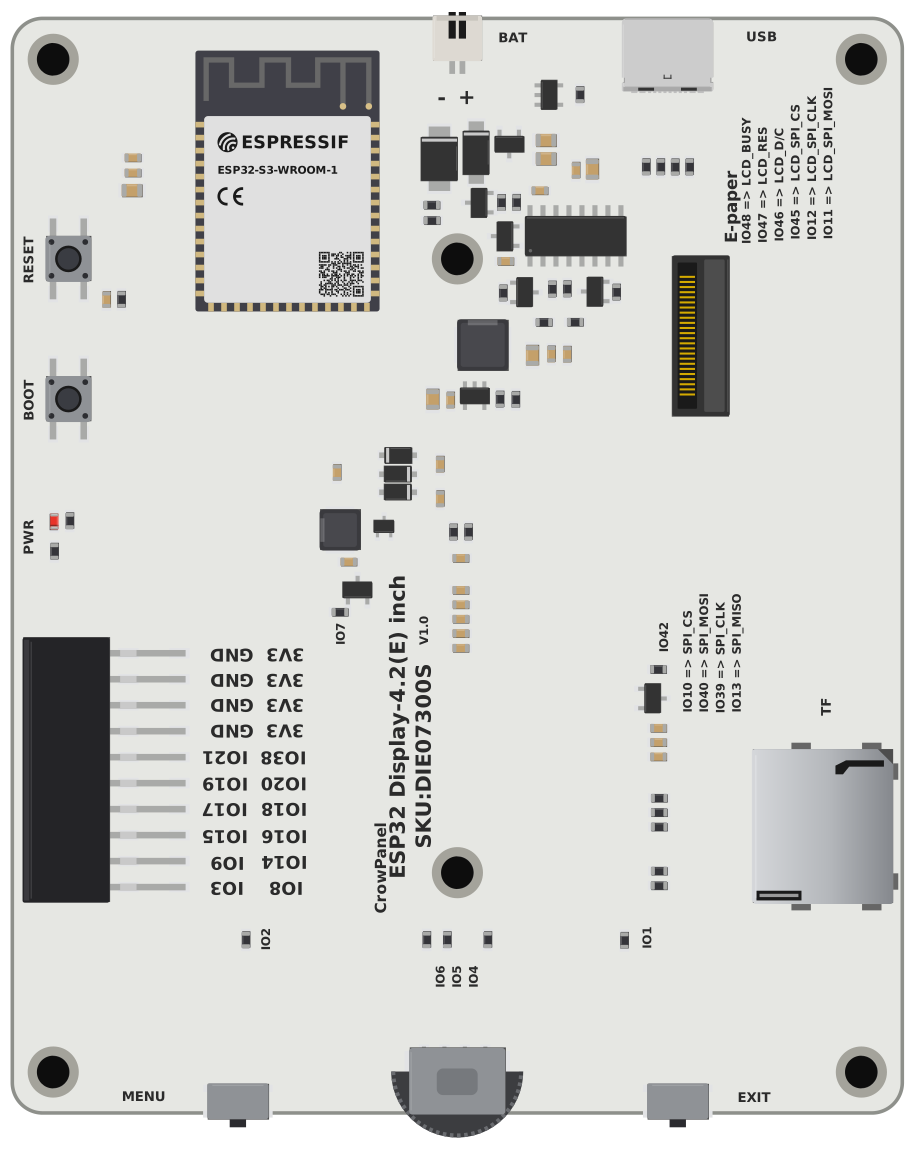
Pinout diagram
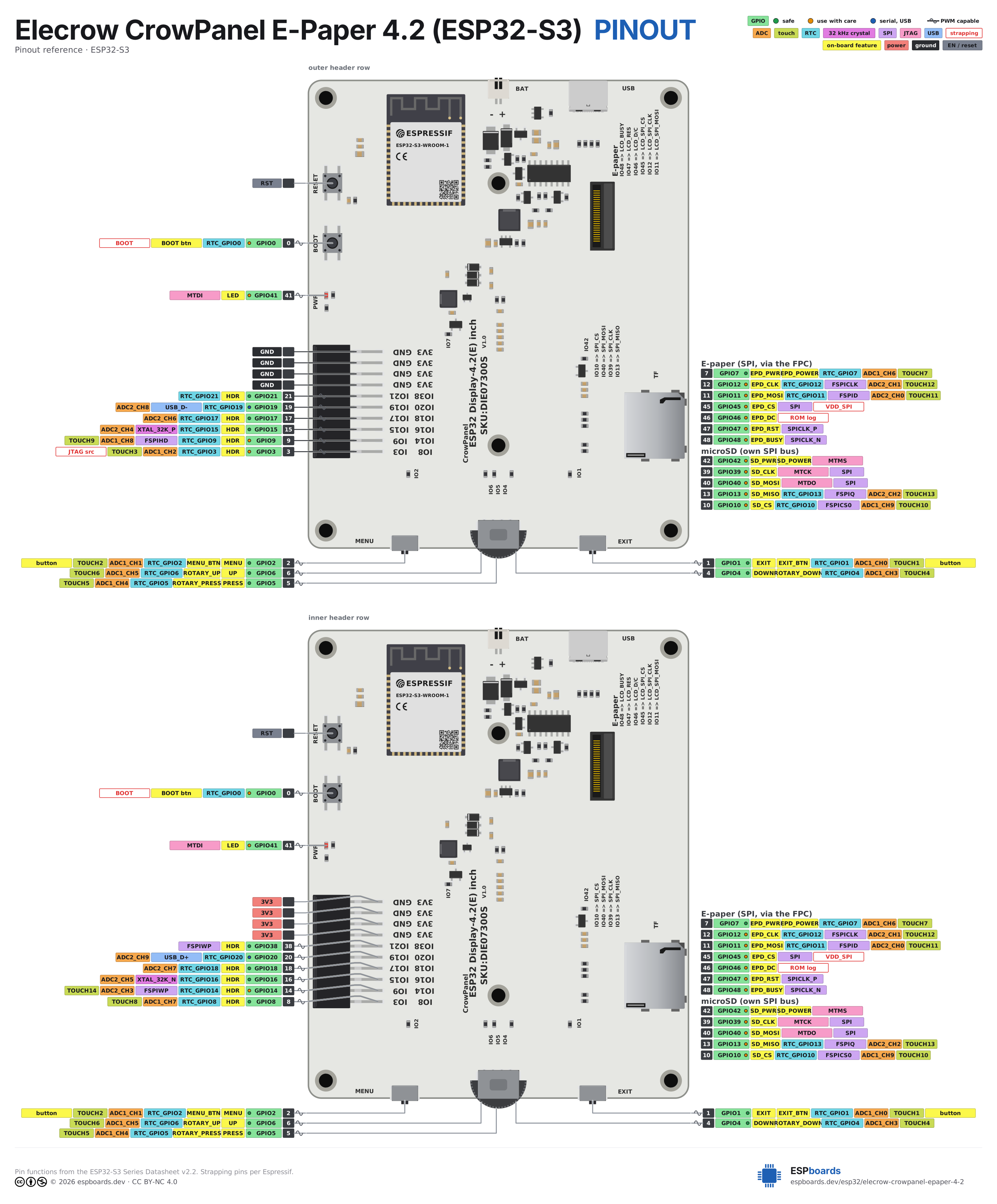
Every pin on both sides of the board with its functions, drawn by ESPboards from the ESP32-S3 Series Datasheet v2.2 - the same sheet shown at the top of this page. The PNG is a high-resolution image for screens, the SVG is vector so it stays sharp at any size, and the PDF is laid out to print on A4 or Letter.
Yours to use, share and adapt for non-commercial work, as long as you credit espboards.dev - the full terms and ready-made credit lines are here.
Specifications
ESP32-S3 · vs other ESP32 chips →About this board
Inside sits the ESP32-S3 - a dual-core Xtensa with vector extensions suited to AI workloads.
The $26.90 price tag is typical for an ESP32-S3 board.
With 33 GPIO broken out, you get more pins to play with than most ESP32-S3 boards offer.
Around the module: 8MB PSRAM, an E-Paper 4.2" 400x300 display, a microSD slot, a rotary encoder, battery charging via SH1.0-2P and Menu/Exit/Boot/Reset + rotary up/down/press buttons.
The Elecrow CrowPanel E-Paper 4.2 pairs an ESP32-S3-WROOM-1 N8R8 (8 MB flash, 8 MB PSRAM, up to 240 MHz) with a 400x300 black-and-white e-paper panel in a white acrylic case. It is the squarer, cheaper sibling of the 5.79" CrowPanel e-paper, and shares its input hardware, its connectors and most of its pin map.
One thing to know before you buy or write firmware: Elecrow has shipped this board with two different display controllers under the same product listing and the same SKU. v1.0 boards carry an SSD1683; v1.2 boards carry a UC8276C. The two need genuinely different drivers, and the revision is not printed on the listing or the box - only on the PCB itself. Everything else about the board is identical, which is why this page covers both.
The input hardware is the underrated part: besides Boot and Reset you get Menu and Exit buttons plus a three-way rotary switch (up/down/press), so menu-driven UIs work without any external controller. A microSD slot on its own SPI bus, an SH1.0 battery connector with charging, and a 2x10 header carrying 12 free GPIOs round it out - twice what the 5.79" exposes, and a genuinely generous allocation for a display board.
Where it fits: always-on dashboards, weather stations and status displays where an LCD's backlight is wrong, and where deep sleep between updates matters. E-paper holds its image at zero power, so a wake-update-sleep cycle gives battery life in weeks. It won't do video or smooth animation - that is e-paper physics, not a flaw. We wrote the ESPHome external component that drives it with full LVGL support, and later added support for the v1.2 controller, with partial refresh at 448 ms.
- 4.2" 400x300 black-and-white e-paper (SSD1683 on v1.0 boards, UC8276C on v1.2)
- ESP32-S3-WROOM-1 N8R8 - 8 MB flash, 8 MB PSRAM, up to 240 MHz
- Menu and Exit buttons plus a three-way rotary switch (up/down/press) for controller-free UIs
- 2x10 GPIO header with twelve free IOs - double what the 5.79" model exposes
- microSD slot on a dedicated SPI bus
- SH1.0 battery connector with onboard charging - built for deep-sleep battery projects
- Full ESPHome + LVGL support via our open-source crowpanel_epaper external component
- Partial refresh in 448 ms on v1.2 boards, with configurable full-refresh cadence to clear ghosting
- White acrylic case included; demo firmware preloaded
FAQ
6 common questionsHow do I tell whether I have a v1.0 or a v1.2 board?›
Does the CrowPanel E-Paper 4.2 work with ESPHome?›
Why is my display blank or garbled?›
How fast does the screen update?›
What is the difference from the 5.79" CrowPanel e-paper?›
Can it run on battery?›
Where to buy
prices are typical street pricesResources
Similar boards

