
MR24HPB1 Human Presence Radar Sensor
The MR24HPB1 is a high-sensitivity 24GHz radar sensor capable of detecting human presence and motion. It communicates via UART and is ideal for smart home and security applications.

MR24HPB1 pinout
The MR24HPB1 is a 24GHz FMCW radar sensor with 4 pins: 5V power, GND, and UART TX/RX for communication.
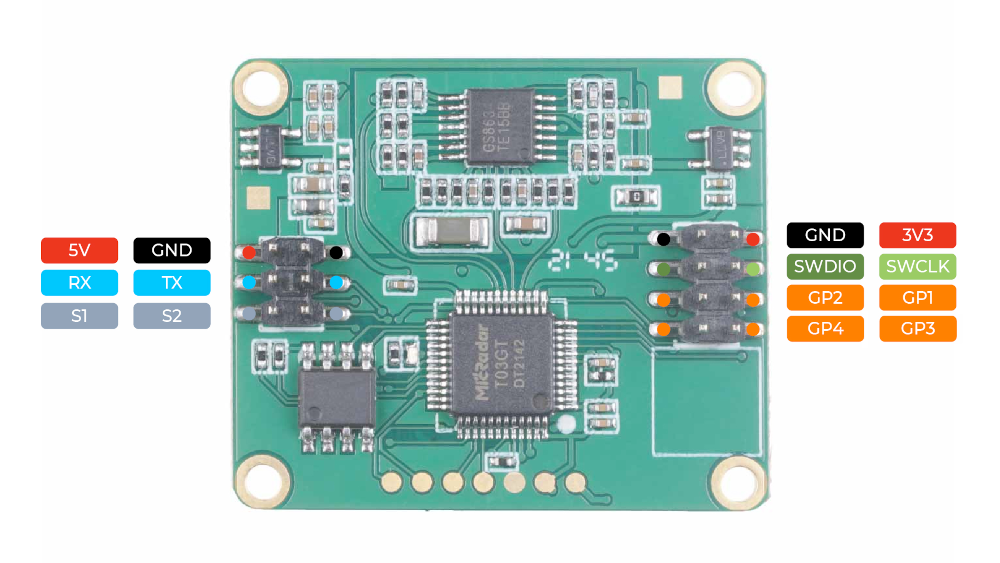
| Pin | Type | Description | Notes |
|---|---|---|---|
| 5V | Power | Power input (5V DC). Powers the radar chipset and processing circuits. | Requires stable 5V supply capable of handling current spikes. |
| GND | Power | Ground connection. Common reference for power and UART signals. | Connect to ESP32 GND for shared reference. |
| TX | UART | UART transmit pin. Sends presence data, motion intensity, and distance to ESP32. | Connect to ESP32 RX pin (e.g., GPIO 16). Often 3.3V tolerant. |
| RX | UART | UART receive pin. Receives configuration commands from ESP32. | Connect to ESP32 TX pin (e.g., GPIO 17). |
24GHz FMCW radar technology
Detection range: up to 6 meters
Field of view: ±45° horizontal, ±25° vertical
Detects both moving and stationary humans
UART logic: typically 3.3V tolerant (verify with datasheet)
Wiring the MR24HPB1 to ESP32
To connect the MR24HPB1 to an ESP32 via UART, connect 5V to power, GND to ground, TX to ESP32 GPIO 16 (RX2), and RX to ESP32 GPIO 17 (TX2).
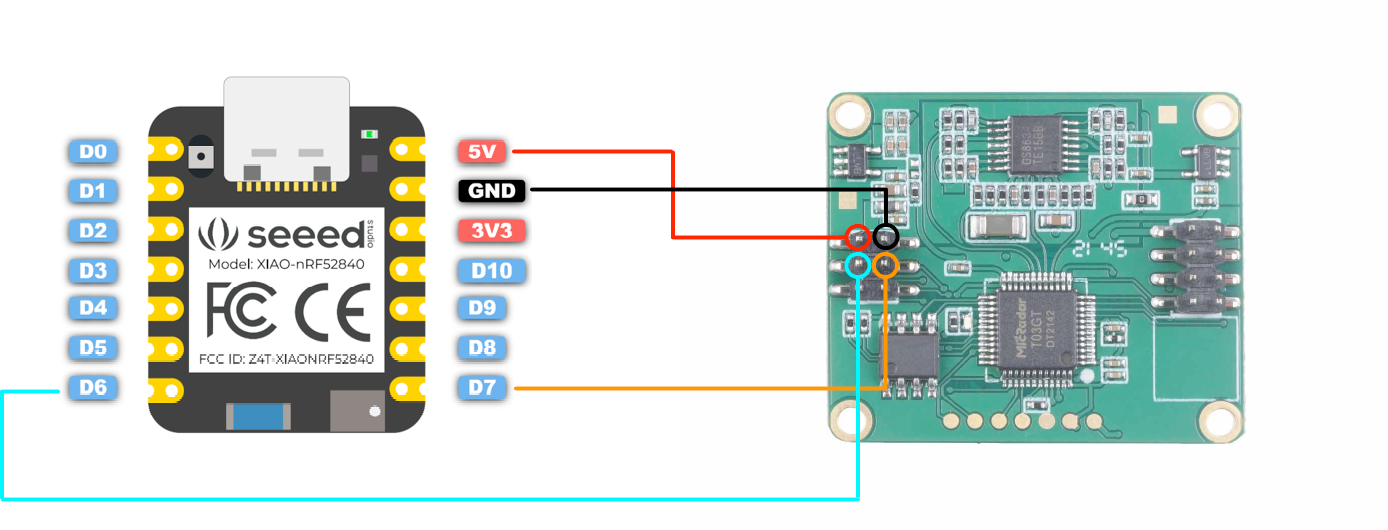
| MR24HPB1 pin | ESP32 pin | Purpose |
|---|---|---|
| 5V (red) | 5V or External Supply | Power supply (5V). Use regulated supply for consistent operation. |
| GND (black) | GND | Ground connection. Critical for UART and power stability. |
| TX (green) | GPIO 16 (RX2) | Radar transmits data to ESP32. |
| RX (blue) | GPIO 17 (TX2) | ESP32 sends configuration commands to radar. |
UART baud rate: 9600 bps (8N1 format)
Use UART2 on ESP32 (GPIO 16/17) to avoid conflicts with USB serial
Verify UART logic levels - use level shifter if sensor requires 5V logic
Mount sensor securely - vibrations affect detection
Avoid obstructions in detection field of view
Current draw: typically ~80mA during operation
Similar to LD series radar sensors - check LD2410/LD2450 examples
MR24HPB1 code examples
// The MR24HPB1 speaks Seeed's binary UART protocol (frames start with 0x55).
// This sketch prints each received frame as hex - decode it with the protocol
// tables in Seeed's MR24HPB1 user manual.

HardwareSerial radar(2); // UART2: sensor TX -> GPIO16 (RX2), RX -> GPIO17 (TX2)

void setup() {
  Serial.begin(115200);
  radar.begin(9600, SERIAL_8N1, 16, 17);
  Serial.println("MR24HPB1 frame monitor");
}

void loop() {
  // Sync on the 0x55 frame header
  if (radar.available() && radar.read() == 0x55) {
    while (radar.available() < 2) {} // wait for the length field
    uint16_t length = radar.read() | (radar.read() << 8); // little-endian, excludes header
    if (length < 3 || length > 32) return; // implausible - resync

    Serial.print("Frame (len ");
    Serial.print(length);
    Serial.print("): 55");
    for (uint16_t i = 0; i < length - 2 && i < 32; i++) {
      while (!radar.available()) {}
      uint8_t b = radar.read();
      Serial.print(" ");
      if (b < 0x10) Serial.print("0");
      Serial.print(b, HEX);
    }
    Serial.println();
  }
}
There is no established Arduino library for the MR24HPB1, so this sketch reads the module's binary UART protocol directly on UART2 (RX on GPIO16, TX on GPIO17). Every frame starts with 0x55 followed by a little-endian length; the sketch syncs on that header and prints each complete frame as hex. Decode the function-code and address bytes with the protocol tables in Seeed's MR24HPB1 user manual to extract presence and motion reports, or use the module through Home Assistant/ESPHome for a ready-made integration.
#include <stdio.h>
#include "freertos/FreeRTOS.h"
#include "freertos/task.h"
#include "driver/uart.h"

// MR24HPB1 on UART2: module TX -> GPIO16 (RX2), RX -> GPIO17 (TX2), 9600 baud
#define RADAR_UART UART_NUM_2

void app_main(void)
{
    uart_config_t config = {
        .baud_rate = 9600,
        .data_bits = UART_DATA_8_BITS,
        .parity = UART_PARITY_DISABLE,
        .stop_bits = UART_STOP_BITS_1,
        .flow_ctrl = UART_HW_FLOWCTRL_DISABLE,
    };
    ESP_ERROR_CHECK(uart_param_config(RADAR_UART, &config));
    ESP_ERROR_CHECK(uart_set_pin(RADAR_UART, 17, 16, UART_PIN_NO_CHANGE, UART_PIN_NO_CHANGE));
    ESP_ERROR_CHECK(uart_driver_install(RADAR_UART, 1024, 0, 0, NULL, 0));

    uint8_t buf[64];
    while (1) {
        int len = uart_read_bytes(RADAR_UART, buf, sizeof(buf), pdMS_TO_TICKS(200));
        if (len > 0) {
            for (int i = 0; i < len; i++)
                printf("%02X ", buf[i]);
            printf("\n");
        }
    }
}
There is no established library for the MR24HPB1, so this example reads its UART stream (9600 baud on UART2) and prints each burst as hex - decode it with the frame tables in Seeed's MR24HPB1 user manual (frames start with 0x55 and a little-endian length).
external_components:
  - source: github://alitheg/esphome-seeed-mr24hpb1@v2.1.0
    components: [seeed_mr24hpb1]

uart:
  id: uart_bus
  tx_pin: GPIO17
  rx_pin: GPIO16
  baud_rate: 9600

seeed_mr24hpb1:
  id: mr24hpb1_radar
  uart_id: uart_bus

binary_sensor:
  - platform: seeed_mr24hpb1
    presence:
      name: "MR24HPB1 Presence"
    motion:
      name: "MR24HPB1 Motion"

text_sensor:
  - platform: seeed_mr24hpb1
    movement_class:
      name: "MR24HPB1 Movement Class"
ESPHome's core seeed_mr24hpc1 component does NOT work here (the HPB1 speaks a different protocol), but the community alitheg/esphome-seeed-mr24hpb1 external component supports the MR24HPB1 directly: presence and motion binary sensors, movement classification, plus scene-mode and sensitivity controls, all over UART at 9600 baud.
[env:esp32dev]
platform = espressif32
board = esp32dev
framework = arduino
monitor_speed = 115200#include <Arduino.h>
// The MR24HPB1 speaks Seeed's binary UART protocol (frames start with 0x55).
// This sketch prints each received frame as hex - decode it with the protocol
// tables in Seeed's MR24HPB1 user manual.
HardwareSerial radar(2); // UART2: sensor TX -> GPIO16 (RX2), RX -> GPIO17 (TX2)
void setup() {
Serial.begin(115200);
radar.begin(9600, SERIAL_8N1, 16, 17);
Serial.println("MR24HPB1 frame monitor");
}
void loop() {
// Sync on the 0x55 frame header
if (radar.available() && radar.read() == 0x55) {
while (radar.available() < 2) {} // wait for the length field
uint16_t length = radar.read() | (radar.read() << 8); // little-endian, excludes header
if (length < 3 || length > 32) return; // implausible - resync
Serial.print("Frame (len ");
Serial.print(length);
Serial.print("): 55");
for (uint16_t i = 0; i < length - 2 && i < 32; i++) {
while (!radar.available()) {}
uint8_t b = radar.read();
Serial.print(" ");
if (b < 0x10) Serial.print("0");
Serial.print(b, HEX);
}
Serial.println();
}
}There is no established Arduino library for the MR24HPB1, so this sketch reads the module's binary UART protocol directly on UART2 (RX on GPIO16, TX on GPIO17). Every frame starts with 0x55 followed by a little-endian length; the sketch syncs on that header and prints each complete frame as hex. Decode the function-code and address bytes with the protocol tables in Seeed's MR24HPB1 user manual to extract presence and motion reports, or use the module through Home Assistant/ESPHome for a ready-made integration.
from machine import UART
import time

# MR24HPB1: module TX -> GPIO16 (RX2), RX -> GPIO17 (TX2), 9600 baud
uart = UART(2, baudrate=9600, tx=17, rx=16)

while True:
    data = uart.read()
    if data:
        print(" ".join("{:02X}".format(b) for b in data))
    time.sleep(0.2)
There is no established library for the MR24HPB1, so this example reads its UART stream (9600 baud on UART2) and prints each burst as hex - decode it with the frame tables in Seeed's MR24HPB1 user manual (frames start with 0x55 and a little-endian length).
MR24HPB1 specifications
About the MR24HPB1
The MR24HPB1 is Seeed’s higher-end 24GHz presence radar - Seeed’s own documentation calls it the 24GHz mmWave Human Static Presence module, distinct from the Lite MR24HPC1 below - and its headline number is range: Seeed rates motion detection out to 12 meters, with tighter 5-meter micro-motion and 3-meter body/existence tiers for someone sitting nearly still, roughly double the flat 5-6 meter figures the rest of this presence-radar family manages. It reports over UART at 9600 baud (8N1).
Like the LD2461, the MR24HPB1 has no official ESPHome component; the community alitheg/esphome-seeed-mr24hpb1 external component covers it instead, exposing presence and motion binary sensors, a movement-classification text sensor, and scene-mode/sensitivity controls over the same 9600-baud UART.
That long range and richer classification sit at the top of this family’s price range - it costs well over double its sibling MR24HPC1, which trades range for a native ESPHome integration and a much lower price. Pick the MR24HPB1 for a large room or hallway where 5-6 meters of coverage would fall short; otherwise the MR24HPC1 or a LD2410-family sensor is the simpler, cheaper route.
MR24HPB1 troubleshooting
No Data Received
›
Issue: The ESP32 receives no data from the sensor.
Ensure correct wiring: verify that TX and RX lines are properly connected, and confirm that the UART baud rate is set to 9600 bps. Also, ensure that the sensor is powered with a stable 5V supply.
Presence Not Detected
›
Issue: The sensor does not detect presence even when someone is in range.
Check the sensor's field of view and ensure there are no obstructions. Verify that the sensor's configuration parameters are set correctly for the desired detection range and sensitivity.
Intermittent Detection
›
Issue: Sensor intermittently detects presence or fails to maintain detection.
Ensure that the sensor is securely mounted and not subject to vibrations. Check for sources of interference in the environment that may affect radar performance.
UART Initialization Fails
›
Issue: UART component in ESPHome reports failure to initialize.
Verify that the UART pins specified in the configuration match the physical connections. Ensure that no other devices are using the same UART bus, and that the baud rate is correctly set to 9600 bps.
Resources
Similar sensors


