
VL53L0X Time-of-Flight Distance Sensor
The VL53L0X is an advanced Time-of-Flight distance sensor offering accurate, laser-based measurements over a range of 30 mm to 2,000 mm. It features low power consumption, compact size, and fast response times, making it ideal for integration into various IoT and robotics applications. The I2C communication protocol simplifies its use with microcontrollers and SBCs like Arduino and Raspberry Pi.

VL53L0X pinout
The VL53L0X pinout includes I2C communication pins (SDA, SCL), power supply (VIN, GND), shutdown pin (XSHUT), and interrupt pin (GPIO1) for advanced configurations.
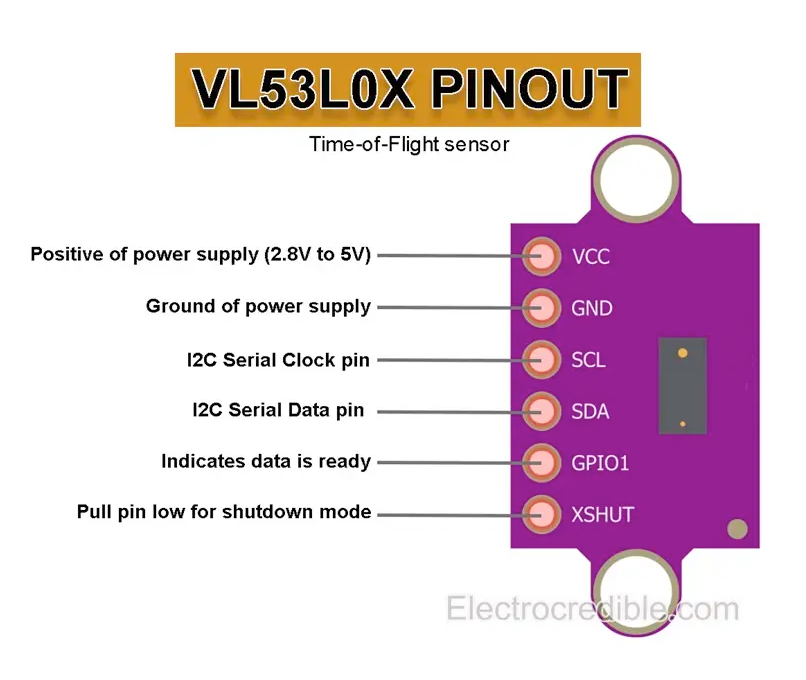
| Pin | Type | Description | Notes |
|---|---|---|---|
| VIN | Power | Power supply input (2.8V to 5.5V) | Typically 3.3V or 5V |
| GND | Ground | Ground connection | Common ground |
| SCL | I2C Clock | I2C Serial Clock line | Clock signal (requires pull-up) |
| SDA | I2C Data | I2C Serial Data line | Bidirectional data (requires pull-up) |
| XSHUT | Control | Shutdown pin (active low) | Used to reset sensor or change I2C address |
| GPIO1 | Interrupt | Interrupt output pin | Optional for event-driven measurements |
Time-of-Flight (ToF) laser ranging sensor
Measurement range: 30 mm to 2000 mm (2 meters)
Resolution: 1 mm
Field of View: ~25°
Operating voltage: 2.8V to 5.5V
I2C address: 0x29 (default, changeable via XSHUT)
Laser wavelength: 940 nm (Class 1)
Fast response time: <30ms typical
Low power consumption: ~20-40 mA during ranging
Wiring the VL53L0X to ESP32
Connect the VL53L0X to your ESP32 via I2C (SDA and SCL pins). The sensor operates at 2.8V to 5.5V and uses laser-based Time-of-Flight technology for accurate distance measurement. Pull-up resistors (typically 4.7kΩ) are usually included on modules.
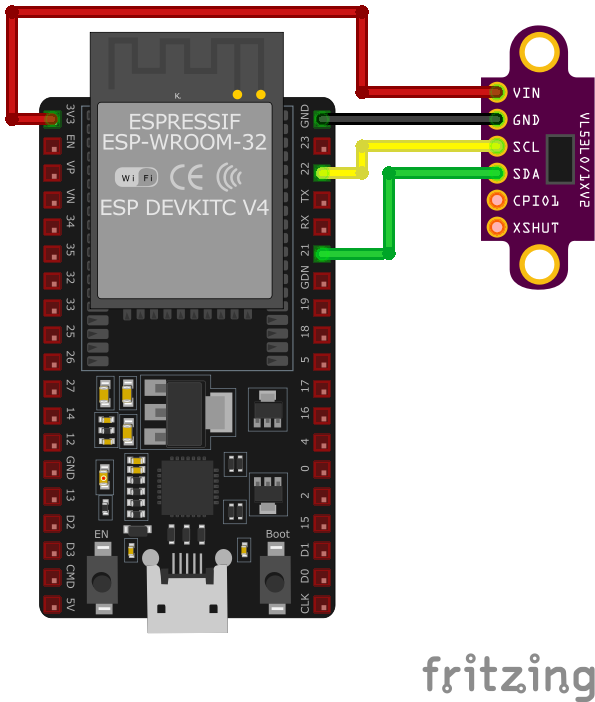
| VL53L0X pin | ESP32 pin | Purpose |
|---|---|---|
| VIN | 3.3V or 5V | Power supply (2.8V to 5.5V) |
| GND | GND | Ground connection |
| SDA | GPIO21 | I2C data line (with 4.7kΩ pull-up) |
| SCL | GPIO22 | I2C clock line (with 4.7kΩ pull-up) |
| XSHUT | GPIO (optional) | Shutdown/reset control · optional |
| GPIO1 | GPIO (optional) | Interrupt output for event detection · optional |
I2C address: 0x29 (default, can be changed using XSHUT pin)
Pull-up resistors (4.7kΩ) usually included on module
I2C bus speed: Standard (100 kHz) or Fast (400 kHz)
XSHUT pin allows multiple sensors on same bus (change addresses)
Pull XSHUT low to shutdown, high to enable sensor
GPIO1 interrupt pin can signal when measurement ready
Laser is Class 1 (eye-safe under normal conditions)
Accuracy affected by target surface (best on matte white)
Avoid shiny, transparent, or very dark surfaces
Cover glass should be clean for best performance
Use Adafruit_VL53L0X or Pololu VL53L0X library
VL53L0X code examples
#include <Wire.h>
#include <Adafruit_VL53L0X.h>

Adafruit_VL53L0X lox = Adafruit_VL53L0X();

void setup() {
    Serial.begin(115200);
    Wire.begin();

    if (!lox.begin()) {
        Serial.println("Failed to initialize VL53L0X! Check connections.");
        while (1);
    }
    Serial.println("VL53L0X Initialized.");
}

void loop() {
    VL53L0X_RangingMeasurementData_t measure;
    lox.rangingTest(&measure, false);

    if (measure.RangeStatus != 4) { // Status 4 means no object detected
        Serial.print("Distance: ");
        Serial.print(measure.RangeMilliMeter);
        Serial.println(" mm");
    } else {
        Serial.println("Out of range.");
    }

    delay(500);
}
This Arduino code demonstrates how to use the VL53L0X sensor with the Adafruit library. It initializes the sensor using the lox.begin() method. In the loop(), the rangingTest() method measures the distance to an object in millimeters, which is printed to the Serial Monitor every 500 ms. If no object is detected or the object is out of range, a corresponding message is displayed. The I2C protocol facilitates communication with the sensor.
// Minimal raw-I2C single-shot ranging for the VL53L0X (address 0x29).
// The chip boots with usable default settings; this reads uncalibrated
// distance directly. For production accuracy, use ST's VL53L0X API.
#include <stdio.h>
#include "freertos/FreeRTOS.h"
#include "freertos/task.h"
#include "driver/i2c.h"
#define I2C_MASTER_SCL_IO 22
#define I2C_MASTER_SDA_IO 21
#define I2C_MASTER_NUM I2C_NUM_0
#define I2C_MASTER_FREQ_HZ 100000
#define VL53L0X_ADDR 0x29
#define REG_SYSRANGE_START 0x00
#define REG_RESULT_INTERRUPT_STATUS 0x13
#define REG_RESULT_RANGE_MM 0x1E // RESULT_RANGE_STATUS + 10
#define REG_SYSTEM_INTERRUPT_CLEAR 0x0B
static esp_err_t wr8(uint8_t reg, uint8_t val) {
uint8_t buf[2] = {reg, val};
return i2c_master_write_to_device(I2C_MASTER_NUM, VL53L0X_ADDR, buf, 2, pdMS_TO_TICKS(1000));
}
static esp_err_t rd(uint8_t reg, uint8_t *data, size_t len) {
return i2c_master_write_read_device(I2C_MASTER_NUM, VL53L0X_ADDR, ®, 1, data, len, pdMS_TO_TICKS(1000));
}
void app_main(void) {
i2c_config_t conf = {
.mode = I2C_MODE_MASTER,
.sda_io_num = I2C_MASTER_SDA_IO,
.scl_io_num = I2C_MASTER_SCL_IO,
.sda_pullup_en = GPIO_PULLUP_ENABLE,
.scl_pullup_en = GPIO_PULLUP_ENABLE,
.master.clk_speed = I2C_MASTER_FREQ_HZ,
};
ESP_ERROR_CHECK(i2c_param_config(I2C_MASTER_NUM, &conf));
ESP_ERROR_CHECK(i2c_driver_install(I2C_MASTER_NUM, conf.mode, 0, 0, 0));
uint8_t model_id = 0;
if (rd(0xC0, &model_id, 1) != ESP_OK || model_id != 0xEE) {
printf("VL53L0X not found (model id 0x%02X) - check wiring\n", model_id);
return;
}
printf("VL53L0X found.\n");
while (1) {
wr8(REG_SYSRANGE_START, 0x01); // Start a single-shot measurement
// Wait for the result (interrupt status bits 0-2 set when ready)
uint8_t status = 0;
for (int i = 0; i < 50; i++) {
rd(REG_RESULT_INTERRUPT_STATUS, &status, 1);
if (status & 0x07) break;
vTaskDelay(pdMS_TO_TICKS(5));
}
if (status & 0x07) {
uint8_t range[2];
rd(REG_RESULT_RANGE_MM, range, 2);
uint16_t distance = (range[0] << 8) | range[1];
if (distance < 8190) {
printf("Distance: %u mm\n", distance);
} else {
printf("Out of range\n");
}
wr8(REG_SYSTEM_INTERRUPT_CLEAR, 0x01);
} else {
printf("Measurement timeout\n");
}
vTaskDelay(pdMS_TO_TICKS(500));
}
}This is a minimal raw-I2C example: the VL53L0X boots with usable default settings, so writing 0x01 to the SYSRANGE_START register triggers a single-shot measurement, the interrupt-status register signals completion, and the 16-bit range in millimeters is read from the result registers (values around 8190 mean out of range). This gives functional but uncalibrated readings - for production accuracy (calibration, long-range/high-accuracy profiles), port ST's official VL53L0X API as an ESP-IDF component.
i2c:
  sda: GPIO21
  scl: GPIO22

sensor:
  - platform: vl53l0x
    name: "VL53L0X Distance"
    update_interval: 500ms
This ESPHome configuration uses the vl53l0x platform to interface with the sensor. The sensor’s name, ‘VL53L0X Distance,’ makes it easily identifiable in home automation platforms like Home Assistant. The update_interval of 500 ms ensures frequent updates for applications requiring real-time distance measurements.
[env:esp32dev]
platform = espressif32
board = esp32dev
framework = arduino
monitor_speed = 115200
lib_deps =
adafruit/Adafruit_VL53L0X @ ^1.2.4#include <Arduino.h>
#include <Wire.h>
#include <Adafruit_VL53L0X.h>
Adafruit_VL53L0X lox = Adafruit_VL53L0X();
void setup() {
Serial.begin(115200);
Wire.begin();
if (!lox.begin()) {
Serial.println("Failed to initialize VL53L0X! Check connections.");
while (1);
}
Serial.println("VL53L0X Initialized.");
}
void loop() {
VL53L0X_RangingMeasurementData_t measure;
lox.rangingTest(&measure, false);
if (measure.RangeStatus != 4) { // Status 4 means no object detected
Serial.print("Distance: ");
Serial.print(measure.RangeMilliMeter);
Serial.println(" mm");
} else {
Serial.println("Out of range.");
}
delay(500);
}The PlatformIO code uses the Adafruit VL53L0X library to interface with the sensor. After initializing I2C communication with Wire.begin(), the sensor is configured using lox.begin(). The rangingTest() function retrieves distance measurements in millimeters, which are printed to the Serial Monitor every 500 ms. A status check ensures meaningful data is displayed, and the code gracefully handles ‘out of range’ cases.
# Requires driver: VL53L0X.py from https://github.com/uceeatz/VL53L0X
# Copy it to the board: mpremote cp VL53L0X.py :
from machine import I2C, Pin
import time
import VL53L0X

# Initialize I2C (SDA=GPIO21, SCL=GPIO22)
i2c = I2C(0, scl=Pin(22), sda=Pin(21))

# Initialize VL53L0X sensor
tof = VL53L0X.VL53L0X(i2c)
tof.start()

while True:
    distance = tof.read()  # Distance in mm
    print("Distance: {} mm".format(distance))
    time.sleep(0.5)
The example uses the uceeatz/VL53L0X MicroPython driver (copy VL53L0X.py to the board). After start() begins ranging, read() returns the distance in millimeters. The sensor sits at address 0x29 on the default I2C pins.
VL53L0X specifications
About the VL53L0X
The VL53L0X is STMicroelectronics’s original FlightSense laser-ranging chip: a 940 nm VCSEL emitter, a SPAD receiver array and a small onboard microcontroller packed into one 4.4mm x 2.4mm module, all talking plain I2C at the fixed address 0x29. Unlike an IR-triangulation sensor, it measures actual time-of-flight, so the reported distance does not depend on the target’s color the way a Sharp-style analog sensor’s voltage output does.
The often-quoted 2-meter range is a best-case number, not a guarantee: ST’s own datasheet tests it against standard 88% white and 17% gray reflectance targets, and the gap is large. With the default 33 ms timing budget, a white target reaches roughly 200 cm outdoors but only about 80 cm indoors, while a gray target manages about 80 cm indoors and drops to roughly 50 cm outdoors. In practice that means a VL53L0X aimed at a dark or matte surface, or used in bright ambient light, will range far short of 2 meters - plan for it, especially outdoors.
Because it is so cheap to produce, the exact same VL53L0X die shows up on a long list of breakout boards under different names: the GY-530, the TOF200C, and the confusingly-named “VL53L0X V2” are all this chip on a different PCB, so any library or code written for one works unchanged on the rest - buy whichever is cheapest or best stocked. For genuinely longer range with better tolerance to ambient light, step up to the VL53L1X; for close-in work under about 20 cm plus an ambient light reading in the same chip, the VL6180X is the better fit. We used this exact sensor (as a TOF200C board) to build a non-invasive standing desk height tracker with ESP32 and ESPHome.
VL53L0X troubleshooting
Sensor Initialization Failure
›
Issue: The VL53L0X sensor fails to initialize on the ESP32, resulting in errors such as: Failed to boot VL53L0X.
Possible causes include incorrect wiring, insufficient power supply, or improper I2C communication setup.
Solution: Verify that the sensor's SDA and SCL lines are correctly connected to the corresponding I2C pins on the ESP32 (default GPIO21 for SDA and GPIO22 for SCL). Ensure that the sensor is powered within its operating voltage range (2.8V to 5.5V). Use an I2C scanner to confirm the sensor's address (default 0x29) and check for any address conflicts on the bus.
Unstable or Incorrect Distance Measurements
›
Issue: The VL53L0X sensor provides fluctuating or inaccurate distance readings when interfaced with the ESP32.
Possible causes include electrical noise, improper sensor alignment, or interference from ambient light sources.
Solution: Ensure that the sensor is properly aligned perpendicular to the target surface to receive accurate reflections. Minimize exposure to strong ambient light, especially direct sunlight, which can interfere with the sensor's infrared measurements. Implement filtering algorithms, such as averaging multiple readings, to mitigate the effects of occasional erroneous data.
Interference Between Multiple Sensors
›
Issue: When using multiple VL53L0X sensors simultaneously with the ESP32, their signals interfere with each other, causing inaccurate readings.
Possible causes include identical I2C addresses for all sensors or overlapping measurement zones.
Solution: Since the VL53L0X sensor has a fixed I2C address (0x29), using multiple sensors on the same bus requires additional hardware, such as an I2C multiplexer, to manage communication. Alternatively, consider using the sensor's XSHUT pin to control and assign different I2C addresses programmatically. Physically space the sensors apart to prevent their measurement zones from overlapping, reducing the chance of cross-talk interference.
Timeout Issues During Measurement
›
Issue: The VL53L0X sensor experiences timeout errors during distance measurements when connected to the ESP32.
Possible causes include I2C communication errors, long cable lengths, or interference from other devices on the I2C bus.
Solution: Ensure that the I2C bus operates at an appropriate speed (standard mode at 100kHz or fast mode at 400kHz) and that the cable lengths are minimized to reduce capacitance. Check for proper pull-up resistors on the SDA and SCL lines (typically 4.7kΩ) if they are not already included on the sensor module. Isolate the sensor from other devices on the I2C bus to identify potential sources of interference.
Where to buy the VL53L0X

Resources
Similar sensors


