
ESP32 Super Mini Comparison: C3 vs S3 vs C6 vs H2
Compare all ESP32 Super Mini boards: C3, S3, C6, and H2. Exact dimensions (22.52 × 18 mm), battery charging specs, wireless features, software support, and which to pick for your project.
Why ESP32 Super Mini Boards Are Taking Over #
At just 22.52 × 18 mm, the ESP32-C3 Super Mini is one of the smallest ESP32 development boards you can buy - and the entire Super Mini family keeps that same ultra-compact 18 mm width. ESP32 SuperMini boards have exploded in popularity because that footprint makes them perfect for wearables, embedded builds, and anywhere space is tight. But it's not just about the footprint.
Until recently, many makers were cautious about SuperMini boards due to unreliable batches - USB issues, unstable boot modes, or flaky power rails were common with some no-name versions. That’s changed. Reputable vendors are now consistently delivering well-built SuperMinis, and suddenly these boards are becoming the go-to picks for many makers.
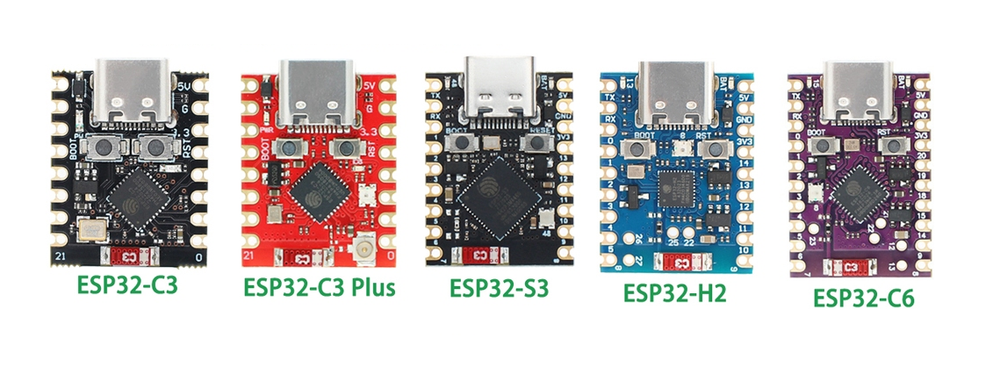
With five versions available - C3, C3 Plus, S3, C6, and H2 - each with different cores and wireless stacks, the real question is, which one fits your project?
That’s exactly what this guide is for.
Quick Comparison #
| Need This? | Pick This |
|---|---|
| Wi-Fi 6 + Zigbee/Thread | ESP32-C6 |
| Zigbee/Thread only (no Wi-Fi) | ESP32-H2 |
| Best performance (dual-core) | ESP32-S3 |
| Built-in battery charging | S3, C6, H2 |
| RGB LED | C3 Plus, S3, C6 |
| External antenna (better range) | ESP32-C3 Plus |
| Minimal, general-purpose | ESP32-C3 |
Size Comparison #
While all ESP32 Super Mini boards aim for ultra-compactness, their physical sizes aren’t exactly identical. The ESP32-C3 SuperMini set the baseline at 22.52 x 18 mm, but:
- The ESP32-S3 SuperMini and ESP32-H2 SuperMini are slightly longer - 1 extra pin row, making them a bit taller while maintaining compatibility.
- The ESP32-C6 SuperMini stretches that even further with 2 extra rows of pins compared to the C3, offering more GPIOs but increasing the height slightly.
CPU and Architecture #
Now onto what’s inside those boards.
- RISC-V: Found in the C3, C6, and H2 variants. These single-core chips prioritize power efficiency and a streamlined toolchain, ideal for low-power or compact projects.
- Xtensa: The S3 SuperMini features a dual-core Xtensa LX7 CPU running at up to 240 MHz - much more capable for performance-heavy tasks like real-time image processing or multitasking peripherals.
If you’re curious about how these cores differ more broadly, we break it all down in this ESP32 architecture comparison.
RISC-V (Single-Core)
160 MHz | Power-efficient
Best for: General purpose, compact builds
RISC-V (Ultra-Low Power)
96 MHz | Battery optimized
- ✓ ESP32-H2
Best for: Always-on sensors, mesh networks
💡 Learn more: ESP32 Architecture Comparison
Wireless Capabilities #
Wi-Fi #
| Standard | Boards |
|---|---|
| Wi-Fi 4 (802.11 b/g/n) | C3, C3 Plus, S3 |
| Wi-Fi 6 (802.11ax) | C6 only |
| No Wi-Fi | H2 (Zigbee/Thread only) |
Bluetooth #
Zigbee / Thread (IEEE 802.15.4) #
| Board | Protocol Support | Best For |
|---|---|---|
| ESP32-C6 | Wi-Fi 6 + Zigbee/Thread + BLE | Multi-protocol smart devices |
| ESP32-H2 | Zigbee/Thread + BLE (no Wi-Fi) | Battery-powered mesh nodes |
Battery Support #
| Board | Built-in Charging | Charging IC | Max Current | Connector |
|---|---|---|---|---|
| ESP32-S3 Super Mini | ✅ Yes | TP4054 / MCP73831 | ~500 mA | BAT+/BAT− pads |
| ESP32-C6 Super Mini | ✅ Yes | TP4054 / MCP73831 | ~500 mA | BAT+/BAT− pads |
| ESP32-H2 Super Mini | ✅ Yes | TP4054 / MCP73831 | ~500 mA | BAT+/BAT− pads |
| ESP32-C3 Super Mini | ❌ No | - | - | Use external TP4056 |
| ESP32-C3 Plus | ❌ No | - | - | Use external TP4056 |
⚠️ BAT+/BAT− are solder pads, not a JST connector. You'll need to solder wires directly to the board. All three boards that support charging accept Li-ion/LiPo cells and charge them over USB-C at up to ~500 mA.
Onboard LED #
Each SuperMini variant includes an onboard LED for status indication, but the type and capabilities vary significantly. Some boards feature basic single-color LEDs for simple status feedback, while others include programmable RGB LEDs that allow full color control for more sophisticated visual feedback in your projects.
| Board | LED Type | GPIO | Notes |
|---|---|---|---|
| C3 | Blue | GPIO8 | Basic status |
| C3 Plus | RGB | - | Full color control |
| S3 | WS2812 RGB | - | Programmable animations |
| C6 | RGB | GPIO8 | Multi-color status |
| H2 | Single | GPIO13 | Activity indicator |
Common Features #
All SuperMini boards share:
- Compact design optimized for space
- Standard interfaces: UART, I2C, SPI
- Consistent pinouts (core functions mapped similarly)
- Reset & Boot buttons for manual flashing
Complete Specifications #
| Feature | C3 | C3 Plus | S3 | C6 | H2 |
|---|---|---|---|---|---|
| CPU | RISC-V @160MHz | RISC-V @160MHz | Dual Xtensa @240MHz | RISC-V @160MHz | RISC-V @96MHz |
| Wireless | Wi-Fi 4, BLE 5 | Wi-Fi 4, BLE 5 | Wi-Fi 4, BLE 5 | Wi-Fi 6, BLE, Mesh | Thread, Zigbee, BLE |
| Antenna | PCB | External U.FL | PCB | PCB | PCB |
| Flash/RAM | 4MB / 400KB | 4MB / 400KB | 4MB / 512KB | 4MB / 512KB | 4MB / 320KB |
| Size | 22.52 × 18 mm | ~24 × 18 mm | ~27 × 18 mm | ~30 × 18 mm | ~27 × 18 mm |
| LED | Blue (GPIO8) | RGB | WS2812 RGB | RGB (GPIO8) | GPIO13 |
| USB | USB-C | USB-C | USB-C | USB-C | USB-C |
| Battery | ❌ | ❌ | ✅ BAT+/BAT- | ✅ BAT+/BAT- | ✅ BAT+/BAT- |
| Sleep | ~43μA | ~43μA | ~43μA | Ultra-low | Ultra-low |
| Price | ~$3 | ~$4 | ~$6 | ~$5 | ~$5 |
| Buy | Amazon, AliExpress | AliExpress | Amazon, AliExpress | Amazon, AliExpress | AliExpress |
Use Case Scenarios #
🔋 Battery-Powered Projects
For always-on sensors, remote monitoring, or mesh network nodes that need to run for weeks or months on a single battery.
Best choice: ESP32-H2
Ultra-low 96 MHz power, Zigbee/Thread, built-in charging
Alternative: ESP32-C6
If you need Wi-Fi 6 connectivity
🧠 Processing-Heavy Tasks
For real-time image processing, audio applications, machine learning, or projects that need to multitask multiple peripherals simultaneously.
Best choice: ESP32-S3
Dual-core Xtensa @ 240 MHz, 512 KB RAM, AI acceleration
🌐 Zigbee or Thread
For smart home devices, Matter-compatible gadgets, or mesh network applications that need IEEE 802.15.4 support.
With Wi-Fi: ESP32-C6
Multi-protocol hub, gateway, or bridge device
Without Wi-Fi: ESP32-H2
Battery-powered sensor or end device
📡 Strong Wi-Fi Signal
For devices in challenging RF environments, long-range communication, or installations far from the access point.
Best range: ESP32-C3 Plus
U.FL connector for external antenna
Latest standard: ESP32-C6
Wi-Fi 6 (802.11ax) for better performance in crowded areas
Quick Decision Guide #
C3 vs C3 Plus: What's Different? #
Both the ESP32-C3 SuperMini and the C3 SuperMini Plus are built around the same chip - the ESP32-C3 RISC-V core with 4MB of flash, 400 KB SRAM, and support for Wi-Fi 4 and Bluetooth 5 (LE). They also share the same pinout and overall form factor, even though the plus sometimes might be a little bit longer.
First, the antenna: the original C3 SuperMini uses a small onboard PCB antenna. It works well for most general-use projects, but if you need stronger or more stable signal - especially in noisy environments or over longer distances - the C3 Plus offers a U.FL connector so you can add an external antenna.
Second, the LED: the C3 SuperMini includes a basic blue status LED on GPIO8. It’s great for simple feedback like boot status or blinking heartbeat. The Plus version, however, upgrades this with an onboard RGB LED, giving you full color control - ideal for projects that need richer visual feedback without adding extra hardware.
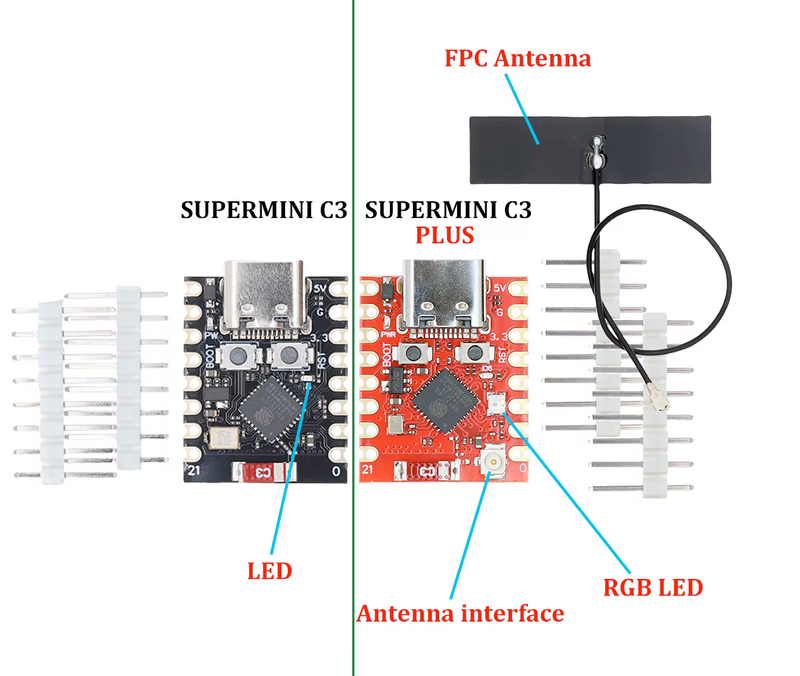
Choose C3 for minimal design. Choose C3 Plus for RGB visuals or better wireless range.
ESP32-C3 vs ESP32-S3 Super Mini #
The ESP32-C3 Super Mini and ESP32-S3 Super Mini are the two most popular picks for general IoT work, but they serve different needs:
| Feature | ESP32-C3 Super Mini | ESP32-S3 Super Mini |
|---|---|---|
| CPU | Single-core RISC-V @ 160 MHz | Dual-core Xtensa @ 240 MHz |
| RAM | 400 KB | 512 KB |
| Size | 22.52 × 18 mm | ~27 × 18 mm |
| Battery charging | ❌ No | ✅ Yes |
| LED | Blue (GPIO8) | WS2812 RGB |
| AI acceleration | ❌ No | ✅ Yes (vector instructions) |
| Price | ~$3 | ~$6 |
Pick the C3 Super Mini if you want the smallest and cheapest option for basic Wi-Fi/BLE sensor work. Pick the S3 Super Mini if you need more processing power, dual-core multitasking, RGB feedback, or onboard battery charging.
ESP32-C6 vs ESP32-H2 Super Mini #
Both boards support Zigbee and Thread (IEEE 802.15.4) - but they target opposite ends of the spectrum:
| Feature | ESP32-C6 Super Mini | ESP32-H2 Super Mini |
|---|---|---|
| Wi-Fi | ✅ Wi-Fi 6 (802.11ax) | ❌ None |
| Zigbee / Thread | ✅ Yes | ✅ Yes |
| Bluetooth | ✅ BLE 5 + Mesh | ✅ BLE 5 + Mesh |
| CPU speed | 160 MHz | 96 MHz (lower power) |
| Battery charging | ✅ Yes | ✅ Yes |
| Best for | Multi-protocol hub or gateway | Battery mesh node / end device |
| Price | ~$5 | ~$5 |
Pick the C6 Super Mini when you need both Wi-Fi and Zigbee/Thread in one board - perfect for a Matter bridge or smart home gateway. Pick the H2 Super Mini when Wi-Fi is unnecessary, and you want the lowest-power mesh node possible running on a battery for weeks.
ESP32-C3 Mini vs SuperMini - What’s the Difference? #
This is a common point of confusion. "C3 Mini" and "C3 SuperMini" usually refer to two different boards:
- ESP32-C3 Super Mini (this article) - 22.52 × 18 mm, ultra-compact, no castellated holes, USB-C, aimed at embedded/wearable builds.
- ESP32-C3 Mini (e.g., Seeed XIAO, LilyGO variants) - slightly different form factor, sometimes with castellated edges for SMD mounting, often from a named brand.
If you bought a generic board labelled "ESP32-C3 Mini" from AliExpress, it's almost certainly the same Super Mini board described here. The naming is inconsistent across vendors - the key identifiers are the 22.52 × 18 mm footprint and the two rows of through-hole pins.
Software Support #
All ESP32 Super Mini boards work with the major frameworks out of the box:
| Framework | C3 / C3 Plus | S3 | C6 | H2 |
|---|---|---|---|---|
| Arduino IDE | ✅ | ✅ | ✅ | ✅ |
| ESPHome | ✅ | ✅ | ✅ | ✅ |
| MicroPython | ✅ | ✅ | ✅ | ⚠️ partial |
| PlatformIO | ✅ | ✅ | ✅ | ✅ |
| Tasmota | ✅ | ❌ | ✅ | ❌ |
For ESPHome specifically, all five Super Mini variants have first-class support. Just select the right board target (esp32c3, esp32s3, esp32c6, esp32h2) in your YAML config - no custom board definitions needed.
3D-Printed Enclosures #
Protect your SuperMini with custom 3D-printed cases designed for a perfect fit.
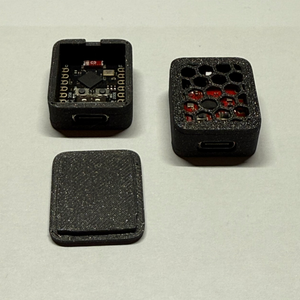

Available Options:
📌 Headers
With or without pin cutouts
🌬️ Ventilation
Vented or solid lids
🎨 Colors
Multiple color options
🔌 USB Fit
USB-C alignment
Conclusion #
Choosing the right ESP32 SuperMini comes down to understanding your project's priorities. Each variant brings something unique to the table, whether it's the H2's ultra-low power consumption for battery-powered mesh networks, the S3's dual-core processing power for demanding applications, or the C6's cutting-edge Wi-Fi 6 and multi-protocol support for smart home hubs.
The beauty of the SuperMini lineup is that there's no wrong choice - just different tools for different jobs. And with prices hovering around $3-6, you can afford to experiment with multiple boards to find your perfect match.
Explore Detailed Board Pages #
📖 Deep dives with pinouts, specifications, and project ideas:
ESP32-C3 SuperMini
The minimalist
ESP32-C3 Plus
RGB + external antenna
ESP32-S3 SuperMini
Dual-core performance
ESP32-C6 SuperMini
Wi-Fi 6 + Zigbee/Thread
ESP32-H2 SuperMini
Ultra-low power mesh
💡 Pro tip: Still not sure? At ~$5 each, consider buying two or three different variants to test side-by-side. Hands-on experience is the best teacher, and you'll quickly find which board fits your workflow and project needs.