
BME280 Temperature and Humidity Sensor
The BME280 is a compact digital sensor by Bosch Sensortec, designed for measuring temperature, humidity, and pressure with high accuracy and low power consumption. It supports both <strong>I²C</strong> and <strong>SPI</strong> communication protocols, making it versatile for integration into IoT devices, weather stations, and portable electronics. Operating within a wide range of environmental conditions, it features a small 2.5mm x 2.5mm package.

BME280 pinout
The BME280 supports both I²C and SPI communication protocols:
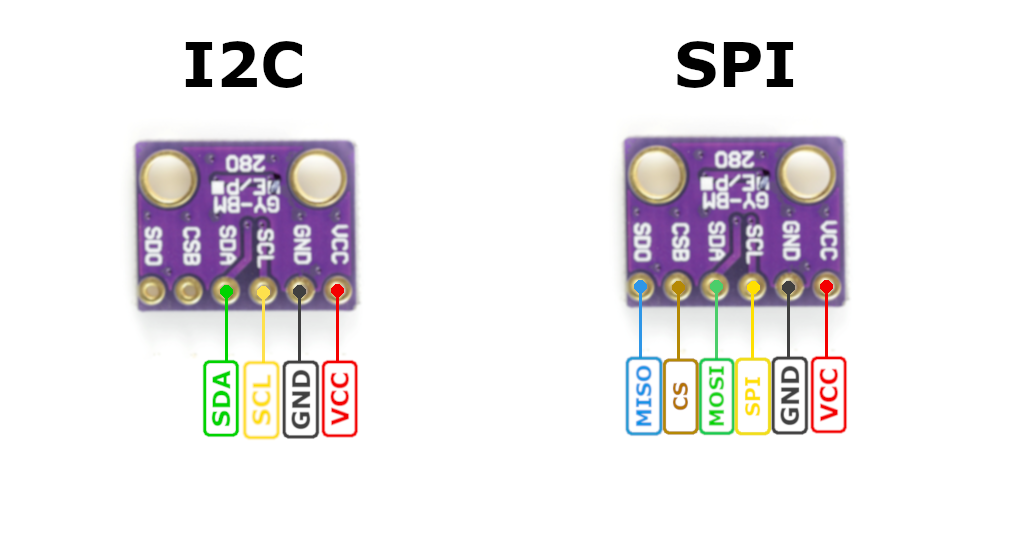
| Pin | Type | Description | Notes |
|---|---|---|---|
| VIN/VCC | Power | Power input | 3.3V or 5V (depending on module) |
| GND | Power | Ground connection | |
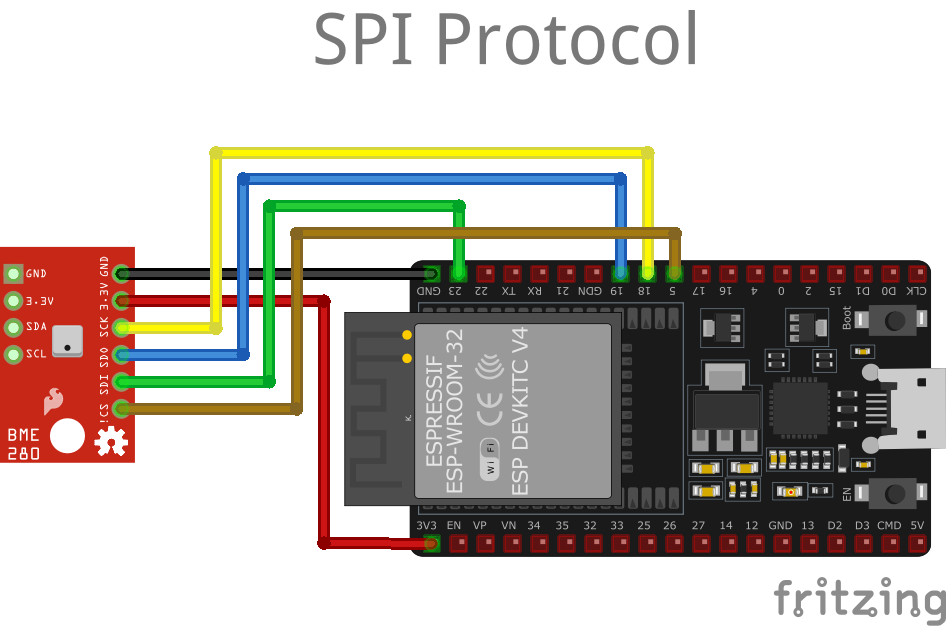
| SCL/SCK | Communication | I²C clock / SPI clock | Connect to ESP32 SCL (I²C) or GPIO18 (SPI) |
| SDA/SDI | Communication | I²C data / SPI MOSI | Connect to ESP32 SDA (I²C) or GPIO23 (SPI) |
| SDO | Communication | SPI MISO (optional for I²C address) | GPIO19 for SPI, or use for I²C address selection |
| CS | Communication | SPI chip select | GPIO5 for SPI (not used in I²C mode) |
Dual Protocol: Supports both I²C and SPI
I²C Address: 0x76 or 0x77 (depends on SDO pin)
Power: 3.3V or 5V compatible (check module specs)
Measurements: Temperature, humidity, and pressure
Temperature: -40°C to +85°C, ±1°C accuracy
Humidity: 0-100% RH, ±3% accuracy
Pressure: 300-1100 hPa, ±1 hPa accuracy
Low Power: 1.8 µA sleep current
Applications: Weather stations, IoT, altitude tracking
Wiring the BME280 to ESP32
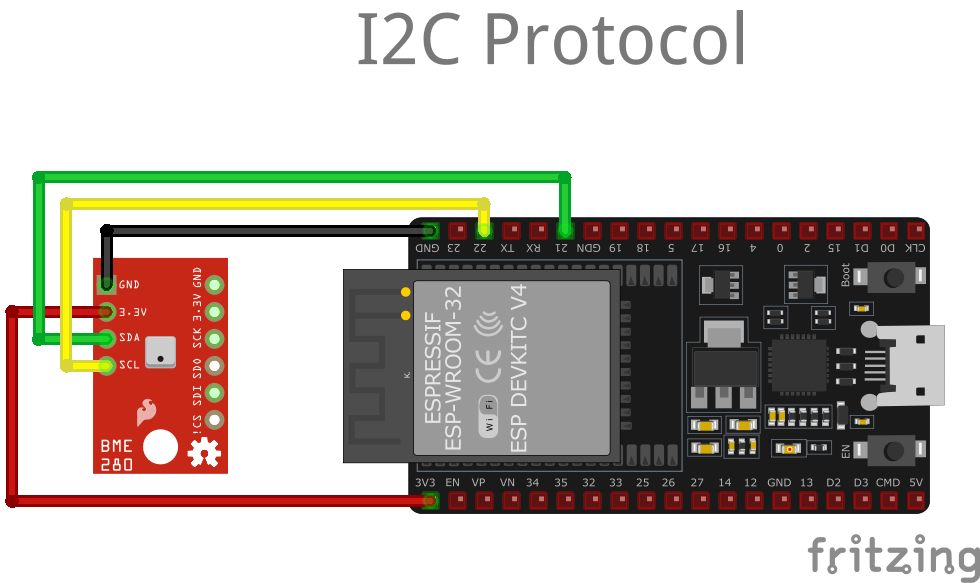
To interface the BME280 with an ESP32 using I²C:
| BME280 pin | ESP32 pin | Purpose |
|---|---|---|
| VCC | 3.3V | Power supply |
| GND | GND | Ground |
| SCL | GPIO22 | I²C clock line |
| SDA | GPIO21 | I²C data line |
I²C Address: Default 0x76 or 0x77 (check with I²C scanner)
Pull-up Resistors: Usually included on breakout boards
Power: Use 3.3V for most modules
Speed: I²C supports up to 3.4 MHz
Simple Wiring: Only 4 wires needed
BME280 code examples
#include <Wire.h>
#include <Adafruit_Sensor.h>
#include <Adafruit_BME280.h>

/* Uncomment these lines if using SPI interface
#include <SPI.h>
#define SPI_CLK 18
#define SPI_MISO 19
#define SPI_MOSI 23
#define SPI_CS 5
*/

#define SEA_LEVEL_PRESSURE (1013.25) // Standard sea level pressure

Adafruit_BME280 environmentSensor; // Using I2C for communication
//Adafruit_BME280 environmentSensor(SPI_CS); // Use for hardware SPI
//Adafruit_BME280 environmentSensor(SPI_CS, SPI_MOSI, SPI_MISO, SPI_CLK); // Use for software SPI

unsigned long refreshInterval;

void setup() {
  Serial.begin(9600);
  Serial.println(F("Initializing BME280 Sensor"));

  bool initSuccess;

  // Initialize sensor with default settings (I2C address 0x76)
  initSuccess = environmentSensor.begin(0x76);
  if (!initSuccess) {
    Serial.println("Sensor initialization failed. Verify wiring and connections.");
    while (1); // Halt execution if sensor is not found
  }

  Serial.println("-- Running Default Configuration --");
  refreshInterval = 1000; // Data refresh every 1000 ms

  Serial.println();
}

void loop() {
  displaySensorData();
  delay(refreshInterval);
}

void displaySensorData() {
  Serial.print("Temperature: ");
  Serial.print(environmentSensor.readTemperature());
  Serial.println(" °C");

  // Optional: Uncomment for Fahrenheit conversion
  /*Serial.print("Temperature: ");
  Serial.print(1.8 * environmentSensor.readTemperature() + 32);
  Serial.println(" °F");*/

  Serial.print("Pressure: ");
  Serial.print(environmentSensor.readPressure() / 100.0F);
  Serial.println(" hPa");

  Serial.print("Estimated Altitude: ");
  Serial.print(environmentSensor.readAltitude(SEA_LEVEL_PRESSURE));
  Serial.println(" meters");

  Serial.print("Humidity: ");
  Serial.print(environmentSensor.readHumidity());
  Serial.println(" %");

  Serial.println();
}
This code is configured for I2C communication by default, with the BME280 sensor initialized using its default I2C address (0x76). However, it includes commented-out sections for using SPI communication as an alternative protocol.
Library Installation
To use this code, you need to install the Adafruit BME280 library. Follow these steps:
- Open Arduino IDE.
- Navigate to Sketch → Include Library → Manage Libraries.
- Search for “Adafruit BME280” and install it.
Alternatively, you can download the library from the official Adafruit GitHub repository:
Adafruit BME280 Library
// Requires the esp-idf-lib BMP280/BME280 driver from the ESP Component Registry:
// idf.py add-dependency "esp-idf-lib/bmp280^1.0.7"
#include <stdio.h>
#include <string.h>
#include "freertos/FreeRTOS.h"
#include "freertos/task.h"
#include "bmp280.h"
#define SDA_GPIO GPIO_NUM_21
#define SCL_GPIO GPIO_NUM_22
void app_main(void)
{
ESP_ERROR_CHECK(i2cdev_init());
bmp280_params_t params;
bmp280_init_default_params(¶ms);
bmp280_t dev;
memset(&dev, 0, sizeof(bmp280_t));
ESP_ERROR_CHECK(bmp280_init_desc(&dev, BMP280_I2C_ADDRESS_0, 0, SDA_GPIO, SCL_GPIO));
ESP_ERROR_CHECK(bmp280_init(&dev, ¶ms));
bool bme280p = dev.id == BME280_CHIP_ID;
printf("Found %s\n", bme280p ? "BME280" : "BMP280");
float pressure, temperature, humidity;
while (1) {
if (bmp280_read_float(&dev, &temperature, &pressure, &humidity) == ESP_OK) {
printf("Temp %.2f C, Press %.2f Pa", temperature, pressure);
if (bme280p) printf(", Hum %.2f%%", humidity);
printf("\n");
} else {
printf("Could not read data from sensor\n");
}
vTaskDelay(pdMS_TO_TICKS(2000));
}
}ESP-IDF ships no BME280 driver of its own, so this example uses the maintained esp-idf-lib BMP280/BME280 driver from the ESP Component Registry. Install it into your project first with idf.py add-dependency "esp-idf-lib/bmp280^1.0.7", then build as usual.
i2cdev_init() sets up the shared I2C layer used by all esp-idf-lib drivers. After bmp280_init() the chip ID tells you whether a BME280 (with humidity) or a plain BMP280 is connected, and bmp280_read_float() returns temperature in Celsius, pressure in Pascal and - on the BME280 - relative humidity. Wire SDA to GPIO 21 and SCL to GPIO 22, or change the defines to match your board.
i2c:
  sda: GPIO21
  scl: GPIO22

sensor:
  - platform: bme280_i2c
    address: 0x76
    temperature:
      name: "BME280 Temperature"
    pressure:
      name: "BME280 Pressure"
    humidity:
      name: "BME280 Humidity"
    update_interval: 60s

# The sensor also supports SPI: use platform bme280_spi with an spi: block and cs_pin.
Since ESPHome 2023.12 the platform is split by bus: bme280_i2c (shown here, with the sensor on the default I2C pins and address 0x76) and bme280_spi. Temperature, pressure and humidity each become their own entity; the update interval defaults to 60 seconds.
[env:esp32dev]
platform = espressif32
board = esp32dev
framework = arduino
monitor_speed = 115200

lib_deps =
    adafruit/Adafruit BME280 Library @ ^2.2.2
    adafruit/Adafruit Unified Sensor @ ^1.1.7

build_flags =
    -DBME280_I2C    ; Define if using I2C
; -DBME280_SPI ; Uncomment if using SPI#include <Wire.h>
#include <Adafruit_Sensor.h>
#include <Adafruit_BME280.h>
// Define I2C address or SPI pins
#define SEALEVELPRESSURE_HPA (1013.25)
Adafruit_BME280 bme;
void setup() {
Serial.begin(115200);
if (!bme.begin(0x76)) { // Replace 0x76 with your I2C address
Serial.println("Could not find a valid BME280 sensor, check wiring!");
while (1);
}
}
void loop() {
Serial.print("Temperature = ");
Serial.print(bme.readTemperature());
Serial.println(" °C");
Serial.print("Pressure = ");
Serial.print(bme.readPressure() / 100.0F);
Serial.println(" hPa");
Serial.print("Humidity = ");
Serial.print(bme.readHumidity());
Serial.println(" %");
Serial.println();
delay(2000);
}This program configures a BME280 sensor using PlatformIO. Key steps include:
- Library Inclusions: Include
Wire.h,Adafruit_Sensor.h, andAdafruit_BME280.hfor I2C communication and sensor interfacing. - PlatformIO Setup: Add required libraries in
platformio.iniunderlib_deps:lib_deps = adafruit/Adafruit BME280 Library @ ^2.2.2 adafruit/Adafruit Unified Sensor @ ^1.1.7 - Sensor Initialization: Use
bme.begin(0x76)for I2C (replace with0x77if needed). - Data Reading: Read temperature, pressure, and humidity with
bme.readTemperature(),bme.readPressure(), andbme.readHumidity().
# Requires driver: bme280_float - install with: mpremote mip install github:robert-hh/BME280
import time
from machine import I2C, Pin
import bme280_float as bme280

# Initialize I2C (SDA=GPIO21, SCL=GPIO22)
i2c = I2C(0, scl=Pin(22), sda=Pin(21))

# Initialize BME280 (address 0x76 on most breakouts, 0x77 on some)
bme = bme280.BME280(i2c=i2c)

while True:
    temperature, pressure, humidity = bme.values  # formatted strings
    print("Temperature:", temperature)
    print("Pressure:", pressure)
    print("Humidity:", humidity)
    print("-" * 30)
    time.sleep(2)
The example uses robert-hh's maintained BME280 driver, installable in one step with mpremote mip install github:robert-hh/BME280. The values property returns ready-formatted temperature, pressure and humidity strings; use read_compensated_data() instead if you want raw numbers.
BME280 specifications
About the BME280
The BME280 is Bosch’s long-running three-in-one environmental sensor: temperature, humidity and barometric pressure from a single I2C or SPI chip, accurate to ±0.5 degC, ±3 %RH and ±1 hPa. Current draw is 1.8 uA in temperature+humidity mode and 3.6 uA with pressure added, low enough that it still shows up in ESP32 weather stations and wearables years after cheaper single-purpose sensors arrived.
The real gotcha with this part is buying the right one: the BME280 shares a footprint and product family with the humidity-less BMP280, and mislabeled breakout boards are a well-known problem on AliExpress and eBay - modules printed “BME280” that are actually a BMP280 underneath, silently missing the humidity channel. The fix costs nothing but a read: query the chip ID register over I2C - 0x60 means a genuine BME280, 0x56-0x58 means you got a BMP280 instead.
Bosch has since discontinued the plain BMP280 die (distributor listings mark it obsolete, with the BMP390 as the recommended successor), while the BME280 remains in active production - so for a new design the BME280’s humidity channel is close to a free upgrade over its cheaper sibling. Add gas and VOC sensing in a similar footprint by stepping up to the BME680.
BME280 troubleshooting
I2C Sensor Found, but Could not find a valid BME280 sensor
›
Issue: The I2C scanner detects the BME280 sensor, but example sketches fail to initialize it.
`I2C device found at addres 0x76`
`Could not find a valid BME280 sensor, check wiring, address, sensor ID!`
Some cheeap BME280 named sensors does not actually work with the Adafruit library, due to the I2C Bus Timing - different libraries configure I2C clock speeds differently, which might cause issues with sensors that cannot keep up with faster communication.
Solution: Try using different library instead of Adafruit_BME280.h, such as the BME280.h
Incorrect Sensor Identification
›
Issue: The sensor is identified incorrectly, leading to initialization failures..
`SensorID was: 0x0`
`ID of 0xFF probably means a bad address, a BMP 180 or BMP 085`
`ID of 0x56-0x58 represents a BMP 280,`
`ID of 0x60 represents a BME 280.`
`ID of 0x61 represents a BME 680.`
Some modules labeled as BME280 are actually `BMP280`, which lacks the humidity sensor.
Solution: If the sensor is a BMP280, use the BMP280 library (`Adafruit_BMP280.h`) instead of the BME280 library.
Where to buy the BME280

Resources
Similar sensors


